
Join the Conversation
- Find Answers
- :
- Apps & Add-ons
- :
- Splunk Development
- :
- Splunk Dev
- :
- trellis behaving badly squished plots
- Subscribe to RSS Feed
- Mark Topic as New
- Mark Topic as Read
- Float this Topic for Current User
- Bookmark Topic
- Subscribe to Topic
- Mute Topic
- Printer Friendly Page
- Mark as New
- Bookmark Message
- Subscribe to Message
- Mute Message
- Subscribe to RSS Feed
- Permalink
- Report Inappropriate Content
trellis behaving badly squished plots

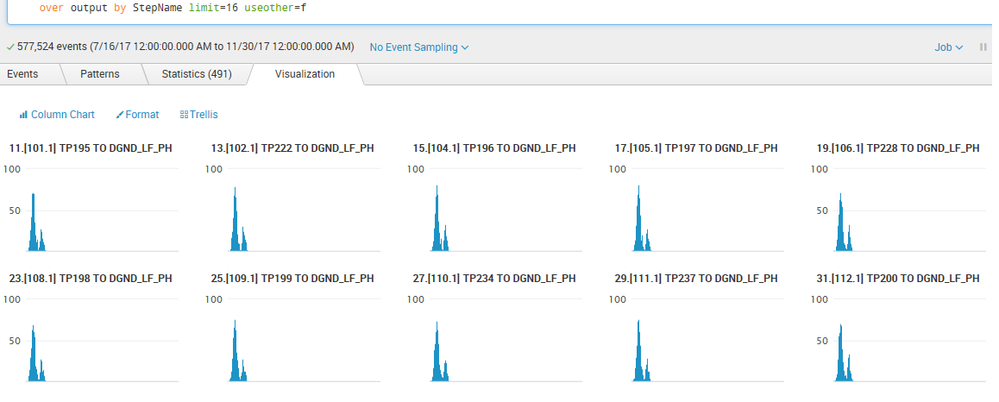
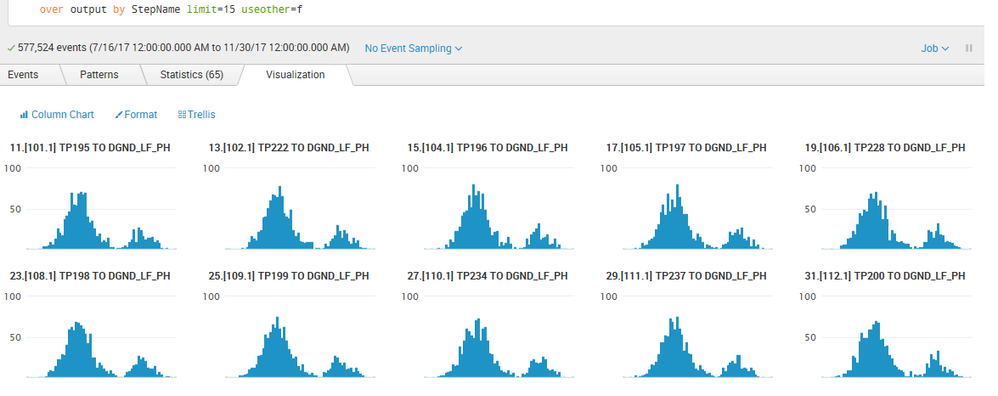
Trellis appears to plot 15 charts nicely, but 16 or more and Trellis squishes them.
sourcetype=mfgtestengsoftware | search "Result Logged" "Results{}.Pass"=true "B1611" "CCS" | spath Results{}.Actual | rename Results{}.Actual AS Actual | spath Results{}.Minimum | rename Results{}.Minimum AS Minimum | spath Results{}.Maximum | rename Results{}.Maximum AS Maximum | eval output = toString(Actual) + ";" + toString(Minimum) + ";" + toString(Maximum) | makemv delim=";" output | mvexpand output | eval new=mvdedup(output) | bin output span=0.5 | chart dc(new) over output by StepName limit=16 useother=f
here is squished plots limit=16
here is good plots at limit=15
- Mark as New
- Bookmark Message
- Subscribe to Message
- Mute Message
- Subscribe to RSS Feed
- Permalink
- Report Inappropriate Content

@Lynyrd, have you tried setting the Trellis Scale to Independent instead of Shared? Following is corresponding Simple XML
<option name="trellis.scales.shared">0</option>
| makeresults | eval message= "Happy Splunking!!!"
- Mark as New
- Bookmark Message
- Subscribe to Message
- Mute Message
- Subscribe to RSS Feed
- Permalink
- Report Inappropriate Content
Is there a way to get the Splunk Team to investigate the limitations on Trellis and why it is squishing the plots past 16 or more plots? We have hundreds of plots to analyze. Can SPLUNK Incorporated investigate any bugs or limitations to Trellis plotting? Is there a trellis configuration setting?
- Mark as New
- Bookmark Message
- Subscribe to Message
- Mute Message
- Subscribe to RSS Feed
- Permalink
- Report Inappropriate Content
We basically have what we want, we just need a way for Trellis to NOT squish the plots if we desire 16 or more plots. We have nearly 150 plots to visually examine.
- Mark as New
- Bookmark Message
- Subscribe to Message
- Mute Message
- Subscribe to RSS Feed
- Permalink
- Report Inappropriate Content
Yes we tried both Shared and Independent and when limit=16 or greater we get squished plots. There seems to be a scaling issue with Trellis if you try to do many plots.




Join the Splunk Community Slack to learn, troubleshoot, and make connections with fellow Splunk practitioners in real time!
Join Splunk User Groups to connect and learn in-person by region or remotely by topic or industry.
Persistent Queue at TcpOut — One of Splunk's Most Practical Features
Skip the Awkward Silence: Have a .conf-ersation at .conf26
Rethinking Zero Trust: From Product Purchases to Logical Control Evidence
