
Join the Conversation
- Find Answers
- :
- Apps & Add-ons
- :
- Splunk Development
- :
- Splunk Dev
- :
- Why are default values not working for Add-on Buil...
- Subscribe to RSS Feed
- Mark Topic as New
- Mark Topic as Read
- Float this Topic for Current User
- Bookmark Topic
- Subscribe to Topic
- Mute Topic
- Printer Friendly Page
- Mark as New
- Bookmark Message
- Subscribe to Message
- Mute Message
- Subscribe to RSS Feed
- Permalink
- Report Inappropriate Content
Why are default values not working for Add-on Builder Configuration/Add-on Setup Parameters?

Shouldn't the "Default value" for this 'Add-on Setup Parameter' get saved in the respective conf file's default file? Or do anything, for that matter? I see it the 'Display initial text' renders when the Configuration UI is loaded but since no value for this is set in the 'default' file there effectively is no value set anywhere - resulting in a broken add-on since it's not "fully configured".
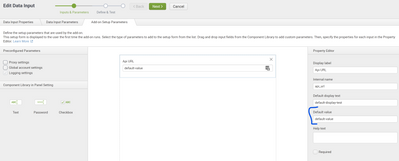
Said another way: The default values for Add-on Setup Parameters don't seem to get saved into the respective default conf file created (default/<ta_name>.conf). Conversely, any default values for the Data Input properties do get saved in the proper place in default/inputs.conf . I see some of this info is saved in the <ta_name>_rh_settings but that seems to only handle the setup pages. The result of this missing default config is that when I try to save a new instantiation of the input it won't work because it's missing those critical Add-on Setup Parameters. I'm not AoB expert so maybe I'm doing something wrong here?
Cross post: https://splunk-usergroups.slack.com/archives/C04DC8JJ6/p1659404655720859
- Mark as New
- Bookmark Message
- Subscribe to Message
- Mute Message
- Subscribe to RSS Feed
- Permalink
- Report Inappropriate Content


I can reproduce this behavior on the latest Add-On Builder from Splunkbase. Not sure if it always this way or changed recently.
When creating a new Add-On, you’ll get the default in bin/<ta>_rh_settings.py as part of the source code as well as client-side in ./appserver/static/js/build/globalConfig.json
Once the value is changed via the UI, it is saved in local/<ta>_settings.conf.
If I’m understanding this right then this would fail a new input unless the global setting has been modified at least once through the UI in some way. If someone simply wants to use the default value, they would not actually get that because helper.get_global_setting tries to read the conf file directly (which does not exist at this point.
The workaround is, in case of global settings, to simply go to the page and save the default. This will create the conf file in local and everything works as expected. A more radical alternative is to use the account-level settings only. Since there are no accounts created by default, there will always be a conf file saved there.
The workaround based on
- Mark as New
- Bookmark Message
- Subscribe to Message
- Mute Message
- Subscribe to RSS Feed
- Permalink
- Report Inappropriate Content
Ok, I'm pretty sure this is a bug so I filed TAB-3048


Join the Splunk Community Slack to learn, troubleshoot, and make connections with fellow Splunk practitioners in real time!
Join Splunk User Groups to connect and learn in-person by region or remotely by topic or industry.
Rethinking Zero Trust: From Product Purchases to Logical Control Evidence
Preparing your Splunk Environment for OpenSSL3
Announcing Modern Navigation: A New Era of Splunk User Experience
