
Join the Conversation
- Find Answers
- :
- Apps & Add-ons
- :
- Splunk Development
- :
- Splunk Dev
- :
- Python REST API JSON response malformed on one ins...
- Subscribe to RSS Feed
- Mark Topic as New
- Mark Topic as Read
- Float this Topic for Current User
- Bookmark Topic
- Subscribe to Topic
- Mute Topic
- Printer Friendly Page
- Mark as New
- Bookmark Message
- Subscribe to Message
- Mute Message
- Subscribe to RSS Feed
- Permalink
- Report Inappropriate Content

We've used the Add-on Builder to create a custom app which uses a Python script to query a REST API, process some of the data (mostly to convert epoch to human-readable timestamps), and write events to Splunk.
This works fine on three different test or development instances. On those, the returned data look like the following:
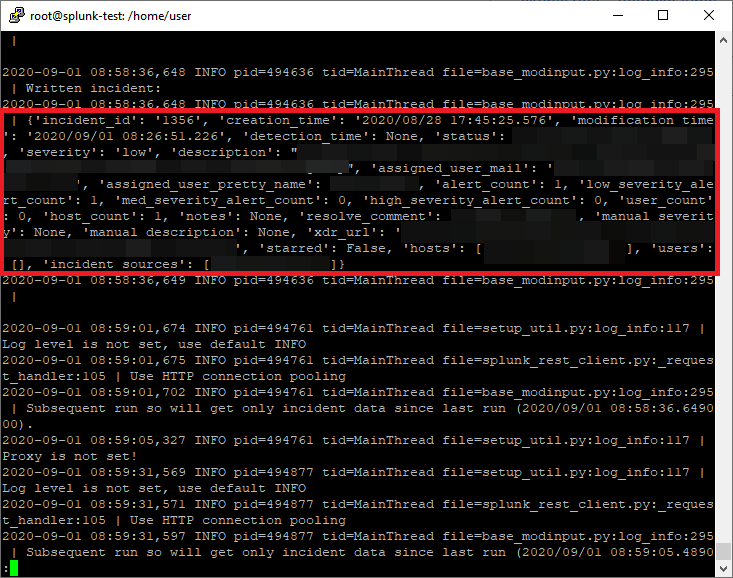
The API's documentation and manually running the API request in Python confirms that this is the normal and expected data structure:
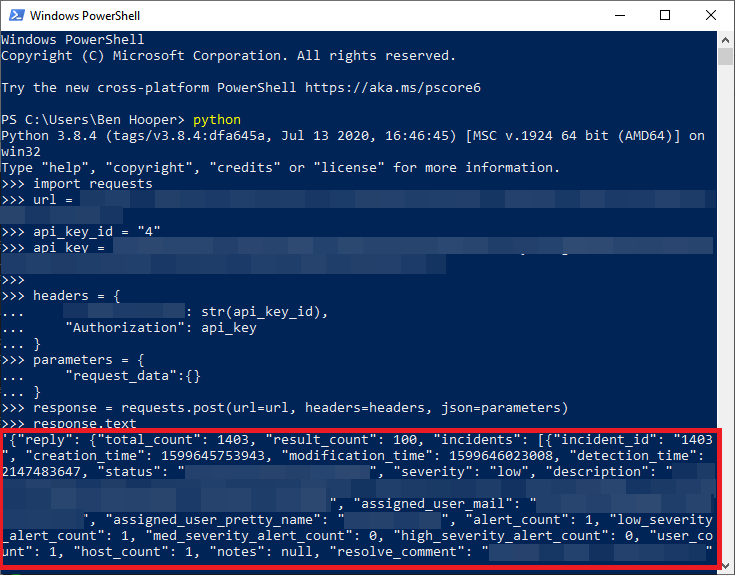
As such, the regex for field parsing / extraction is written to follow this structure.
However, when we run the same version of the app on the production instance there are two problems with the returned data:
- The data is in a completely different order. This is an unworkable problem with regex and I don't want to have to maintain a separate version just for this once instance.
- Every key is prefixed with u. I guess that, for some reason, this is to explicitly define the strings as Unicode but, whatever the reason, I guess that using u* would work around this fairly easily.
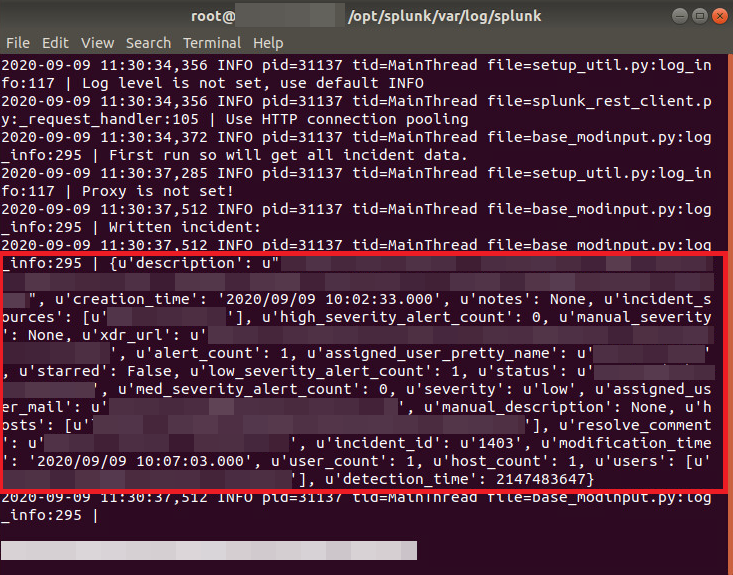
Does anyone know why this is happening?
Further information on the instances' environments:
- 1 x development:
- OS: Ubuntu Server 20.04
- Splunk Enterprise: 8.0.5.
- Python: 3.8.2
- 2 x test:
- OS: Ubuntu Server 20.04
- Splunk Enterprise: 8.0.5.
- Python: 3.8.2
- Production:
- OS: Ubuntu Server 18.04.4 LTS
- Splunk Enterprise: 8.0.4.
- Python: 3.6.9
Thanks.
Update 2020/09/10 11:32: I just tried running the API commands in Python on the actual production instance and it worked fine so it seems to be Splunk itself that's causing this problem.
Update 2020/09/11 16:03:
On the production instance, I updated the installation of Splunk Enterprise to version 8.0.6 (latest as of writing) but it didn't make a difference.
Interestingly enough, when the custom app is installed via the Splunk Add-on Builder, rather than directly, it works fine and exactly as expected, even though it's installed directly on the test instances.
- Mark as New
- Bookmark Message
- Subscribe to Message
- Mute Message
- Subscribe to RSS Feed
- Permalink
- Report Inappropriate Content
I added the following lines to the Python script:
pythonversion = str(sys.version_info[0]) + "." + str(sys.version_info[1]) + "." + str(sys.version_info[2])
helper.log_info("collect_events() triggered. Currently running Python version {}.".format(pythonversion))
From this, I discovered that the app was being run in Python version 2.7 but it was designed for Python version 3.
I:
- Added the line python.version = python3 under the section [general] in file /opt/splunk/etc/system/local/server.conf
- Removed the app with command sudo /opt/splunk/bin/splunk remove app <appName> which deleted the index(es).
- Deleted the app's KV store with command sudo /opt/splunk/bin/splunk clean kvstore -app <appName> (just in case)
- Restarted Splunk.
- Reinstalled the app.
The REST API then worked as expected.
- Mark as New
- Bookmark Message
- Subscribe to Message
- Mute Message
- Subscribe to RSS Feed
- Permalink
- Report Inappropriate Content
I added the following lines to the Python script:
pythonversion = str(sys.version_info[0]) + "." + str(sys.version_info[1]) + "." + str(sys.version_info[2])
helper.log_info("collect_events() triggered. Currently running Python version {}.".format(pythonversion))
From this, I discovered that the app was being run in Python version 2.7 but it was designed for Python version 3.
I:
- Added the line python.version = python3 under the section [general] in file /opt/splunk/etc/system/local/server.conf
- Removed the app with command sudo /opt/splunk/bin/splunk remove app <appName> which deleted the index(es).
- Deleted the app's KV store with command sudo /opt/splunk/bin/splunk clean kvstore -app <appName> (just in case)
- Restarted Splunk.
- Reinstalled the app.
The REST API then worked as expected.
- Mark as New
- Bookmark Message
- Subscribe to Message
- Mute Message
- Subscribe to RSS Feed
- Permalink
- Report Inappropriate Content


- The data is in a completely different order. This is an unworkable problem with regex
can you try removing regex and see if the order is same.
- Every key is prefixed with u. I guess that, for some reason, this is to explicitly define the strings as Unicode but, whatever the reason, I guess that using u* would work around this fairly easily.
are you using json module in python ?
if not use json module and do below before further processing your response:
json_loads = json.loads(response.content) # this should solve the issue I guess.
json_dumps = json.dumps(json_loads) # try adding this also to above if above it selft doesn't work.
https://stackoverflow.com/questions/13940272/python-json-loads-returns-items-prefixing-with-u
If this helps, give a like below.
- Mark as New
- Bookmark Message
- Subscribe to Message
- Mute Message
- Subscribe to RSS Feed
- Permalink
- Report Inappropriate Content
"can you try removing regex and see if the order is same"
Not easily because that would require the app to be re-exported and re-installed, the latter of which requires a reboot but it's a production system.
In any case, the problem seems to be at the Python stage which is before the regex stage so I'm not sure that's relevant.
"are you using json module in python ?"
Not exactly. We're using response.json() from the module requests.


Join the Splunk Community Slack to learn, troubleshoot, and make connections with fellow Splunk practitioners in real time!
Join Splunk User Groups to connect and learn in-person by region or remotely by topic or industry.
Supercharging Windows Security Detection Performance: Introducing Hybrid Field ...
Enriching Signals with the OTel Lookup Processor
Meet the .conf26 AI Agent Buildathon Winners
