
Join the Conversation
- Find Answers
- :
- Apps & Add-ons
- :
- Splunk Development
- :
- Splunk Dev
- :
- Re: Not able to connect splunk using java sdk
- Subscribe to RSS Feed
- Mark Topic as New
- Mark Topic as Read
- Float this Topic for Current User
- Bookmark Topic
- Subscribe to Topic
- Mute Topic
- Printer Friendly Page
- Mark as New
- Bookmark Message
- Subscribe to Message
- Mute Message
- Subscribe to RSS Feed
- Permalink
- Report Inappropriate Content

Hi team,
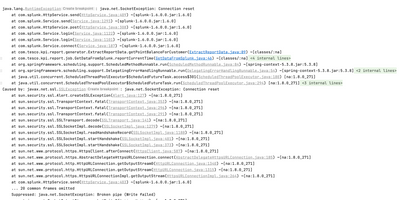
i am getting below error while trying to login with splunk using java sdk.
Caused by: javax.net.ssl.SSLException: java.net.SocketException: Connection reset
Suppressed: java.net.SocketException: Broken pipe (Write failed)
- Mark as New
- Bookmark Message
- Subscribe to Message
- Mute Message
- Subscribe to RSS Feed
- Permalink
- Report Inappropriate Content


Can you please try this? It is working for me.
import com.splunk.*;

public class App {
    public static void main(String[] args) throws Exception {
        HttpService.setSslSecurityProtocol(SSLSecurityProtocol.TLSv1_2);

        // Create a map of arguments and add login parameters
        ServiceArgs loginArgs = new ServiceArgs();
        loginArgs.setUsername("admin");
        loginArgs.setPassword("admin123");
        loginArgs.setHost("localhost");
        loginArgs.setPort(8089);

        // Create a Service instance and log in with the argument map
        Service service = Service.connect(loginArgs);

        for (User user : service.getUsers().values())
            System.out.println(user.getName());

    }
}
Thanks
KV
▄︻̷̿┻̿═━一
If any of my reply helps you to solve the problem Or gain knowledge, an upvote would be appreciated.
- Mark as New
- Bookmark Message
- Subscribe to Message
- Mute Message
- Subscribe to RSS Feed
- Permalink
- Report Inappropriate Content
You can try and set a different SSL protocol, the default protocol in Java is not suitable for connection with Splunk:
HttpService.setSslSecurityProtocol(SSLSecurityProtocol.TLSv1_2);
Edit:
Example code - just add the line somewhere that Java will execute it first before Service connection:
HttpService.setSslSecurityProtocol(SSLSecurityProtocol.TLSv1_2);
ServiceArgs loginArgs = new ServiceArgs();
loginArgs.setUsername(user);
loginArgs.setPassword(password);
loginArgs.setHost(host);
loginArgs.setPort(port);
- Mark as New
- Bookmark Message
- Subscribe to Message
- Mute Message
- Subscribe to RSS Feed
- Permalink
- Report Inappropriate Content
In your case it seems that the connection has been closed by the server end of the connection. This could be an issue with the request you are sending or an issue at their end.
Can you please share you sample code to reproduce the same issue?
KV
- Mark as New
- Bookmark Message
- Subscribe to Message
- Mute Message
- Subscribe to RSS Feed
- Permalink
- Report Inappropriate Content
ServiceArgs loginArgs = new ServiceArgs();
loginArgs.setUsername("uname");
loginArgs.setPassword("xx");
loginArgs.setHost("myhost");
loginArgs.setPort(8089);

// Create a Service instance and log in with the argument map
Service service = Service.connect(serviceArgs);
for (User user : service.getUsers().values())
    System.out.println(user.getName());
- Mark as New
- Bookmark Message
- Subscribe to Message
- Mute Message
- Subscribe to RSS Feed
- Permalink
- Report Inappropriate Content
Can you please try this? It is working for me.
import com.splunk.*;

public class App {
    public static void main(String[] args) throws Exception {
        HttpService.setSslSecurityProtocol(SSLSecurityProtocol.TLSv1_2);

        // Create a map of arguments and add login parameters
        ServiceArgs loginArgs = new ServiceArgs();
        loginArgs.setUsername("admin");
        loginArgs.setPassword("admin123");
        loginArgs.setHost("localhost");
        loginArgs.setPort(8089);

        // Create a Service instance and log in with the argument map
        Service service = Service.connect(loginArgs);

        for (User user : service.getUsers().values())
            System.out.println(user.getName());

    }
}
Thanks
KV
▄︻̷̿┻̿═━一
If any of my reply helps you to solve the problem Or gain knowledge, an upvote would be appreciated.


Join the Splunk Community Slack to learn, troubleshoot, and make connections with fellow Splunk practitioners in real time!
Join Splunk User Groups to connect and learn in-person by region or remotely by topic or industry.
Data Management Digest – September 2026
Federated Search for CloudWatch Unified Data Store Is Generally Available
Announcing Modern Navigation: A New Era of Splunk User Experience
