
Join the Conversation
- Find Answers
- :
- Apps & Add-ons
- :
- Splunk Development
- :
- Splunk Dev
- :
- Re: Multiple timestamps in a file
- Subscribe to RSS Feed
- Mark Topic as New
- Mark Topic as Read
- Float this Topic for Current User
- Bookmark Topic
- Subscribe to Topic
- Mute Topic
- Printer Friendly Page
- Mark as New
- Bookmark Message
- Subscribe to Message
- Mute Message
- Subscribe to RSS Feed
- Permalink
- Report Inappropriate Content
Multiple timestamps in a file

Hi,
I am trying to break the events based on the timestamp.
File contains multiple time formats.
sample Time stamps:
01 January 2021 10:21:66
2021年01月01日 金曜日 10:07:54 AM
2021年01月01日 金曜日 14:54:03
2021年01月01日 12:55:54 PM
2021年01月01日 13:54:54
2021年1月1日 20:59:04
2021年1月1日 9:23:32 AM
金曜日, 3 1月 2021 11:49:45 AM
Monday 3 January 2021 14:01:40
Monday, 3 January 2021 11:05:11 AM
Monday, January 3, 2021 10:04:44 AM
Thu Jan 7 22:33:44 EST 2021
Sample events:
07 January 2021 18:21:56
Employee1
Project Project Name Project Owner
------ ---------- -----------
A Y: \\Owner1\owner2
B Z: \\owner_1\owner 2
C g: \\owner11\owner12\owner 13
Friday, January 8, 2021 10:04:44 AM
Employee2
Project Project Name Project Owner
------ ---------- -----------
A Y: \\Owner1\owner2
B Z: \\owner_1\owner 2
C g: \\owner11\owner12\owner 13
2021年01月08日 金曜日 10:07:54 AM
Employee3
Project Project Name Project Owner
------ ---------- -----------
A Y: \\Owner1\owner2
B Z: \\owner_1\owner 2
C g: \\owner11\owner12\owner 13
I tried with datetime.xml but it didn't work.
Expected output:
Break events before timestamp and show results in the below tabular format.
Employee1 A Y: \\Owner1\owner2
Employee1 B Z: \\owner_1\owner 2
Employee1 C g: \\owner11\owner12\owner 13
- Mark as New
- Bookmark Message
- Subscribe to Message
- Mute Message
- Subscribe to RSS Feed
- Permalink
- Report Inappropriate Content

try (?m)
LINE_BREAKER=(?m)([\r\n]+).*\d\d\:\d\d\:\d\d($| [AP]M| \w{3} \d{4})
- Mark as New
- Bookmark Message
- Subscribe to Message
- Mute Message
- Subscribe to RSS Feed
- Permalink
- Report Inappropriate Content
in props.conf:
LINE_BREAKER = ([\r\n]+).*\d\d\:\d\d\:\d\d($| [AP]M| \w{3} \d{4})
After that, please rex it.
- Mark as New
- Bookmark Message
- Subscribe to Message
- Mute Message
- Subscribe to RSS Feed
- Permalink
- Report Inappropriate Content
I tried mentioned props but below events are excluded.
2021年01月08日 金曜日 10:07:54 AM
Employee3
Project Project Name Project Owner
------ ---------- -----------
A Y: \\Owner1\owner2
B Z: \\owner_1\owner 2
C g: \\owner11\owner12\owner 13
- Mark as New
- Bookmark Message
- Subscribe to Message
- Mute Message
- Subscribe to RSS Feed
- Permalink
- Report Inappropriate Content
Of course.
SHOULD_LINEMERGE = false
right?
sample:
sourcetype=your_sourcetype
| rex "(?m)(?<employee>^\w+$)"
| rex "(?ms)----$\s(?<csv>.*)"
| rex field=csv max_match=0 "(?m)(?<project>\S+)\s(?<project_name>\S+)\s(?<project_owner>.*)"
| table employee project*
- Mark as New
- Bookmark Message
- Subscribe to Message
- Mute Message
- Subscribe to RSS Feed
- Permalink
- Report Inappropriate Content
Yes, still events are not breakings before timestamp.
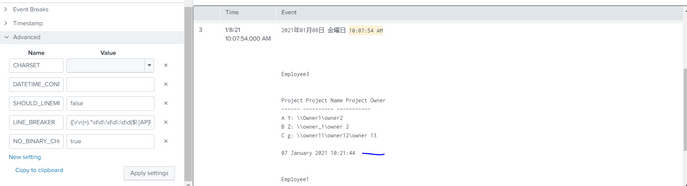
Sample time formats in my log data:
01 January 2021 10:21:66
2021年01月01日 金曜日 10:07:54 AM
2021年01月01日 金曜日 14:54:03
2021年01月01日 12:55:54 PM
2021年01月01日 13:54:54
2021年1月1日 20:59:04
2021年1月1日 9:23:32 AM
金曜日, 3 1月 2021 11:49:45 AM
Monday 3 January 2021 14:01:40
Monday, 3 January 2021 11:05:11 AM
Monday, January 3, 2021 10:04:44 AM
Thu Jan 7 22:33:44 EST 2021


Join the Splunk Community Slack to learn, troubleshoot, and make connections with fellow Splunk practitioners in real time!
Join Splunk User Groups to connect and learn in-person by region or remotely by topic or industry.
Free Professional Services for .conf26 Attendees
Defend at Machine Speed: Your Guide to Security Sessions at .conf26
Where Innovation Takes Flight: The Splunk4Aviation Flight Sim Lands at .conf26
