
Join the Conversation
- Find Answers
- :
- Apps & Add-ons
- :
- Splunk Development
- :
- Splunk Dev
- :
- Deployed a search app from deployer
- Subscribe to RSS Feed
- Mark Topic as New
- Mark Topic as Read
- Float this Topic for Current User
- Bookmark Topic
- Subscribe to Topic
- Mute Topic
- Printer Friendly Page
- Mark as New
- Bookmark Message
- Subscribe to Message
- Mute Message
- Subscribe to RSS Feed
- Permalink
- Report Inappropriate Content
Deployed a search app from deployer

hi ,
I deployed a search app from deployer on 3 member cluster search head. Deployer successful pushed the bundle but its not pushing local directory.
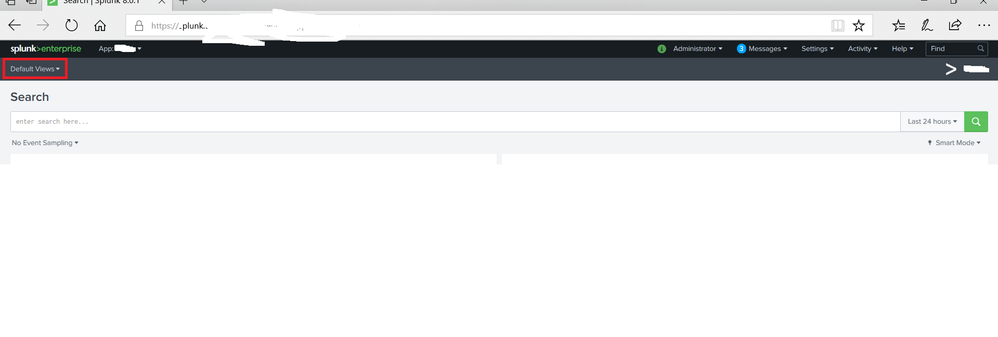
The app got visible on search head but ( its missing search and reporting ) . Its showing only Defaultviews instead of standard ( alert, search , dashboard tabs) .
I checked permission on the deployed app and its set as execute/read/write.

- Mark as New
- Bookmark Message
- Subscribe to Message
- Mute Message
- Subscribe to RSS Feed
- Permalink
- Report Inappropriate Content

By default deployer merges both local and default directories then pushes apps to search heads. Check your changes in default directories on search heads.
It might be something to do with default.xml in your app. Check if following content is there in the default.xml in $SPLUNK_HOME/etc/apps/yourapp/default/data/ui/nav/. If not add it in the app on deployer server, deploy apps again and check.
<nav search_view="search" color="#5CC05C">
  <view name="search" default="true" />
  <view name="reports" />
  <view name="alerts" />
  <view name="dashboards" />
</nav>

Join the Splunk Community Slack to learn, troubleshoot, and make connections with fellow Splunk practitioners in real time!
Join Splunk User Groups to connect and learn in-person by region or remotely by topic or industry.
Persistent Queue at TcpOut — One of Splunk's Most Practical Features
Catalog Is Now Generally Available on Splunk Cloud Platform
Your Path to AgenticOps: AI Experiences for Every Splunk Practitioner
