
Join the Conversation
- Find Answers
- :
- Apps & Add-ons
- :
- Splunk Development
- :
- Splunk Dev
- :
- Can anyone tell how to get below graph using splun...
- Subscribe to RSS Feed
- Mark Topic as New
- Mark Topic as Read
- Float this Topic for Current User
- Bookmark Topic
- Subscribe to Topic
- Mute Topic
- Printer Friendly Page
- Mark as New
- Bookmark Message
- Subscribe to Message
- Mute Message
- Subscribe to RSS Feed
- Permalink
- Report Inappropriate Content
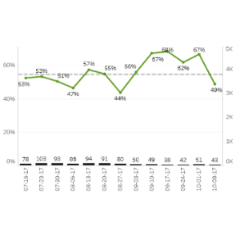
I want two y-axis graph having percentage on left side and number (in thousands) on right side.And on x axis we should have total no. of cases on each day.

- Mark as New
- Bookmark Message
- Subscribe to Message
- Mute Message
- Subscribe to RSS Feed
- Permalink
- Report Inappropriate Content

Do you have th syntax worked out for number of cases, percentage and the other number?
If so, in the format option, there is a chart overlay button, click in that and choose the number field so that it displays on the right.
https://docs.splunk.com/Documentation/Splunk/7.0.1/SearchTutorial/Chartoverlays
If you don’t have the syntax worked out, if you could share some sample data, that could be helpful.
- Mark as New
- Bookmark Message
- Subscribe to Message
- Mute Message
- Subscribe to RSS Feed
- Permalink
- Report Inappropriate Content

There is an app splunk 6.x examples which provides basic concepts and also sample searches to populate dashboards fast and easily.
Hopefully it helps
- Mark as New
- Bookmark Message
- Subscribe to Message
- Mute Message
- Subscribe to RSS Feed
- Permalink
- Report Inappropriate Content
Do you have th syntax worked out for number of cases, percentage and the other number?
If so, in the format option, there is a chart overlay button, click in that and choose the number field so that it displays on the right.
https://docs.splunk.com/Documentation/Splunk/7.0.1/SearchTutorial/Chartoverlays
If you don’t have the syntax worked out, if you could share some sample data, that could be helpful.
- Mark as New
- Bookmark Message
- Subscribe to Message
- Mute Message
- Subscribe to RSS Feed
- Permalink
- Report Inappropriate Content
Sorry but I do not have source code for this but take it like you are having two fields at the end of the search.
By using only that two fields you have to make the graph.

Join the Splunk Community Slack to learn, troubleshoot, and make connections with fellow Splunk practitioners in real time!
Join Splunk User Groups to connect and learn in-person by region or remotely by topic or industry.
Announcing Modern Navigation: A New Era of Splunk User Experience
Observability Simplified: Combining User Experience, Application Performance & ...
Event Series May & June: From Network Visibility to Service Intelligence
