
Join the Conversation
- Find Answers
- :
- Splunk Administration
- :
- Admin Other
- :
- Security
- :
- Why is Index Based RBAC not working?
- Subscribe to RSS Feed
- Mark Topic as New
- Mark Topic as Read
- Float this Topic for Current User
- Bookmark Topic
- Subscribe to Topic
- Mute Topic
- Printer Friendly Page
- Mark as New
- Bookmark Message
- Subscribe to Message
- Mute Message
- Subscribe to RSS Feed
- Permalink
- Report Inappropriate Content
Why is Index Based RBAC not working?

Hey all,
Working on creating some access control based on indices and running into a weird issue. When I create a custom role and grant this role all capabilities (with no role inheritance) to the specified index, I'm not able to search data inside that index. However if I create said custom role inheriting the user role, but with the exact same capabilities it then it lets me search.
I've also cloned the user role and appended the index permissions to suit my needs but experiencing the exact same issue, the cloned role has no access to the allowed indices but the second I inherit the user role it seems to work again.
This behaviour is only found on our dedicated search heads. When I enable the web ui and replicate on indexers it works as expected with the custom role searching assigned indices.
Splunk Enterprise Version: 9.0.0.1
Any help would be appreciated!!!
Thanks guys
- Mark as New
- Bookmark Message
- Subscribe to Message
- Mute Message
- Subscribe to RSS Feed
- Permalink
- Report Inappropriate Content


Hi @HaydenMc,
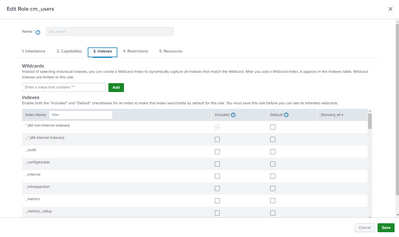
are you sure that flagged the "Included" box option for your index in the Role definition page?
Ciao.
Giuseppe
- Mark as New
- Bookmark Message
- Subscribe to Message
- Mute Message
- Subscribe to RSS Feed
- Permalink
- Report Inappropriate Content
Hi @gcusello,
Thanks for the reply. Yes can confirm the included box has been ticked. Just for testing I've cloned the out of box user role with everything including the accessible indexes and I am experiencing the exact same issue. Any user assigned this cloned role has no access, but any user assigned the user role (the role that I cloned), it works as expected. It's almost like the out of the box user role is somehow different to the cloned role I've created.
Thanks
- Mark as New
- Bookmark Message
- Subscribe to Message
- Mute Message
- Subscribe to RSS Feed
- Permalink
- Report Inappropriate Content

Those access issues are quite hard to solve with GUI. I usually use some separate app which can told how splunk has expanded those roles. Here is one which you could install and test in your (test) environment https://splunkbase.splunk.com/app/4111/#/details
r. Ismo
- Mark as New
- Bookmark Message
- Subscribe to Message
- Mute Message
- Subscribe to RSS Feed
- Permalink
- Report Inappropriate Content
Hi @HaydenMc,
As I said, I never experienced this behavior and I used this feature many times but never with the last Splunk Version.
I hint to open a ticket to Splunk Support, it could be a bug.
Ciao.
Giuseppe

Join the Splunk Community Slack to learn, troubleshoot, and make connections with fellow Splunk practitioners in real time!
Join Splunk User Groups to connect and learn in-person by region or remotely by topic or industry.
Index This | What travels the world but is also stuck in place?
Discover New Use Cases: Unlock Greater Value from Your Existing Splunk Data
Continue Your Journey: Join Session 2 of the Data Management and Federation Bootcamp ...
