
Join the Conversation
- Find Answers
- :
- Splunk Administration
- :
- Admin Other
- :
- Security
- :
- Re: How to remove Splunk login page iframe?
- Subscribe to RSS Feed
- Mark Topic as New
- Mark Topic as Read
- Float this Topic for Current User
- Bookmark Topic
- Subscribe to Topic
- Mute Topic
- Printer Friendly Page
- Mark as New
- Bookmark Message
- Subscribe to Message
- Mute Message
- Subscribe to RSS Feed
- Permalink
- Report Inappropriate Content

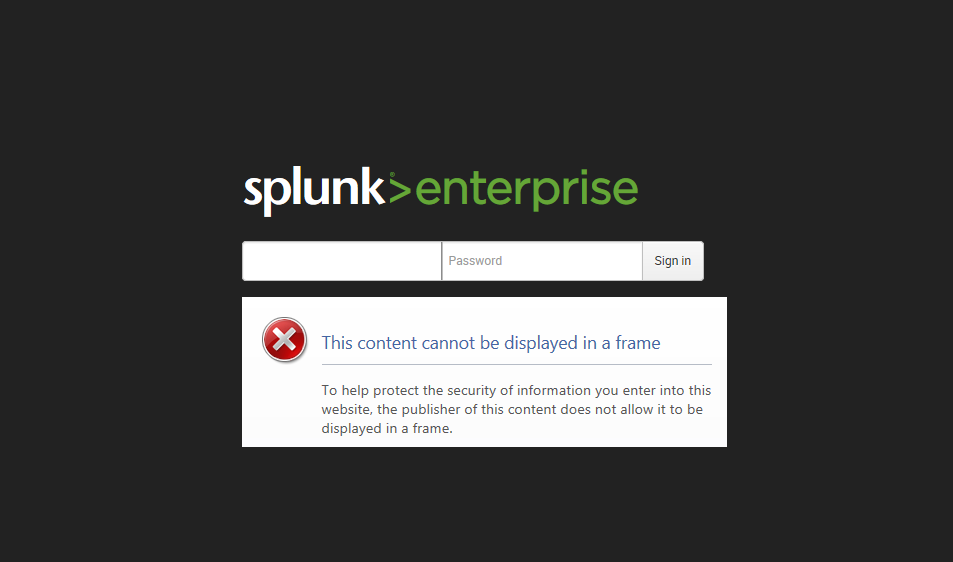
Hello! I would like to understand what content should be displayed in the login page iframe and also how to remove it permanently (currently displaying an error). Any help would be greatly appreciated - Thanks!
- Mark as New
- Bookmark Message
- Subscribe to Message
- Mute Message
- Subscribe to RSS Feed
- Permalink
- Report Inappropriate Content

Hmm, I wonder if it is the update check.
Has anyone modified these files?
share/splunk/search_mrsparkle/exposed/css/login.css
share/splunk/search_mrsparkle/exposed/js/login.js
share/splunk/search_mrsparkle/exposed/js/views/account/login/updatechecker/IFrame.js
share/splunk/search_mrsparkle/exposed/js/views/account/login/updatechecker/Master.js
- Mark as New
- Bookmark Message
- Subscribe to Message
- Mute Message
- Subscribe to RSS Feed
- Permalink
- Report Inappropriate Content

Hi, no need for hacking js files, it's an option in web.conf:
updateCheckerBaseURL = http://quickdraw.Splunk.com/js/
- Setting updateCheckerBaseURL to 0 will stop the SplunkWeb from pinging Splunk.com for new versions of itself.
so :
[settings]
updateCheckerBaseURL=0
- Mark as New
- Bookmark Message
- Subscribe to Message
- Mute Message
- Subscribe to RSS Feed
- Permalink
- Report Inappropriate Content
Thanks for the alternate answer. I reverted my changes and updated the [settings] option as you described above!
- Mark as New
- Bookmark Message
- Subscribe to Message
- Mute Message
- Subscribe to RSS Feed
- Permalink
- Report Inappropriate Content
Hmm, I wonder if it is the update check.
Has anyone modified these files?
share/splunk/search_mrsparkle/exposed/css/login.css
share/splunk/search_mrsparkle/exposed/js/login.js
share/splunk/search_mrsparkle/exposed/js/views/account/login/updatechecker/IFrame.js
share/splunk/search_mrsparkle/exposed/js/views/account/login/updatechecker/Master.js
- Mark as New
- Bookmark Message
- Subscribe to Message
- Mute Message
- Subscribe to RSS Feed
- Permalink
- Report Inappropriate Content
Yes! Navigating here: share/splunk/search_mrsparkle/exposed/js/login.js
I changed the url from "http://www.splunk.com/r/download" to just "" and it resolved the issue.
template: '\
                <a href="http://www.splunk.com/r/download" class="btn"><%= _("Download").t() %></a>\
                <a href="#" class="skip"><%= _("Skip update").t() %></a>\
Thanks!
- Mark as New
- Bookmark Message
- Subscribe to Message
- Mute Message
- Subscribe to RSS Feed
- Permalink
- Report Inappropriate Content
This isn't much to go on. What's your browser? What's in your web.conf? Specifically the login_content line?
- Mark as New
- Bookmark Message
- Subscribe to Message
- Mute Message
- Subscribe to RSS Feed
- Permalink
- Report Inappropriate Content
Hello - For some reason the description I added along with the photo isn't showing - my apologies. Basically I want to know where the login page is located on the Splunk Enterprise Search Head and how to remove the iframe imbedded in the page. Right now its displaying the error finding the page to fill the iframe. We are currently using IE11. Thanks!
- Mark as New
- Bookmark Message
- Subscribe to Message
- Mute Message
- Subscribe to RSS Feed
- Permalink
- Report Inappropriate Content
I believe that is dynamically generated content by a combination of json, js and css.
Do you have a "login_content" line in either system/default/\web.conf or system/local/web.conf ?
That line specifies what is to be auto generated and your screen shot sort of looks like "login_content" might be set something invalid.
- Mark as New
- Bookmark Message
- Subscribe to Message
- Mute Message
- Subscribe to RSS Feed
- Permalink
- Report Inappropriate Content
Found the line in systems/default/web.conf
Custom content for login screen
login_content =
Tried to comment out the reference and reboot the system with no change.
- Mark as New
- Bookmark Message
- Subscribe to Message
- Mute Message
- Subscribe to RSS Feed
- Permalink
- Report Inappropriate Content
changed to login_content = false and now I see the word "false" above the blank iframe!



Join the Splunk Community Slack to learn, troubleshoot, and make connections with fellow Splunk practitioners in real time!
Join Splunk User Groups to connect and learn in-person by region or remotely by topic or industry.
Cisco Data Fabric from Architecture to Investigation, Better SOC Visibility, and More ...
The Trust Gap: Why a Data Foundation is Fundamental to an Agentic Enterprise
Data Management Digest – September 2026
