
Join the Conversation
- Find Answers
- :
- Splunk Administration
- :
- Admin Other
- :
- Security
- :
- How to identify each Active Directory Service Acco...
- Subscribe to RSS Feed
- Mark Topic as New
- Mark Topic as Read
- Float this Topic for Current User
- Bookmark Topic
- Subscribe to Topic
- Mute Topic
- Printer Friendly Page
- Mark as New
- Bookmark Message
- Subscribe to Message
- Mute Message
- Subscribe to RSS Feed
- Permalink
- Report Inappropriate Content

I need to identify each Active Directory Service Accounts that are being used for authentication for my work group. I am trying to create a working list of active and disabled accounts. I am using the following, but not having any luck obtaining all Events with complete list of EventCodes.
index=xxxxxxxxxx inserted group*Svc source="xxxxxxxxx"
| rex field=Account_Name "(?<Account_Name_parsed>[\w]*)\@.*"
| where isnotnull(Account_Name_parsed)
| eval startDate=strftime(strptime(whenCreated,"%Y%m%d%H%M"), "%Y/%m/%d %H:%M")
| eval endDate=strftime(strptime(accountExpires,"%Y-%m-%dT%H:%M:%S%Z"), "%Y/%m/%d %H:%M")
| eval lastDate=strftime(strptime(lastTime,"%Y-%m-%dT%H:%M:%S"), "%Y/%m/%d %H:%M")
| eval Days=floor((now()-strptime(lastDate,"%Y/%m/%d %H:%M"))/(3600*24))
| rex field=userAccountControl "(?<userAccountControl_parsed>[^,]+)"
| eval userAccountControl=lower(replace(mvjoin(userAccountControl_parsed, "|"), " ", "_"))
| eval status=case(
match(userAccountControl, "accountdisable") , "disabled",
1==1, "active"
)
| stats first(_time) AS Time by Account_Name_parsed
| eval Time=strftime(Time, "%b %d %H:%M:%S")
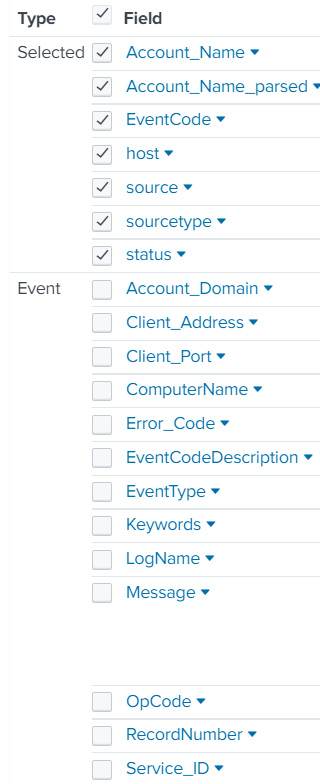
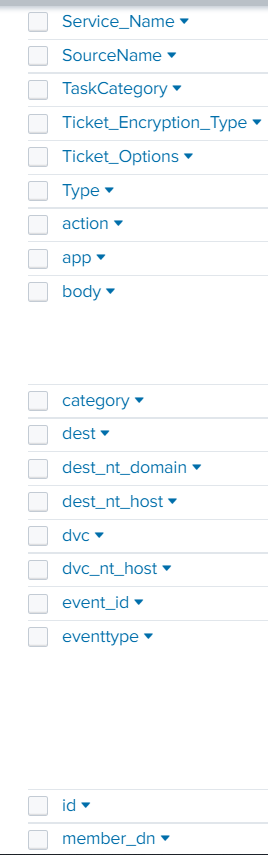
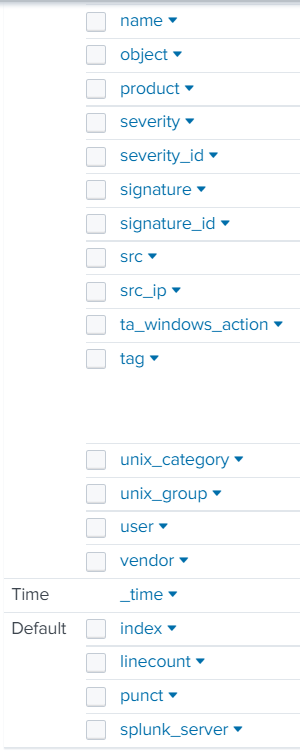
The only thing showing in Statistics is the account name and time. I need for my list to show active and non-active accounts. I would also like for the Source_Workstation to be shown as well. I have attached an example of fields within an event.
- Mark as New
- Bookmark Message
- Subscribe to Message
- Mute Message
- Subscribe to RSS Feed
- Permalink
- Report Inappropriate Content


Please share the SPL you tried.
The stats command may not show results if one of the grouping fields is null. Use fillnull before calling stats to help with that.
The eventstats command shouldn't be computing values you didn't ask for, but you can always get rid of the unwanted field with | fields - field-name.
If this reply helps you, Karma would be appreciated.
- Mark as New
- Bookmark Message
- Subscribe to Message
- Mute Message
- Subscribe to RSS Feed
- Permalink
- Report Inappropriate Content
The report is showing only account name and time because that is what it is told to display by the stats command near the end. You can modify the command to include other fields or use the eventstats command.
Inactive accounts are unlikely to generate events, since they're not active.
If this reply helps you, Karma would be appreciated.
- Mark as New
- Bookmark Message
- Subscribe to Message
- Mute Message
- Subscribe to RSS Feed
- Permalink
- Report Inappropriate Content
Hello @richgalloway ,
When I add other fields in the stats command it eliminates any Statistics from showing. Why is this happening? When using the eventstats command it provided the average duration which I don't need that.
- Mark as New
- Bookmark Message
- Subscribe to Message
- Mute Message
- Subscribe to RSS Feed
- Permalink
- Report Inappropriate Content
Please share the SPL you tried.
The stats command may not show results if one of the grouping fields is null. Use fillnull before calling stats to help with that.
The eventstats command shouldn't be computing values you didn't ask for, but you can always get rid of the unwanted field with | fields - field-name.
If this reply helps you, Karma would be appreciated.

[Puzzles] Solve, Learn, Repeat: Dynamic formatting from XML events
Enter the Agentic Era with Splunk AI Assistant for SPL 1.4
Stronger Security with Federated Search for S3, GCP SQL & Australian Threat ...
