
Turn on suggestions
Auto-suggest helps you quickly narrow down your search results by suggesting possible matches as you type.
Security
×
Join the Conversation
Without signing in, you're just watching from the sidelines. Sign in or Register to connect, share, and be part of the Splunk Community.
Turn on suggestions
Auto-suggest helps you quickly narrow down your search results by suggesting possible matches as you type.
- Find Answers
- :
- Splunk Administration
- :
- Admin Other
- :
- Security
- :
- How to customize or change the default footer in S...
Options
- Subscribe to RSS Feed
- Mark Topic as New
- Mark Topic as Read
- Float this Topic for Current User
- Bookmark Topic
- Subscribe to Topic
- Mute Topic
- Printer Friendly Page
- Mark as New
- Bookmark Message
- Subscribe to Message
- Mute Message
- Subscribe to RSS Feed
- Permalink
- Report Inappropriate Content

fdi01
Motivator
06-23-2015
02:40 AM
hi.
please see picture below to understand fine what i want.
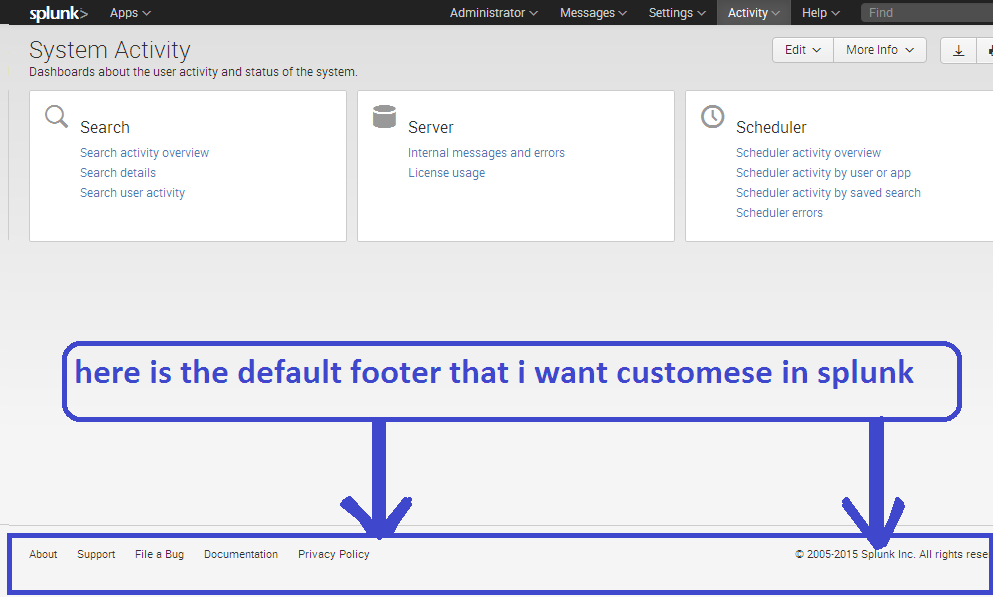
how can i do it in splunk??
thank.

1 Solution
- Mark as New
- Bookmark Message
- Subscribe to Message
- Mute Message
- Subscribe to RSS Feed
- Permalink
- Report Inappropriate Content

MuS

SplunkTrust
06-23-2015
01:27 PM
Hi fdi01,
in your own dashboards you can add the following option to hide either:
hideSplunkBar = "true"
hideAppBar = "true"
hideFooter = "true"
hideChrome = "true"
hideTitle = "true"
hideEdit = "true"
Hope that helps ...
cheers, MuS
- Mark as New
- Bookmark Message
- Subscribe to Message
- Mute Message
- Subscribe to RSS Feed
- Permalink
- Report Inappropriate Content

davidpaper
Contributor
09-10-2015
01:20 PM
In addition, you can add these to the end of a dashboard URL to hide specific items. Example:
en-US/app/search/chrometest?earliest=0&latest=&hideChrome=true&hideEdit=true
Will make it nice and sparse for a TV display.
- Mark as New
- Bookmark Message
- Subscribe to Message
- Mute Message
- Subscribe to RSS Feed
- Permalink
- Report Inappropriate Content
MuS
SplunkTrust
06-23-2015
01:27 PM
Hi fdi01,
in your own dashboards you can add the following option to hide either:
hideSplunkBar = "true"
hideAppBar = "true"
hideFooter = "true"
hideChrome = "true"
hideTitle = "true"
hideEdit = "true"
Hope that helps ...
cheers, MuS
- Mark as New
- Bookmark Message
- Subscribe to Message
- Mute Message
- Subscribe to RSS Feed
- Permalink
- Report Inappropriate Content
DominikGM
Explorer
01-10-2017
04:47 AM
To easier get it done:
In dashboard view, click on button "Edit" > "Edit source" and edit the <dashboard> section to <dashboard hideFooter="true">. See Splunk documentation.

Get Updates on the Splunk Community!
.conf25 technical session recap of Observability for Gen AI: Monitoring LLM ...
If you’re unfamiliar, .conf is Splunk’s premier event where the Splunk community, customers, partners, and ...
A Season of Skills: New Splunk Courses to Light Up Your Learning Journey
There’s something special about this time of year—maybe it’s the glow of the holidays, maybe it’s the ...
Announcing the Migration of the Splunk Add-on for Microsoft Azure Inputs to ...
Announcing the Migration of the Splunk Add-on for Microsoft Azure Inputs to Officially Supported Splunk ...
