
Join the Conversation
- Find Answers
- :
- Using Splunk
- :
- Other Using Splunk
- :
- Reporting
- :
- Re: Referencing a saved search in simple xml not r...
- Subscribe to RSS Feed
- Mark Topic as New
- Mark Topic as Read
- Float this Topic for Current User
- Bookmark Topic
- Subscribe to Topic
- Mute Topic
- Printer Friendly Page
- Mark as New
- Bookmark Message
- Subscribe to Message
- Mute Message
- Subscribe to RSS Feed
- Permalink
- Report Inappropriate Content
Referencing a saved search in simple xml not returning the most recent saved search anymore

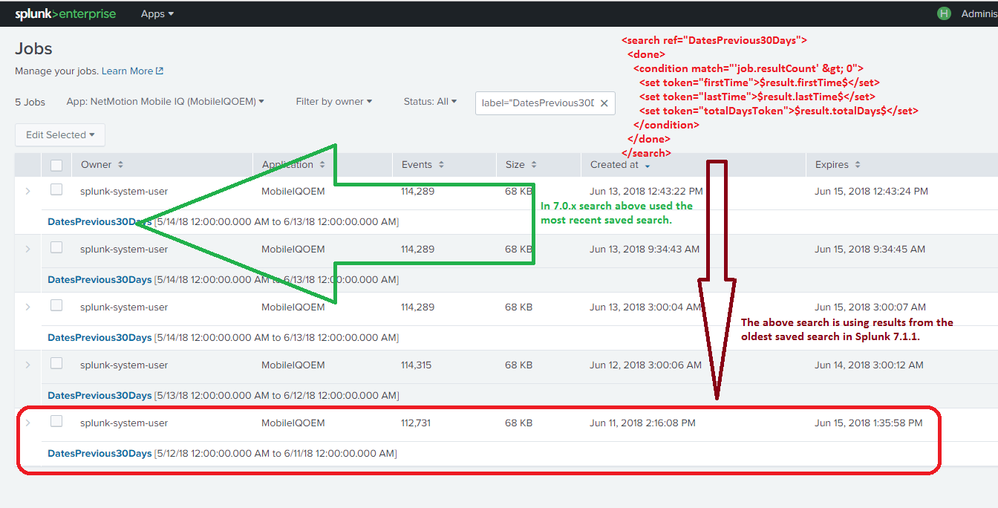
We have a simple xml dashboard that has many charts that reference saved searches that are run every night at 3am. Since upgrading to Splunk 7.1.1 when we reference the saved search in our dashboard the search that is used is NOT the most recent saved search it is the oldest. This was not the behavior in Splunk 7.0.x.
savedsearches.conf:
[DatesPrevious30Days]
run_on_startup = true
alert.track = 0
cron_schedule = 0 3 * * *
dispatch.earliest_time = -30d@d
dispatch.latest_time = @d
enableSched = 1
search = index=nmi_main source=netmotion sourcetype=nm_session \
| fields _time \
| stats min(_time) as firstTime max(_time) as lastTime \
| eval totalDays=round((lastTime-firstTime)/86400,0) \
| eval firstTime=strftime(firstTime, "%a %b %e, %Y") \
| eval lastTime=strftime(lastTime, "%a %b %e, %Y")



- Mark as New
- Bookmark Message
- Subscribe to Message
- Mute Message
- Subscribe to RSS Feed
- Permalink
- Report Inappropriate Content

I'm having this problem with SE 7.1.0. Did you ever find a solution?
- Mark as New
- Bookmark Message
- Subscribe to Message
- Mute Message
- Subscribe to RSS Feed
- Permalink
- Report Inappropriate Content
I am not sure on the issue, as we are still using 6.64; but did you happen to use the below for calling the saved search and try it?
|loadjob savedsearch="owner:app:savedsearchname"
- Mark as New
- Bookmark Message
- Subscribe to Message
- Mute Message
- Subscribe to RSS Feed
- Permalink
- Report Inappropriate Content
I use <search ref="saved_search_name"></search> in Simple XML dashboards, so I'm not sure how I would adapt that to use the | loadjob construct.
- Mark as New
- Bookmark Message
- Subscribe to Message
- Mute Message
- Subscribe to RSS Feed
- Permalink
- Report Inappropriate Content
Before applying this on the dashboard, you can try running this on the search bar, and see if it is taking the latest savedsearch result,
|loadjob savedsearch="owner:app:savedsearchname"

Splunk Observability for AI
[Puzzles] Solve, Learn, Repeat: Dereferencing XML to Fixed-length events
Stay Connected: Your Guide to December Tech Talks, Office Hours, and Webinars!
