
Join the Conversation
- Find Answers
- :
- Using Splunk
- :
- Other Using Splunk
- :
- Reporting
- :
- Re: Connect 2 databases from different servers wit...
- Subscribe to RSS Feed
- Mark Topic as New
- Mark Topic as Read
- Float this Topic for Current User
- Bookmark Topic
- Subscribe to Topic
- Mute Topic
- Printer Friendly Page
- Mark as New
- Bookmark Message
- Subscribe to Message
- Mute Message
- Subscribe to RSS Feed
- Permalink
- Report Inappropriate Content
How to connect two databases from different servers with join command?

Hello guys. I received this task at my job, and I still need money in my pocket, so please help me :))
I'm in a Network Operational team; maybe this will help you understand better the following description.
So, In a single Splunk search I have to connect 2 databases, from different servers.
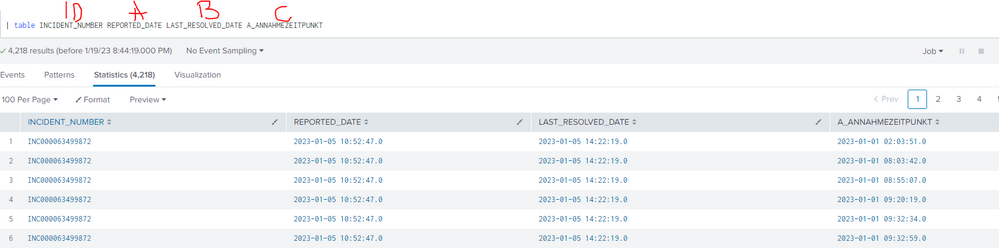
One DB contains "Incidents": Incident ID, Start time of the Incident (Let's call it A), End time of the incident (B)
The other DB contains "Call Complaints": The timestamp of each Call complaint (C).
I need to find out the amount of call complaints for each incident. So, if C>=A AND C<=B, we count a call complaint for a specific incident, and we can move on to check the next C timestamp, and so on.
I have issues right from the start. I tried to connect the databases with the next syntax:
| dbxquery query=[...] connection=A
| join
[ dbxquery query=[...] connection=B]
But, when I try a table command to see the interesting fields for me (Incident ID, A, B, C), the fields from the joined DB are looking the same on each line..
Could you please help me with this?
- Mark as New
- Bookmark Message
- Subscribe to Message
- Mute Message
- Subscribe to RSS Feed
- Permalink
- Report Inappropriate Content


Hi @razzeri,
Join command default type is INNER which tries to match all possible fields. Can you try below?
Assuming connection A is your Incidents table.
| dbxquery query=[...]  connection=A
| join type=left max=0 INCIDENT_NUMBER
              [ dbxquery  query=[...]  connection=B]
- Mark as New
- Bookmark Message
- Subscribe to Message
- Mute Message
- Subscribe to RSS Feed
- Permalink
- Report Inappropriate Content
I think I need a new "time" field to link with both DB. But how??


Join the Splunk Community Slack to learn, troubleshoot, and make connections with fellow Splunk practitioners in real time!
Join Splunk User Groups to connect and learn in-person by region or remotely by topic or industry.
SOC4Kafka - New Kafka Connector Powered by OpenTelemetry
Rounding off the Splunk Dashboard Contest
A Four Part Event Series: AI + Observability: AI Agents, LLMs, Apps, & Infrastructure
