
Join the Conversation
- Find Answers
- :
- Using Splunk
- :
- Other Using Splunk
- :
- Other Usage
- :
- How to create custom alert email template on Splun...
- Subscribe to RSS Feed
- Mark Topic as New
- Mark Topic as Read
- Float this Topic for Current User
- Bookmark Topic
- Subscribe to Topic
- Mute Topic
- Printer Friendly Page
- Mark as New
- Bookmark Message
- Subscribe to Message
- Mute Message
- Subscribe to RSS Feed
- Permalink
- Report Inappropriate Content
How to create custom alert email template on Splunk Cloud?

Hi Splunkers, we are setting a Splunk Cloud environment for a customer and we are working on Trigger Actions for alerts.
We don't need, for now, some particular custom actions: afer alert triggering, sending an email to our SOC is enough. We know that fields in the events/alerts are easily usable thanks to $<field_name> notation, so how to customize the email action is not a problem.
What we don't know is: if we have a custom template we want to use for our emails, with some logos and HTML code, is it possible simply put it in the message box? I mean, simply put our html code here:
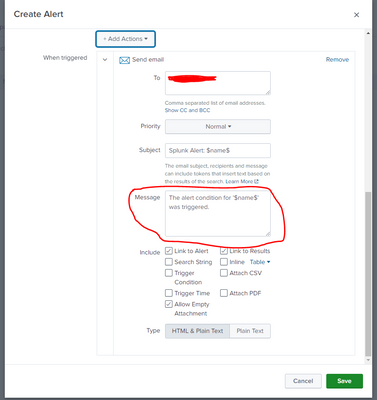
or we have to follow another way? And which one?
- Mark as New
- Bookmark Message
- Subscribe to Message
- Mute Message
- Subscribe to RSS Feed
- Permalink
- Report Inappropriate Content


@SplunkExplorer - The message box here is part of the email and not the full email content, so it's not a complete replacement for the email template.
But you can there whatever you need, most likely even the HTML content will work.
But if you want all together a custom email template than you have to write a custom alert action and write your own python code to send email in necessary template.
I hope this helps!!! Kindly upvote if it does!!!

[Puzzles] Solve, Learn, Repeat: Dynamic formatting from XML events
Enter the Agentic Era with Splunk AI Assistant for SPL 1.4
Stronger Security with Federated Search for S3, GCP SQL & Australian Threat ...
