
Join the Conversation
- Find Answers
- :
- Splunk Administration
- :
- Monitoring Splunk
- :
- Re: Possible to set a different name for Splunkd?
- Subscribe to RSS Feed
- Mark Topic as New
- Mark Topic as Read
- Float this Topic for Current User
- Bookmark Topic
- Subscribe to Topic
- Mute Topic
- Printer Friendly Page
- Mark as New
- Bookmark Message
- Subscribe to Message
- Mute Message
- Subscribe to RSS Feed
- Permalink
- Report Inappropriate Content
Possible to set a different name for Splunkd?

Currently deploying a solution at all client's environment using version 8.x, however an existing third party has already some servers where Splunk v7.0 is deployed. To avoid responsibility conflicts and total separation of Splunk, we are working on different location and ports however we are not able to locate conf file to change Splunkd to something else. This would prevent either team to kill incorrectly other daemon by mistake.
Please any lead will help us. Tks.
- Mark as New
- Bookmark Message
- Subscribe to Message
- Mute Message
- Subscribe to RSS Feed
- Permalink
- Report Inappropriate Content
Thanks for replies.
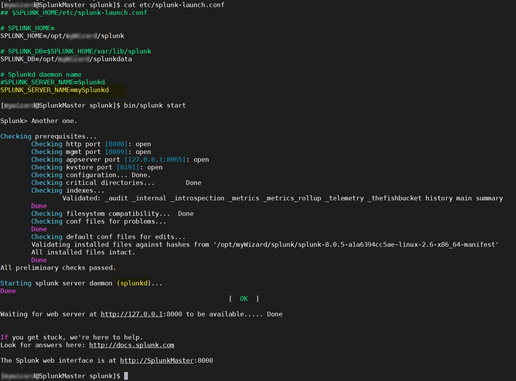
I am currently running Splunk 8.05 in a CentOS Stream 8, and followed recommendation by soutamo but daemon still remains: Splunkd. Was this feature discontinued for Enterprise and Universal Forwarders?
I have successfully adjusted splunk-launch.conf to point datastore to an alternative location without any problem. However SPLUNK_SERVICE_NAME is not responding as expected.
Here is capture of information from splunk-launch.conf and initialization. Is there something else missing?
Thanks.
- Mark as New
- Bookmark Message
- Subscribe to Message
- Mute Message
- Subscribe to RSS Feed
- Permalink
- Report Inappropriate Content


Hi
You cannot change splunkd process name, only change of service name is allowed.
More information can found here: https://docs.splunk.com/Documentation/Splunk/8.1.1/Admin/RunSplunkassystemdservice
Based on your screenshot you are still using init.d versio startup. I strongly propose that you should change to systemd version. Then you can change that name and it's easier to run several versions at same time (e.g. server + UF, if this is mandatory by your policy). Also you can start to use workload management after that if needed.
r. Ismo
- Mark as New
- Bookmark Message
- Subscribe to Message
- Mute Message
- Subscribe to RSS Feed
- Permalink
- Report Inappropriate Content
Hi
when you said Splunkd I expecting that you are talking about linux service name? If so then you could change it by editing splunk-launch.conf with parameter
SPLUNK_SERVER_NAME
You must do this before enabling splunk boot start. If you have already enabled it then just disable it, edit this parameter and then enable it again.
r. Ismo
- Mark as New
- Bookmark Message
- Subscribe to Message
- Mute Message
- Subscribe to RSS Feed
- Permalink
- Report Inappropriate Content

I suspect you won't find anything on how to do that. But... the different ports will be listed in top.
Also, perhaps teach them to use start/stop in the right folder rather than killing processes?


Join the Splunk Community Slack to learn, troubleshoot, and make connections with fellow Splunk practitioners in real time!
Join Splunk User Groups to connect and learn in-person by region or remotely by topic or industry.
Your Feedback. Our Roadmap. Visit the PX Feedback Booth at .conf26
Agentic SOC Triage: Investigating Splunk ES Notables with MCP Server and a Local LLM
Painting a Clearer Picture: Creating Cross-Domain Visibility with AI Canvas
