
Join the Conversation
- Find Answers
- :
- Splunk Administration
- :
- Monitoring Splunk
- :
- Re: How to fsck scan thaweddb folder?
- Subscribe to RSS Feed
- Mark Topic as New
- Mark Topic as Read
- Float this Topic for Current User
- Bookmark Topic
- Subscribe to Topic
- Mute Topic
- Printer Friendly Page
- Mark as New
- Bookmark Message
- Subscribe to Message
- Mute Message
- Subscribe to RSS Feed
- Permalink
- Report Inappropriate Content
How to fsck scan thaweddb folder?

According to official Troubleshooting documentation fscan command has "--thawed" switch in splunk 6.5.1 version also.
(http://docs.splunk.com/Documentation/Splunk/6.5.1/Troubleshooting/CommandlinetoolsforusewithSupport)
I tried to use it as:
splunk fsck scan --all-buckets-one-index --index-name=my_index ----thawed
and got response:
_ Unrecognized argument "--thawed"_
Any idea how to scan all thawed bucket without use external script and single bucket selection?
(splunk fsck scan --one-bucket --bucket-path=/opt/splunk/var/lib/splunk/my_index/thaweddb/db_1234567890/
- Mark as New
- Bookmark Message
- Subscribe to Message
- Mute Message
- Subscribe to RSS Feed
- Permalink
- Report Inappropriate Content
Hi,
As I sad, I used ".. --index myindex" as described in help command, and got error "Unrecognized argument "--index""
- Mark as New
- Bookmark Message
- Subscribe to Message
- Mute Message
- Subscribe to RSS Feed
- Permalink
- Report Inappropriate Content
Hi!
Seems that there are some errors on support page:
root@myserver# /opt/splunk/bin/splunk fsck scan --all-buckets-one-index --index myindex --thawed
Unrecognized argument "--index"
Also:
root@myserver# /opt/splunk/bin/splunk fsck --help
USAGE
Supported modes are: scan, repair, clear-bloomfilter, check-integrity, generate-hash-files
:= --one-bucket|--all-buckets-one-index|--all-buckets-all-indexes
[--index-name=
[--include-hots]
[--local-id=
[--min-ET=
- Mark as New
- Bookmark Message
- Subscribe to Message
- Mute Message
- Subscribe to RSS Feed
- Permalink
- Report Inappropriate Content
Hi!
Little bash scripting can help:
for bucket_folder in ls -1 thawed_folder; do /opt/splunk/bin/splunk fsck scan --one-bucket --bucket-path=thawed_folder/$bucket_folder;done
🙂
- Mark as New
- Bookmark Message
- Subscribe to Message
- Mute Message
- Subscribe to RSS Feed
- Permalink
- Report Inappropriate Content

Based on Command line tools for use with Support
We see -
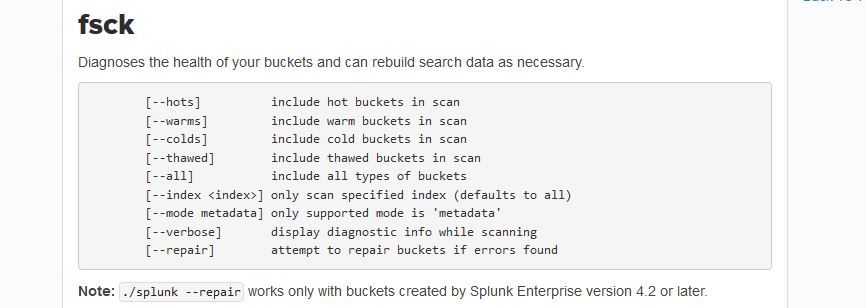
Your --index-name=my_index doesn't look right...



Join the Splunk Community Slack to learn, troubleshoot, and make connections with fellow Splunk practitioners in real time!
Join Splunk User Groups to connect and learn in-person by region or remotely by topic or industry.
Agentic SOC Triage: Investigating Splunk ES Notables with MCP Server and a Local LLM
All Work and No Play? Not at .conf26! Unwind at These Evening Events
Join the Hackathon at .conf26 and build a No-Code AI agent
