Monitoring Splunk

How does one restart just the KV Store process on a Windows system?

NK
Path Finder

Using Splunk Enterprise for Windows, v8.2.10

When the KV Store process terminates abnormally, the "Health Status of Splunkd" window still indicates green for everything. 😕

How does one restart just the KV Store process on a Windows system?
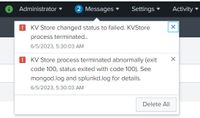
KV Store process terminated abnormallyKV Store process terminated abnormally

Labels (1)
Tags (3)
0 Karma
Get Updates on the Splunk Community!

Your Guide to Splunk Digital Experience Monitoring

A flawless digital experience isn't just an advantage, it's key to customer loyalty and business success. But ...

Data Management Digest – November 2025

  Welcome to the inaugural edition of Data Management Digest! As your trusted partner in data innovation, the ...

Upcoming Webinar: Unmasking Insider Threats with Slunk Enterprise Security’s UEBA

Join us on Wed, Dec 10. at 10AM PST / 1PM EST for a live webinar and demo with Splunk experts! Discover how ...

