
Join the Conversation
- Find Answers
- :
- Splunk Administration
- :
- Monitoring Splunk
- :
- Health:Red
- Subscribe to RSS Feed
- Mark Topic as New
- Mark Topic as Read
- Float this Topic for Current User
- Bookmark Topic
- Subscribe to Topic
- Mute Topic
- Printer Friendly Page
- Mark as New
- Bookmark Message
- Subscribe to Message
- Mute Message
- Subscribe to RSS Feed
- Permalink
- Report Inappropriate Content
Health:Red

I cannot find what is doing this and the answer that google always brings back from the community is not very good.
Root Cause(s):
- The number of extremely lagged searches (1) over the last hour exceeded the red threshold (1) on this Splunk instance
- Mark as New
- Bookmark Message
- Subscribe to Message
- Mute Message
- Subscribe to RSS Feed
- Permalink
- Report Inappropriate Content


Hi
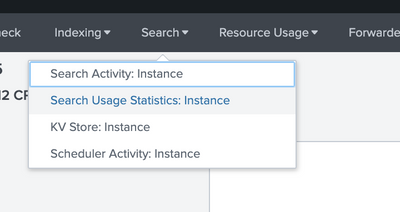
use the MC (monitoring console) to check what is status of scheduled searches. It should show to you which search and why is caused this warning.
r. Ismo
- Mark as New
- Bookmark Message
- Subscribe to Message
- Mute Message
- Subscribe to RSS Feed
- Permalink
- Report Inappropriate Content
hey thanks ! would you know where exactly in the MC ?
- Mark as New
- Bookmark Message
- Subscribe to Message
- Mute Message
- Subscribe to RSS Feed
- Permalink
- Report Inappropriate Content


depending on your environment, the monitoring console will be available at Settings > Monitoring Console
https://docs.splunk.com/Documentation/Splunk/8.0.5/DMC/DMCoverview
I believe search lag is a symptom of skipped or differed searches...check out the search related stats and review your server resources
- Mark as New
- Bookmark Message
- Subscribe to Message
- Mute Message
- Subscribe to RSS Feed
- Permalink
- Report Inappropriate Content
thank you very much ! i know how to get in to th MC , its from there i get lost 🙂
- Mark as New
- Bookmark Message
- Subscribe to Message
- Mute Message
- Subscribe to RSS Feed
- Permalink
- Report Inappropriate Content
dont worry ill tie this rope to your waist....dive in, you wont get lost...docs has a guide for how to interpret the data (see link i posted above). Once you have touched the bottom of the pool come back up for some air and let us know what you working with and what you have tried!
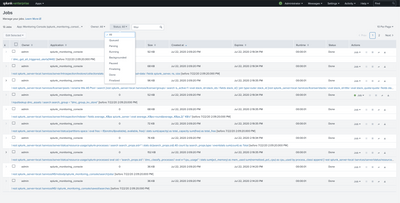
Otherwise, check your jobs tab in splunk and look for jobs that are queued or differed. Also it says 1 search, can you not click into it?
- Mark as New
- Bookmark Message
- Subscribe to Message
- Mute Message
- Subscribe to RSS Feed
- Permalink
- Report Inappropriate Content
Hi
I think that correct item is "Scheduler Activity: Instance". If I recall right it is under the Search Head item on distributed environment?

Join the Splunk Community Slack to learn, troubleshoot, and make connections with fellow Splunk practitioners in real time!
Join Splunk User Groups to connect and learn in-person by region or remotely by topic or industry.
Data Outage Monitoring and Reporting
Manage Datasets and Connections in Catalog on Splunk Cloud Platform
Persistent Queue at TcpOut — One of Splunk's Most Practical Features
