
Join the Conversation
- Find Answers
- :
- Splunk Administration
- :
- Monitoring Splunk
- :
- Re: Distributed Management Console not visible at ...
- Subscribe to RSS Feed
- Mark Topic as New
- Mark Topic as Read
- Float this Topic for Current User
- Bookmark Topic
- Subscribe to Topic
- Mute Topic
- Printer Friendly Page
- Mark as New
- Bookmark Message
- Subscribe to Message
- Mute Message
- Subscribe to RSS Feed
- Permalink
- Report Inappropriate Content

Greetings,
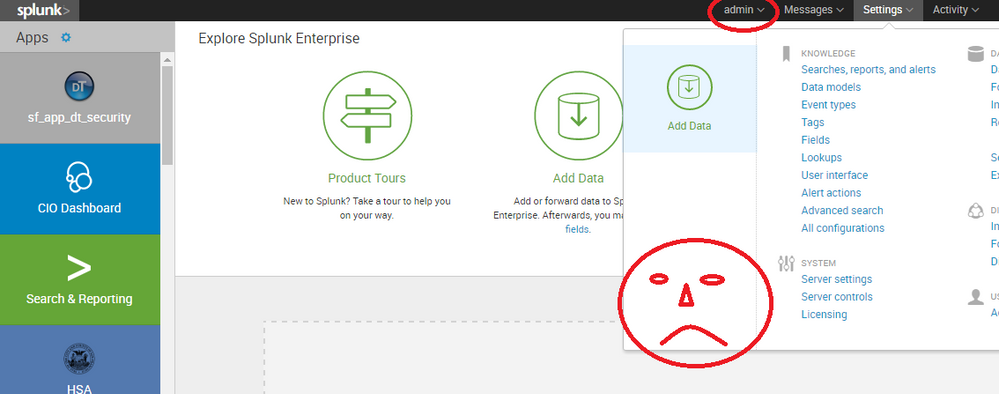
I am currently in the Splunk 6.4 Administration class and we are working with the DMC quite a bit. I didn't even know the DMC existed in Splunk before because the DMC does not show in my environment at all. I am running v.6.3.3. Could there be a permission issue with my admin or do I need to enable or install something?
Thanks,
Dave
- Mark as New
- Bookmark Message
- Subscribe to Message
- Mute Message
- Subscribe to RSS Feed
- Permalink
- Report Inappropriate Content
Yeah so it was the most bone-head of solutions. The app (which thank you to @burwell for making me aware it is an app) was not visible. See my comment in this thread that shows that I do have the app installed. Fifth column shows it is not visible.
Sorry all. I'm embarrassed
- Mark as New
- Bookmark Message
- Subscribe to Message
- Mute Message
- Subscribe to RSS Feed
- Permalink
- Report Inappropriate Content
Yeah so it was the most bone-head of solutions. The app (which thank you to @burwell for making me aware it is an app) was not visible. See my comment in this thread that shows that I do have the app installed. Fifth column shows it is not visible.
Sorry all. I'm embarrassed
- Mark as New
- Bookmark Message
- Subscribe to Message
- Mute Message
- Subscribe to RSS Feed
- Permalink
- Report Inappropriate Content





- Mark as New
- Bookmark Message
- Subscribe to Message
- Mute Message
- Subscribe to RSS Feed
- Permalink
- Report Inappropriate Content
sigh yeah it's installed

- Mark as New
- Bookmark Message
- Subscribe to Message
- Mute Message
- Subscribe to RSS Feed
- Permalink
- Report Inappropriate Content
Hi. What happens if you click on permissions?
Note that you have permissions on the other apps but you don't for this app.
That might give you a clue.
- Mark as New
- Bookmark Message
- Subscribe to Message
- Mute Message
- Subscribe to RSS Feed
- Permalink
- Report Inappropriate Content
Hi. Could you be trying on a search head cluster member? It won't be visible there.
It has to be on a member that is not part of SHC.
- Mark as New
- Bookmark Message
- Subscribe to Message
- Mute Message
- Subscribe to RSS Feed
- Permalink
- Report Inappropriate Content
I only have one splunk enterprise search head so not a clustering issue.
- Mark as New
- Bookmark Message
- Subscribe to Message
- Mute Message
- Subscribe to RSS Feed
- Permalink
- Report Inappropriate Content

According to http://docs.splunk.com/Documentation/Splunk/6.3.3/DMC/DMCoverview you can only see the DMC if you are assigned the Splunk Enterprise admin role.
Are you able to first validate your role? Likely under Settings -> Users and Authentication -> Access Controls - > Users -> Your User
- Mark as New
- Bookmark Message
- Subscribe to Message
- Mute Message
- Subscribe to RSS Feed
- Permalink
- Report Inappropriate Content
Nope, not a user issue. If you look at the picture above, circled at the top, I am trying from the admin user.

Join the Splunk Community Slack to learn, troubleshoot, and make connections with fellow Splunk practitioners in real time!
Join Splunk User Groups to connect and learn in-person by region or remotely by topic or industry.
Data Outage Monitoring and Reporting
Manage Datasets and Connections in Catalog on Splunk Cloud Platform
Persistent Queue at TcpOut — One of Splunk's Most Practical Features
