
Join the Conversation
- Find Answers
- :
- Splunk Administration
- :
- Admin Other
- :
- Knowledge Management
- :
- Re: JSON auto extraction not occuring for a single...
- Subscribe to RSS Feed
- Mark Topic as New
- Mark Topic as Read
- Float this Topic for Current User
- Bookmark Topic
- Subscribe to Topic
- Mute Topic
- Printer Friendly Page
- Mark as New
- Bookmark Message
- Subscribe to Message
- Mute Message
- Subscribe to RSS Feed
- Permalink
- Report Inappropriate Content
JSON auto extraction not occuring for a single field, `src` but occurring for all other fields

Me and another engineer were taking a look at `index=corelight sourcetype=corelight_notice signature="Scan::*"`.
We noticed that `src` was not properly parsed given `kv_mode=auto`.
We've attempted the follwing four course of action:
1. performed an EXTRACT on _raw as : "src":"(?<src>[^"]+)",
2. performed a REPORT as: corelight_notice_src
* with a transform as `"src":"(?<src>[^"]+)",` on _raq
3. perform an EXTRACT on _raw as : \"src\":\"(?<src>[^\"]+)\",
4. * performed a REPORT as: corelight_notice_src
* with a transform as `* \"src\":\"(?<src>[^\"]+)\",`
Note that performing the `| rex field=_raw "\"src\":\"(?<src>[^\"]+)\","` at search time works fine.
We also attempted with `AUTO_KV_JSON = false` with the above tests 3 and 4, which failed.
We also attempted with `AUTO_KV_JSON = false` and `KV_MODE = none` with the above tests 3 and 4, which failed
Note that the following works:
```
index=corelight sourcetype=corelight_notice signature="Scan::*"
| spath output=src path=src
```
When AUTO_KV_JSON=true, then most JSON fields are extracted (except for src).
When AUTO_KV_JSON=true and KV_MODE=json, then most JSON fields are extracted (except for src).
Any ideas on what the problem is?
```
{"_path":"notice","_system_name":"zEEK01","_write_ts":"2021-11-12T23:22:24.722517Z","ts":"2021-11-12T23:22:24.722517Z","note":"Scan::Address_Scan","msg":"kk: 192.168.0.1 scanned at least 27 unique hosts on ports 443/tcp, 80/tcp in 42m29s","sub":"local","src":"192.168.0.1","peer_descr":"proxy-01","actions":["Notice::ACTION_LOG"],"suppress_for":1,"severity.level":3,"severity.name":"error"}
```
Thanks,
Matt
- Mark as New
- Bookmark Message
- Subscribe to Message
- Mute Message
- Subscribe to RSS Feed
- Permalink
- Report Inappropriate Content


Hi @mbrownoutside,
I see FIELDALIAS for src on TA-CorelightForSplunk props.conf . It is trying to alias id.orig_h AS src.
Could you please try deleting this FIELDALIAS to test? id.orig_h null field may be overwriting the src field as null.
- Mark as New
- Bookmark Message
- Subscribe to Message
- Mute Message
- Subscribe to RSS Feed
- Permalink
- Report Inappropriate Content

Are you sure it's a well-formed json?
The value for "suppress_for" field doesn't seem right.
- Mark as New
- Bookmark Message
- Subscribe to Message
- Mute Message
- Subscribe to RSS Feed
- Permalink
- Report Inappropriate Content
I apologize. I meant to use "N" as a replacement for a number, but didn't test the JSON.
This is usually a number, and I have corrected the above.
This isn't it, unfortunately.
- Mark as New
- Bookmark Message
- Subscribe to Message
- Mute Message
- Subscribe to RSS Feed
- Permalink
- Report Inappropriate Content
Well, what can I say. "Works for me".
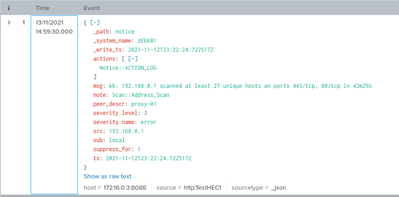
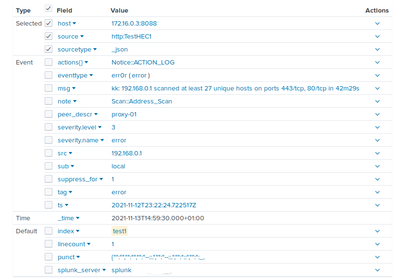
But this is my home instance of splunk free so I don't have multiple users and access rights. Are you sure nothing overwrites/blocks search-time parsing settings for your user?
- Mark as New
- Bookmark Message
- Subscribe to Message
- Mute Message
- Subscribe to RSS Feed
- Permalink
- Report Inappropriate Content
Yes `AUTO_KV_JSON` being set to true then this should work without issue.
Very abnormal to me as `rex` is working to hit and extract via a named group match.


Join the Splunk Community Slack to learn, troubleshoot, and make connections with fellow Splunk practitioners in real time!
Join Splunk User Groups to connect and learn in-person by region or remotely by topic or industry.
A Four-Part Event Series: Full Stack Observability For the AI Era
SOC4Kafka - New Kafka Connector Powered by OpenTelemetry
Event Series: Level up your SOC: Advancing with Splunk Enterprise Security
