
Join the Conversation
- Find Answers
- :
- Splunk Administration
- :
- Admin Other
- :
- Knowledge Management
- :
- Re: How to make a workflow action that performs a ...
- Subscribe to RSS Feed
- Mark Topic as New
- Mark Topic as Read
- Float this Topic for Current User
- Bookmark Topic
- Subscribe to Topic
- Mute Topic
- Printer Friendly Page
- Mark as New
- Bookmark Message
- Subscribe to Message
- Mute Message
- Subscribe to RSS Feed
- Permalink
- Report Inappropriate Content

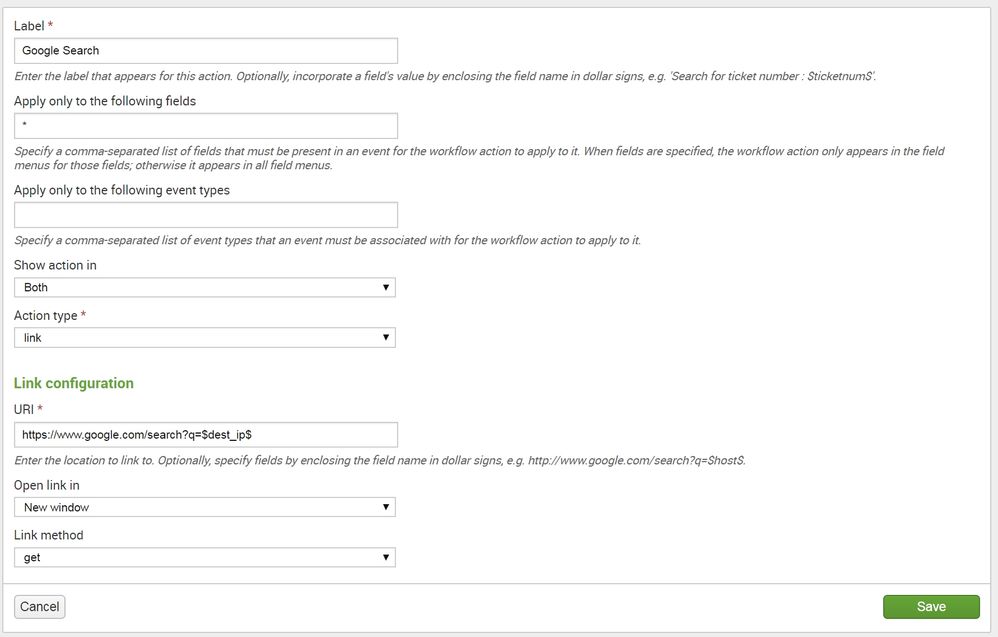
Is there a way I can make a workflow action in order to search Google for every field? My problem right now is that when I put in the URI, I have to pass ONE specific field. Is there a way to pass in whatever field is being looked at?

- Mark as New
- Bookmark Message
- Subscribe to Message
- Mute Message
- Subscribe to RSS Feed
- Permalink
- Report Inappropriate Content

hello there:
like this?
$SPLUNK_HOME$/etc/apps/appName/workflow_actions.conf
[google]
display_location = both
fields = *
label = Google $@field_name$
link.method = get
link.target = blank
link.uri = http://www.google.com/search?q=$@field_name$
type = link
the above is in screenshots, you can also google the field value for example:
[google_value]
display_location = both
fields = *
label = Google $@field_value$
link.method = get
link.target = blank
link.uri = http://www.google.com/search?q=$@field_value$
type = link


hope it helps


- Mark as New
- Bookmark Message
- Subscribe to Message
- Mute Message
- Subscribe to RSS Feed
- Permalink
- Report Inappropriate Content

You cannot use workflow to create a search for "every" field but you can make one for "any" field. So if you really mean "every field" (which is what you said), you cannot.
- Mark as New
- Bookmark Message
- Subscribe to Message
- Mute Message
- Subscribe to RSS Feed
- Permalink
- Report Inappropriate Content
I downvoted this post because wrong answer.
- Mark as New
- Bookmark Message
- Subscribe to Message
- Mute Message
- Subscribe to RSS Feed
- Permalink
- Report Inappropriate Content
Check above to see how to do it
- Mark as New
- Bookmark Message
- Subscribe to Message
- Mute Message
- Subscribe to RSS Feed
- Permalink
- Report Inappropriate Content
hello there:
like this?
$SPLUNK_HOME$/etc/apps/appName/workflow_actions.conf
[google]
display_location = both
fields = *
label = Google $@field_name$
link.method = get
link.target = blank
link.uri = http://www.google.com/search?q=$@field_name$
type = link
the above is in screenshots, you can also google the field value for example:
[google_value]
display_location = both
fields = *
label = Google $@field_value$
link.method = get
link.target = blank
link.uri = http://www.google.com/search?q=$@field_value$
type = link
hope it helps
- Mark as New
- Bookmark Message
- Subscribe to Message
- Mute Message
- Subscribe to RSS Feed
- Permalink
- Report Inappropriate Content
This is almost what I want. Instead of searching for "JSESSIONID", I would like it to search for the value of "JSESSIONID," or in this case "SD5SL4FF5ADFF1." Is that possible? Thanks.
- Mark as New
- Bookmark Message
- Subscribe to Message
- Mute Message
- Subscribe to RSS Feed
- Permalink
- Report Inappropriate Content
its in the second code i posted
google_value stanza
- Mark as New
- Bookmark Message
- Subscribe to Message
- Mute Message
- Subscribe to RSS Feed
- Permalink
- Report Inappropriate Content
That worked, thanks!

Join the Splunk Community Slack to learn, troubleshoot, and make connections with fellow Splunk practitioners in real time!
Join Splunk User Groups to connect and learn in-person by region or remotely by topic or industry.
[Puzzles] Solve, Learn, Repeat: Character substitutions with Regular Expressions
Splunk Community Badges!
[Puzzles] Solve, Learn, Repeat: Matching cron expressions
