
Join the Conversation
- Find Answers
- :
- Splunk Administration
- :
- Admin Other
- :
- Knowledge Management
- :
- Re: How to make a workflow action that performs a ...
- Subscribe to RSS Feed
- Mark Topic as New
- Mark Topic as Read
- Float this Topic for Current User
- Bookmark Topic
- Subscribe to Topic
- Mute Topic
- Printer Friendly Page
- Mark as New
- Bookmark Message
- Subscribe to Message
- Mute Message
- Subscribe to RSS Feed
- Permalink
- Report Inappropriate Content

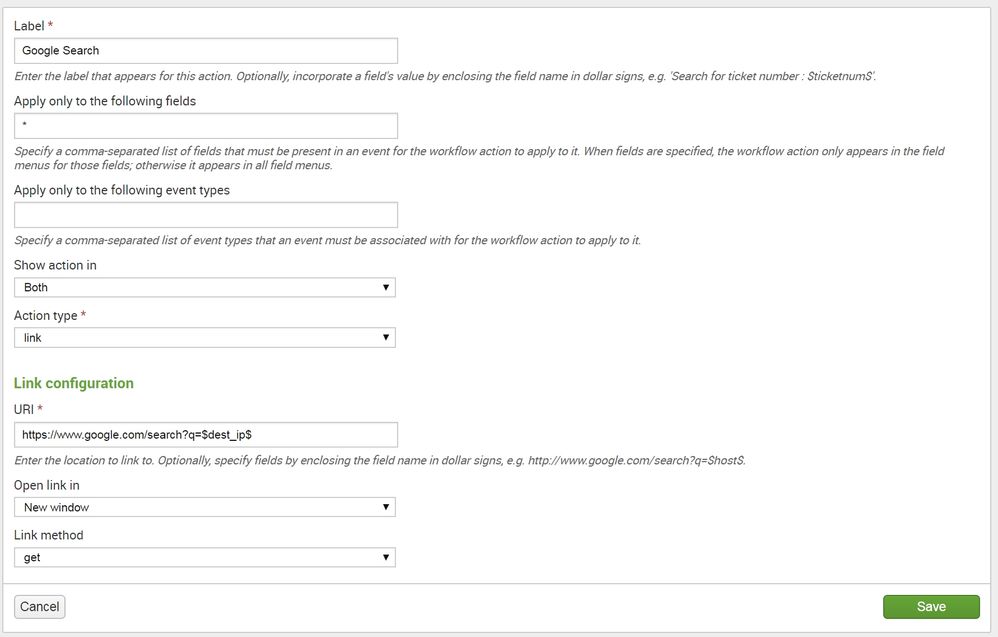
Is there a way I can make a workflow action in order to search Google for every field? My problem right now is that when I put in the URI, I have to pass ONE specific field. Is there a way to pass in whatever field is being looked at?

- Mark as New
- Bookmark Message
- Subscribe to Message
- Mute Message
- Subscribe to RSS Feed
- Permalink
- Report Inappropriate Content

hello there:
like this?
$SPLUNK_HOME$/etc/apps/appName/workflow_actions.conf
[google]
display_location = both
fields = *
label = Google $@field_name$
link.method = get
link.target = blank
link.uri = http://www.google.com/search?q=$@field_name$
type = link
the above is in screenshots, you can also google the field value for example:
[google_value]
display_location = both
fields = *
label = Google $@field_value$
link.method = get
link.target = blank
link.uri = http://www.google.com/search?q=$@field_value$
type = link


hope it helps


- Mark as New
- Bookmark Message
- Subscribe to Message
- Mute Message
- Subscribe to RSS Feed
- Permalink
- Report Inappropriate Content

You cannot use workflow to create a search for "every" field but you can make one for "any" field. So if you really mean "every field" (which is what you said), you cannot.
- Mark as New
- Bookmark Message
- Subscribe to Message
- Mute Message
- Subscribe to RSS Feed
- Permalink
- Report Inappropriate Content
I downvoted this post because wrong answer.
- Mark as New
- Bookmark Message
- Subscribe to Message
- Mute Message
- Subscribe to RSS Feed
- Permalink
- Report Inappropriate Content
Check above to see how to do it
- Mark as New
- Bookmark Message
- Subscribe to Message
- Mute Message
- Subscribe to RSS Feed
- Permalink
- Report Inappropriate Content
hello there:
like this?
$SPLUNK_HOME$/etc/apps/appName/workflow_actions.conf
[google]
display_location = both
fields = *
label = Google $@field_name$
link.method = get
link.target = blank
link.uri = http://www.google.com/search?q=$@field_name$
type = link
the above is in screenshots, you can also google the field value for example:
[google_value]
display_location = both
fields = *
label = Google $@field_value$
link.method = get
link.target = blank
link.uri = http://www.google.com/search?q=$@field_value$
type = link
hope it helps
- Mark as New
- Bookmark Message
- Subscribe to Message
- Mute Message
- Subscribe to RSS Feed
- Permalink
- Report Inappropriate Content
This is almost what I want. Instead of searching for "JSESSIONID", I would like it to search for the value of "JSESSIONID," or in this case "SD5SL4FF5ADFF1." Is that possible? Thanks.
- Mark as New
- Bookmark Message
- Subscribe to Message
- Mute Message
- Subscribe to RSS Feed
- Permalink
- Report Inappropriate Content
its in the second code i posted
google_value stanza
- Mark as New
- Bookmark Message
- Subscribe to Message
- Mute Message
- Subscribe to RSS Feed
- Permalink
- Report Inappropriate Content
That worked, thanks!

Data Management Digest – December 2025
Index This | What is broken 80% of the time by February?
Unlock Faster Time-to-Value on Edge and Ingest Processor with New SPL2 Pipeline ...
