
Join the Conversation
- Find Answers
- :
- Splunk Administration
- :
- Admin Other
- :
- Knowledge Management
- :
- Re: How do I change the order of apps in the dropd...
- Subscribe to RSS Feed
- Mark Topic as New
- Mark Topic as Read
- Float this Topic for Current User
- Bookmark Topic
- Subscribe to Topic
- Mute Topic
- Printer Friendly Page
- Mark as New
- Bookmark Message
- Subscribe to Message
- Mute Message
- Subscribe to RSS Feed
- Permalink
- Report Inappropriate Content

We want to change the order of these apps in the dropdown menu. In my mind it seems that this order depends on the sequence of installing the apps. Any new app installed is at the bottom of the list.
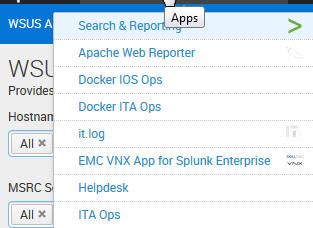
Is there an opportunity to configure it?

- Mark as New
- Bookmark Message
- Subscribe to Message
- Mute Message
- Subscribe to RSS Feed
- Permalink
- Report Inappropriate Content

Hi,
Click on splunk > icon --> rearrange your app from left side.
Click on app dropdown you will see arranged
- Mark as New
- Bookmark Message
- Subscribe to Message
- Mute Message
- Subscribe to RSS Feed
- Permalink
- Report Inappropriate Content
Yes you can change via CLI
location -
$SPLUNK_HOME/etc/apps/user-prefs/default/user-prefs.conf
stanza -
[general_default]
default_namespace = $default
appOrder = search,search,no_search_test,lookup_editor
etc.
- Mark as New
- Bookmark Message
- Subscribe to Message
- Mute Message
- Subscribe to RSS Feed
- Permalink
- Report Inappropriate Content
Ok this is right than i can change the sequence for me and if i want to make a default order for all users?
- Mark as New
- Bookmark Message
- Subscribe to Message
- Mute Message
- Subscribe to RSS Feed
- Permalink
- Report Inappropriate Content
Hi,
Click on splunk > icon --> rearrange your app from left side.
Click on app dropdown you will see arranged
- Mark as New
- Bookmark Message
- Subscribe to Message
- Mute Message
- Subscribe to RSS Feed
- Permalink
- Report Inappropriate Content
You can change the order (drag and drop ) form your launcher app
https://<Splunkserver>:8000/en-US/app/launcher/home

A Season of Skills: New Splunk Courses to Light Up Your Learning Journey
Announcing the Migration of the Splunk Add-on for Microsoft Azure Inputs to ...
Splunk Observability for AI
