
Join the Conversation
- Find Answers
- :
- Splunk Administration
- :
- Admin Other
- :
- Knowledge Management
- :
- Re: Drilldown
- Subscribe to RSS Feed
- Mark Topic as New
- Mark Topic as Read
- Float this Topic for Current User
- Bookmark Topic
- Subscribe to Topic
- Mute Topic
- Printer Friendly Page
- Mark as New
- Bookmark Message
- Subscribe to Message
- Mute Message
- Subscribe to RSS Feed
- Permalink
- Report Inappropriate Content

Hello Team,
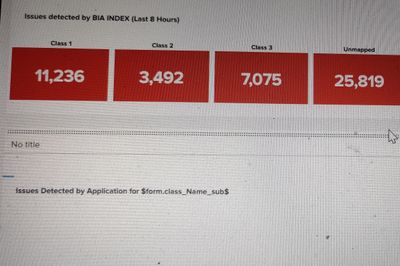
As per below screen, the red one panels are in trellis format. I need to append drilldown on these panels on class vise. So please guide me how i can use drill down on these panel. So whenever when i will click on any class it shows me the result.
Here i used drilldown $trellis.split<fieldname>$
But it us not working.
- Mark as New
- Bookmark Message
- Subscribe to Message
- Mute Message
- Subscribe to RSS Feed
- Permalink
- Report Inappropriate Content


You have to replace <fieldname> with the field name which represents class values.
$trellis.split.<fieldname>$Fir example, if field name is `ClassName` the
$trellis.split.ClassName$
Please check below example for practical.
<dashboard>
  <label>Trail Drilldow</label>
  <row>
    <panel>
      <title>$A$</title>
      <single>
        <search>
          <query>index=_internal | stats count by sourcetype</query>
          <earliest>-24h@h</earliest>
          <latest>now</latest>
          <sampleRatio>1</sampleRatio>
        </search>
        <option name="colorBy">value</option>
        <option name="colorMode">none</option>
        <option name="drilldown">all</option>
        <option name="numberPrecision">0</option>
        <option name="rangeColors">["0x53a051","0x0877a6","0xf8be34","0xf1813f","0xdc4e41"]</option>
        <option name="rangeValues">[0,30,70,100]</option>
        <option name="showSparkline">1</option>
        <option name="showTrendIndicator">1</option>
        <option name="trellis.enabled">1</option>
        <option name="trellis.scales.shared">1</option>
        <option name="trellis.size">medium</option>
        <option name="trendColorInterpretation">standard</option>
        <option name="trendDisplayMode">absolute</option>
        <option name="unitPosition">after</option>
        <option name="useColors">0</option>
        <option name="useThousandSeparators">1</option>
        <drilldown>
          <set token="A">$trellis.split.sourcetype$</set>
        </drilldown>
      </single>
    </panel>
  </row>
</dashboard>
Thanks
KV
▄︻̷̿┻̿═━一
If this reply helps you, an upvote would be appreciated.
- Mark as New
- Bookmark Message
- Subscribe to Message
- Mute Message
- Subscribe to RSS Feed
- Permalink
- Report Inappropriate Content
You have to replace <fieldname> with the field name which represents class values.
$trellis.split.<fieldname>$Fir example, if field name is `ClassName` the
$trellis.split.ClassName$
Please check below example for practical.
<dashboard>
  <label>Trail Drilldow</label>
  <row>
    <panel>
      <title>$A$</title>
      <single>
        <search>
          <query>index=_internal | stats count by sourcetype</query>
          <earliest>-24h@h</earliest>
          <latest>now</latest>
          <sampleRatio>1</sampleRatio>
        </search>
        <option name="colorBy">value</option>
        <option name="colorMode">none</option>
        <option name="drilldown">all</option>
        <option name="numberPrecision">0</option>
        <option name="rangeColors">["0x53a051","0x0877a6","0xf8be34","0xf1813f","0xdc4e41"]</option>
        <option name="rangeValues">[0,30,70,100]</option>
        <option name="showSparkline">1</option>
        <option name="showTrendIndicator">1</option>
        <option name="trellis.enabled">1</option>
        <option name="trellis.scales.shared">1</option>
        <option name="trellis.size">medium</option>
        <option name="trendColorInterpretation">standard</option>
        <option name="trendDisplayMode">absolute</option>
        <option name="unitPosition">after</option>
        <option name="useColors">0</option>
        <option name="useThousandSeparators">1</option>
        <drilldown>
          <set token="A">$trellis.split.sourcetype$</set>
        </drilldown>
      </single>
    </panel>
  </row>
</dashboard>
Thanks
KV
▄︻̷̿┻̿═━一
If this reply helps you, an upvote would be appreciated.
- Mark as New
- Bookmark Message
- Subscribe to Message
- Mute Message
- Subscribe to RSS Feed
- Permalink
- Report Inappropriate Content
@kamlesh_vaghela Yes i have tried and now its working.
Thanks


Join the Splunk Community Slack to learn, troubleshoot, and make connections with fellow Splunk practitioners in real time!
Join Splunk User Groups to connect and learn in-person by region or remotely by topic or industry.
Self-Healing Pipeline Is Now Generally Available: AI-Powered CIM Compliance
Meet Splunk Observability Studio: AI-Assisted OpenTelemetry Instrumentation Without ...
Federated Search for Cisco Security and Analytics Logging (SAL) is now GA on Splunk ...
