
Turn on suggestions
Auto-suggest helps you quickly narrow down your search results by suggesting possible matches as you type.
Installation
×
Join the Conversation
Without signing in, you're just watching from the sidelines. Sign in or Register to connect, share, and be part of the Splunk Community.
- Find Answers
- :
- Splunk Administration
- :
- Admin Other
- :
- Installation
- :
- Help installing on Linux
Options
- Subscribe to RSS Feed
- Mark Topic as New
- Mark Topic as Read
- Float this Topic for Current User
- Bookmark Topic
- Subscribe to Topic
- Mute Topic
- Printer Friendly Page
- Mark as New
- Bookmark Message
- Subscribe to Message
- Mute Message
- Subscribe to RSS Feed
- Permalink
- Report Inappropriate Content
Help installing on Linux

davidsplunk100
New Member
01-17-2018
11:20 PM
Hello everyone,
I'm trying to install SPLUNK on Linux and I can not. I follow the instructions.
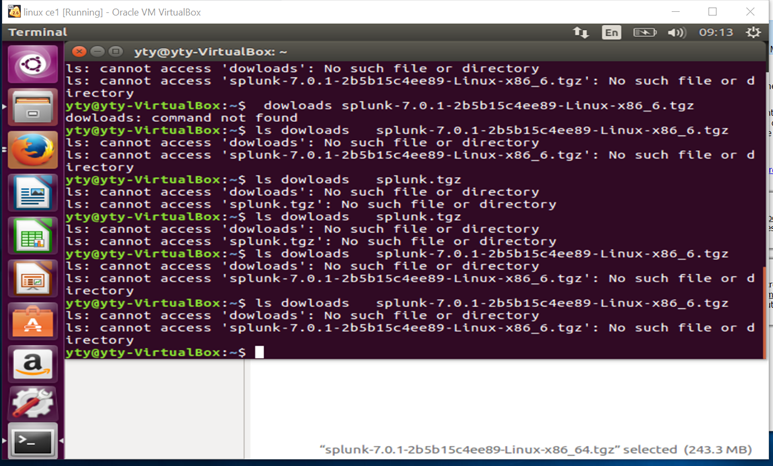
Attached picture - I would be happy to help. Maybe the wrong command? I do not know or understand.
- Mark as New
- Bookmark Message
- Subscribe to Message
- Mute Message
- Subscribe to RSS Feed
- Permalink
- Report Inappropriate Content

mayurr98
Super Champion
01-18-2018
01:26 AM
hey
have a look at this doc http://docs.splunk.com/Documentation/Splunk/7.0.1/Installation/InstallonLinux
And also watch videos on youtube about how to download splunk on linux:
https://www.youtube.com/watch?v=kqzvjjz9Wws
let me know if this helps!
- Mark as New
- Bookmark Message
- Subscribe to Message
- Mute Message
- Subscribe to RSS Feed
- Permalink
- Report Inappropriate Content

horsefez
Motivator
01-17-2018
11:47 PM
Hi David,
typing "dow(n)loads" in a shell doesn't get you anywhere.
- You need to download splunk enterprise from splunk.com using your free splunk.com account.
- Then you need to navigate to the directory you saved the file using the
cdcommand. - Untar the file using
tar xvzf splunk-7.0.1....... - After that just follow the instructions here http://docs.splunk.com/Documentation/Splunk/7.0.1/Installation/InstallonLinux
But before you start, please consider typing linux beginner tutorial into google and try one of them.



Got questions? Get answers!
Join the Splunk Community Slack to learn, troubleshoot, and make connections with fellow Splunk practitioners in real time!
Meet up IRL or virtually!
Join Splunk User Groups to connect and learn in-person by region or remotely by topic or industry.
Get Updates on the Splunk Community!
Data Management Digest – September 2026
Welcome to the September 2026 edition of Data Management Digest!
September brought a fresh wave of ...
Federated Search for CloudWatch Unified Data Store Is Generally Available
As organizations modernize their cloud environments, AWS workloads generate more security, operational, and ...
Announcing Modern Navigation: A New Era of Splunk User Experience
We are excited to introduce the Modern Navigation feature in the Splunk Platform, available to both cloud and ...
