
Join the Conversation
- Find Answers
- :
- Splunk Administration
- :
- Admin Other
- :
- Installation
- :
- Error while installing app Pure unified addon: Err...
- Subscribe to RSS Feed
- Mark Topic as New
- Mark Topic as Read
- Float this Topic for Current User
- Bookmark Topic
- Subscribe to Topic
- Mute Topic
- Printer Friendly Page
- Mark as New
- Bookmark Message
- Subscribe to Message
- Mute Message
- Subscribe to RSS Feed
- Permalink
- Report Inappropriate Content
Error while installing app Pure unified addon: Error: Request failed with status code 500

Hi,
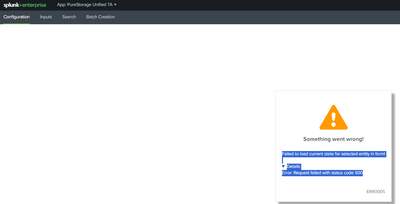
I am trying to installing PureStorage Unified Add-on for Splunk but installing while looking to add configurations I am getting below error in configuration page. I am installing it on my on-prem deployment server rather than Splunk Cloud. Can anyone help advise what could be the reason for the same and how to resolve?
Error:
Failed to load current state for selected entity in form!
Details
Error: Request failed with status code 500
Addon: https://splunkbase.splunk.com/app/5513
Thanks


- Mark as New
- Bookmark Message
- Subscribe to Message
- Mute Message
- Subscribe to RSS Feed
- Permalink
- Report Inappropriate Content

Are there any interesting messages in the error log?
index=_internal TA-purestorage-unified log_level=ERRORI tried installing this add-on on a test machine with Splunk Enterprise 9.2.0 and could load the configuration page without error. Which version of Splunk Enterprise are you using?
- Mark as New
- Bookmark Message
- Subscribe to Message
- Mute Message
- Subscribe to RSS Feed
- Permalink
- Report Inappropriate Content
Nothing in internal logs which could signify problem. Currently on older version of Splunk enterprise version
Version:7.2.8 Build:d613a50d43ac


Join the Splunk Community Slack to learn, troubleshoot, and make connections with fellow Splunk practitioners in real time!
Join Splunk User Groups to connect and learn in-person by region or remotely by topic or industry.
Painting a Clearer Picture: Unifying Your Investigations with Cisco AI Canvas
Hello POJO, meet nocode
Announcing Modern Navigation: A New Era of Splunk User Experience
