
Turn on suggestions
Auto-suggest helps you quickly narrow down your search results by suggesting possible matches as you type.
Installation
×
Join the Conversation
Without signing in, you're just watching from the sidelines. Sign in or Register to connect, share, and be part of the Splunk Community.
- Find Answers
- :
- Splunk Administration
- :
- Admin Other
- :
- Installation
- :
- Re: C Drive
Options
- Subscribe to RSS Feed
- Mark Topic as New
- Mark Topic as Read
- Float this Topic for Current User
- Bookmark Topic
- Subscribe to Topic
- Mute Topic
- Printer Friendly Page
- Mark as New
- Bookmark Message
- Subscribe to Message
- Mute Message
- Subscribe to RSS Feed
- Permalink
- Report Inappropriate Content
C Drive

patp
New Member
07-20-2020
11:56 AM
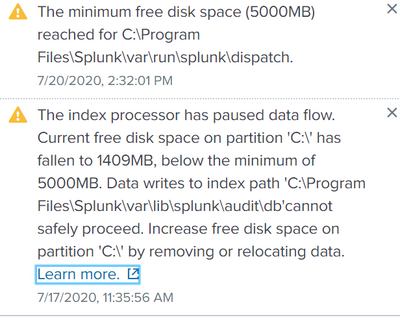
Hello, What do I need to do to fix these issues? I have an external drive of 2TB. Should I move it from C to G? What do I need to do?
When I upload a data file it just freezes.
Patrick
- Mark as New
- Bookmark Message
- Subscribe to Message
- Mute Message
- Subscribe to RSS Feed
- Permalink
- Report Inappropriate Content
anilchaithu
Builder
07-20-2020
12:15 PM
How is your setup?
- Is it a standalone server?
- where does your indexes reside?
- Is it on the same C:\ drive?
Its better to configure indexes on your external drive. So that they won't consume more disk space.
Please follow this document to move your index location
https://docs.splunk.com/Documentation/Splunk/8.0.5/Indexer/Moveanindex
Hope this helps

Got questions? Get answers!
Join the Splunk Community Slack to learn, troubleshoot, and make connections with fellow Splunk practitioners in real time!
Meet up IRL or virtually!
Join Splunk User Groups to connect and learn in-person by region or remotely by topic or industry.
Get Updates on the Splunk Community!
Announcing Modern Navigation: A New Era of Splunk User Experience
We are excited to introduce the Modern Navigation feature in the Splunk Platform, available to both cloud and ...
Kubernetes Alerts That Work Out of the Box with AutoDetect detectors in Splunk ...
A deployment rolls out slowly, one pod sits not ready for a few minutes, and whoever is on call gets an alert ...
Observability at Your Fingertips Directly From Splunk Platform—for Free
At .conf, we announced our roadmap to bring observability foundations to Splunk Platform. Bringing metrics and ...
