
Join the Conversation
- Find Answers
- :
- Splunk Administration
- :
- Getting Data In
- :
- Re: props and transform file modification issue
- Subscribe to RSS Feed
- Mark Topic as New
- Mark Topic as Read
- Float this Topic for Current User
- Bookmark Topic
- Subscribe to Topic
- Mute Topic
- Printer Friendly Page
- Mark as New
- Bookmark Message
- Subscribe to Message
- Mute Message
- Subscribe to RSS Feed
- Permalink
- Report Inappropriate Content

Hi Guys,
In Splunk a field by name “event_sub_type” has multiple values. We don’t want to ingest any logs into splunk whose field “event_sub_type” value is either “WAN Firewall” or “TLS” (as marked in attached screen shot) as these are huge unwanted logs.
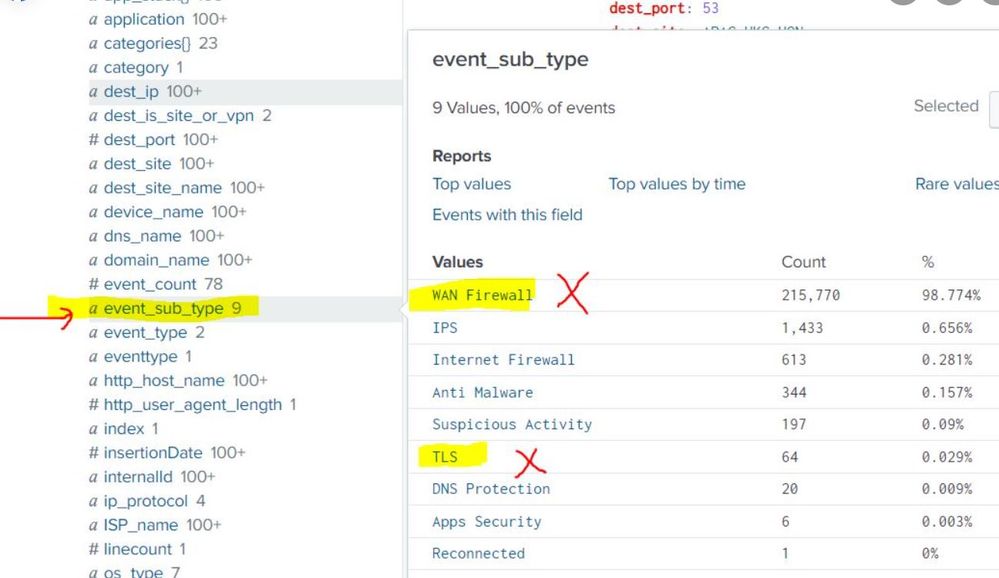
Our search query is : index=cato sourcetype=cato_source
We tried multiple ways by editing the props.conf and transforms.conf to exclude these logs as below but none of them are successful to exclude those logs;
props.conf
[sourcetype::cato_source]
TRANSFORMS-filter_logs = cloudparsing
transforms.conf
[cloudparsing]
REGEX = \"event_sub_type\":\"(WAN Firewall|TLS)\"
DEST_KEY = queue
FORMAT = nullQueue
Can someone please guide how to exclude these events whose “event_sub_type” value contains either “WAN Firewall” or “TLS” by editing props.conf and transforms.conf?
RAW Events for reference which needs to be excluded ;
1. event_sub_type":"WAN
{"event_count":1,"ISP_name":"Shanghai internet","rule":"Initial Connectivity Rule","dest_is_site_or_vpn":"Site","src_isp_ip":"0.0.0.0","time_str":"2023-11-28T04:27:40Z","src_site":"CHINA-AZURE-E2","src_ip":"0.0.0.1","internalId":"54464646","dest_site_name":"china_112,"event_type":"Security","src_country_code":"CN","action":"Monitor","subnet_name":"cn-001.net-vnet-1","pop_name":"Shanghai_1","dest_port":443,"dest_site":"china_connect","rule_name":"Initial Connectivity Rule","event_sub_type":"WAN Firewall","insertionDate":1701188916690,"ip_protocol":"TCP","rule_id":"101238","src_is_site_or_vpn":"Site","account_id":5555,"application":"HTTP(S)","src_site_name":"china_connect","src_country":"China","dest_ip":"0.0.0.0","os_type":"OS_ANDROID","app_stack""TCP","TLS","HTTP(S)"],"time":1701188860834}
2. "event_sub_type":"TLS","
{"event_count":4,"http_host_name":"isp.vpn","ISP_name":"China_internet","src_isp_ip":"0.0.0.0","tls_version":"TLSv1.3","time_str":"2023-11-28T04:27:16Z","src_site":"china_mtt","src_ip":"0.0.0.0","internalId":"rtrgrtr","domain_name":"china.gh.com","event_type":"Security","src_country_code":"CN","tls_error_description":"unknown CA","action":"Alert","subnet_name":"0.0.0.0/24","pop_name":"china_1","dest_port":443,"event_sub_type":"TLS","insertionDate":1701188915580,"dest_country_code":"SG","tls_error_type":"fatal","dns_name":"china.com","traffic_direction":"OUTBOUND","src_is_site_or_vpn":"Site","account_id":56565,"application":"Netskope","src_site_name":"CHINA-44","src_country":"China","dest_ip":"0.0.0.0","os_type":"OS_WINDOWS","time":1701188836011,"dest_country":"Singapore"}
- Mark as New
- Bookmark Message
- Subscribe to Message
- Mute Message
- Subscribe to RSS Feed
- Permalink
- Report Inappropriate Content


Hi @roopeshetty ,
please try this regex in transforms.conf:
REGEX = \"event_sub_type\":\"(WAN|TLS)Ciao.
Giuseppe
- Mark as New
- Bookmark Message
- Subscribe to Message
- Mute Message
- Subscribe to RSS Feed
- Permalink
- Report Inappropriate Content
Hi @roopeshetty ,
please try this regex in transforms.conf:
REGEX = \"event_sub_type\":\"(WAN|TLS)Ciao.
Giuseppe
- Mark as New
- Bookmark Message
- Subscribe to Message
- Mute Message
- Subscribe to RSS Feed
- Permalink
- Report Inappropriate Content
Hi, Tried as below; still no luck , logs are keep coming;
props.conf
[sourcetype::cato_source]
TRANSFORMS-filter_logs = cloudparsing
transforms.conf
[cloudparsing]
REGEX = \"event_sub_type\":\"(WAN|TLS)
DEST_KEY = queue
FORMAT = nullQueue
- Mark as New
- Bookmark Message
- Subscribe to Message
- Mute Message
- Subscribe to RSS Feed
- Permalink
- Report Inappropriate Content
Hi @roopeshetty ,
where did you located props.conf and transforms.conf?
they must be located in the first full Splunk instance that the logs are passing through, in other words in the Indexers or (if present) in the intermediate Heavy Forwarder.
Ciao.
Giuseppe
- Mark as New
- Bookmark Message
- Subscribe to Message
- Mute Message
- Subscribe to RSS Feed
- Permalink
- Report Inappropriate Content
Hi
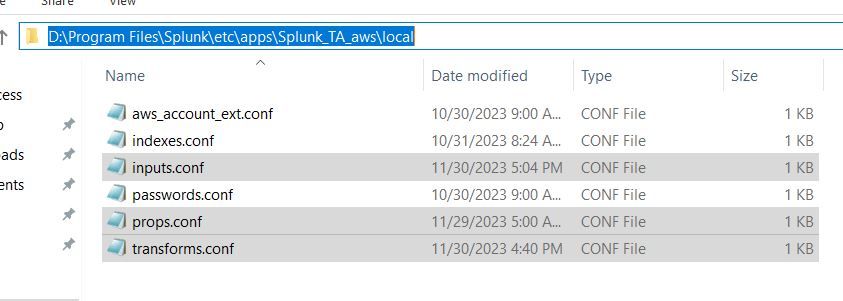
props.conf and transforms.conf are located on our splunk enterprise server on "splunk add on for AWS" app path; that is "D:\Program Files\Splunk\etc\apps\Splunk_TA_aws\local"
- Mark as New
- Bookmark Message
- Subscribe to Message
- Mute Message
- Subscribe to RSS Feed
- Permalink
- Report Inappropriate Content
Hi @roopeshetty ,
yes, but where is the input for there data flow: in the same server or in a different Heavy Forwarder?
If in a different Heavy Forwarder, you have to put these props.conf and transforms.conf in it.
Ciao.
Giuseppe
- Mark as New
- Bookmark Message
- Subscribe to Message
- Mute Message
- Subscribe to RSS Feed
- Permalink
- Report Inappropriate Content
Hi, input also located on the same server on same path;
- Mark as New
- Bookmark Message
- Subscribe to Message
- Mute Message
- Subscribe to RSS Feed
- Permalink
- Report Inappropriate Content
Hi @roopeshetty ,
in the header of the props.conf, try to not use "sourcetype:
[cato_source]
TRANSFORMS-filter_logs = cloudparsing
Ciao.
Giuseppe
- Mark as New
- Bookmark Message
- Subscribe to Message
- Mute Message
- Subscribe to RSS Feed
- Permalink
- Report Inappropriate Content
Thanks a lot gcusello,
It worked as expected. One last question , in below regex we are looking for the texts "WAN" and "TSL"
REGEX = \"event_sub_type\":\"(WAN|TLS)
in case if we want to look for texts "WAN Firewall" and "TSL" , how the regex would be?
- Mark as New
- Bookmark Message
- Subscribe to Message
- Mute Message
- Subscribe to RSS Feed
- Permalink
- Report Inappropriate Content
Hi @roopeshetty ,
you can use this regex:
REGEX = \"event_sub_type\":\"((WAN\s+Firewall)|TLS)that you can test at https://regex101.com/r/YBCWAB/1
Ciao and happy splunking
Giuseppe
P.S.: Karma Points are appreciated 😉
- Mark as New
- Bookmark Message
- Subscribe to Message
- Mute Message
- Subscribe to RSS Feed
- Permalink
- Report Inappropriate Content
thanks a lot.
- Mark as New
- Bookmark Message
- Subscribe to Message
- Mute Message
- Subscribe to RSS Feed
- Permalink
- Report Inappropriate Content
Hi @roopeshetty ,
good for you, see next time!
Ciao and happy splunking
Giuseppe
P.S.: Karma Points are appreciated 😉


Join the Splunk Community Slack to learn, troubleshoot, and make connections with fellow Splunk practitioners in real time!
Join Splunk User Groups to connect and learn in-person by region or remotely by topic or industry.
Meet Splunk Observability Studio: AI-Assisted OpenTelemetry Instrumentation Without ...
Federated Search for Cisco Security and Analytics Logging (SAL) is now GA on Splunk ...
Your Path to AgenticOps: AI Experiences for Every Splunk Practitioner
