
Join the Conversation
- Find Answers
- :
- Splunk Administration
- :
- Getting Data In
- :
- Re: indexer discovery - Heavy forwarder clear text...
- Subscribe to RSS Feed
- Mark Topic as New
- Mark Topic as Read
- Float this Topic for Current User
- Bookmark Topic
- Subscribe to Topic
- Mute Topic
- Printer Friendly Page
- Mark as New
- Bookmark Message
- Subscribe to Message
- Mute Message
- Subscribe to RSS Feed
- Permalink
- Report Inappropriate Content

In indexer discovery method, Heavy forwarder clear text password not being encrypted after restart. Please help
- Mark as New
- Bookmark Message
- Subscribe to Message
- Mute Message
- Subscribe to RSS Feed
- Permalink
- Report Inappropriate Content
In HF, it should be
master_uri = https://192.168.1.180:8089
instead of manager_uri. I followed the https://docs.splunk.com/Documentation/Splunk/9.0.3/Indexer/indexerdiscovery
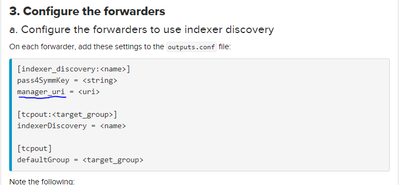
It works now. Thanks
- Mark as New
- Bookmark Message
- Subscribe to Message
- Mute Message
- Subscribe to RSS Feed
- Permalink
- Report Inappropriate Content

I experienced the same error and I had to change manager_uri to master_uri in outputs.conf of the my HF
- Mark as New
- Bookmark Message
- Subscribe to Message
- Mute Message
- Subscribe to RSS Feed
- Permalink
- Report Inappropriate Content


Hi @kumaranv,
Could you please show us your Heavy Forwarder outputs.conf setting (pass4SymmKey masked) ? Maybe there is something wrong with the settings.
- Mark as New
- Bookmark Message
- Subscribe to Message
- Mute Message
- Subscribe to RSS Feed
- Permalink
- Report Inappropriate Content
It is in home practice
in $Splunk/etc/system/local/outputs.conf
[indexer_discovery:idxpeers]
pass4SymmKey = admin1234
manager_uri = https://192.168.1.180:8089
[tcpout:idxdis]
indexerDiscovery = idxpeers
[tcpout]
defaultGroup = idxdis
indexAndForward = 0
- Mark as New
- Bookmark Message
- Subscribe to Message
- Mute Message
- Subscribe to RSS Feed
- Permalink
- Report Inappropriate Content
in Master Node:
in .../etc/system/local/server.conf
[indexer_discovery]
pass4SymmKey = $7$1k1xTHTMxuk2ekDYjDOt9oIONOK3MHxxxxxxxxxxxxxxxx=
pass4SymmKey was set to admin1234 and after restart i t got encripted
I hope it should happen to HF pass4SymmKey also
Thanks
- Mark as New
- Bookmark Message
- Subscribe to Message
- Mute Message
- Subscribe to RSS Feed
- Permalink
- Report Inappropriate Content
In HF, it should be
master_uri = https://192.168.1.180:8089
instead of manager_uri. I followed the https://docs.splunk.com/Documentation/Splunk/9.0.3/Indexer/indexerdiscovery
It works now. Thanks
- Mark as New
- Bookmark Message
- Subscribe to Message
- Mute Message
- Subscribe to RSS Feed
- Permalink
- Report Inappropriate Content
I used the command
./splunk btool check
to identify error in stanzas in conf
- Mark as New
- Bookmark Message
- Subscribe to Message
- Mute Message
- Subscribe to RSS Feed
- Permalink
- Report Inappropriate Content

Hi @kumaranv,
restart by console viewing eventual error messages, check again and if it's still present open immediately a case P1 to Splunk Support.
Ciao.
Giuseppe

Join the Splunk Community Slack to learn, troubleshoot, and make connections with fellow Splunk practitioners in real time!
Join Splunk User Groups to connect and learn in-person by region or remotely by topic or industry.
May 2026 Splunk Expert Sessions: Security & Observability
Network to App: Observability Unlocked [May & June Series]
SPL2 Deep Dives, AppDynamics Integrations, SAML Made Simple and Much More on Splunk ...
