
Join the Conversation
- Find Answers
- :
- Splunk Administration
- :
- Getting Data In
- :
- Re: com.splunk.Index.submit() with a JSON is not r...
- Subscribe to RSS Feed
- Mark Topic as New
- Mark Topic as Read
- Float this Topic for Current User
- Bookmark Topic
- Subscribe to Topic
- Mute Topic
- Printer Friendly Page
- Mark as New
- Bookmark Message
- Subscribe to Message
- Mute Message
- Subscribe to RSS Feed
- Permalink
- Report Inappropriate Content

I have successfully implemented the Splunk Java SDK to write my own .class and implement the code within programs we run on several machines to send and retrieve data. I am able to retrieve search results as a List of <Event> or submit data to the index.
However, Splunk does not format my submitted data to the main index when presented as JSON.
If I run the following code, the JSON is somehow formatted in the Splunk interface as a JSON with it's red/green formatting HOWEVER the data is not formatted through Type Event and therefore I can not search data based on an "application=test" String:
Index myIndex = service.getIndexes().get("main");
eventArgs.put("sourcetype", "_json");
String input = "{\"account\": \"test\",\"password\": \"Welkom\",\"hostname\": \"DESKTOP-KENNETH\",\"application\": \"test\"}";
myIndex.submit(eventArgs, input);
How do I need to submit a JSON where Splunk will recognize this as a Type Event with it's corresponding key/value pairs?
This search will not retrieve the submitted JSON:
index=main application="test"
Type Event now has only one key/value pair: "timestamp: none".
- Mark as New
- Bookmark Message
- Subscribe to Message
- Mute Message
- Subscribe to RSS Feed
- Permalink
- Report Inappropriate Content


Here, I suggest not to use _json sourcetype and clone it and use.
Or create below configurations in props.conf and send data to this sourcetype.
[m_json]
KV_MODE = json
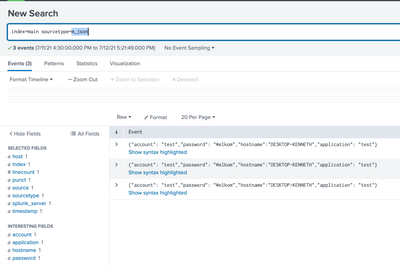
I hope this will help you.
Thanks
KV
▄︻̷̿┻̿═━一
If any of my reply helps you to solve the problem Or gain knowledge, an upvote would be appreciated.
- Mark as New
- Bookmark Message
- Subscribe to Message
- Mute Message
- Subscribe to RSS Feed
- Permalink
- Report Inappropriate Content
I think your code should work.
I have tried this and worked fine. Can you please try this?
import com.splunk.*;

public class App {
    public static void main(String[] args) throws Exception {
        HttpService.setSslSecurityProtocol(SSLSecurityProtocol.TLSv1_2);

        // Create a map of arguments and add login parameters
        ServiceArgs loginArgs = new ServiceArgs();
        loginArgs.setUsername("admin");
        loginArgs.setPassword("admin123");
        loginArgs.setHost("localhost");
        loginArgs.setPort(8089);

        // Create a Service instance and log in with the argument map
        Service service = Service.connect(loginArgs);

        // Retrieve the index for the data
        Index myIndex = service.getIndexes().get("main");

        Args eventArgs = new Args();
        eventArgs.put("sourcetype", "_json");
        String input = "{\"account\": \"test\",\"password\": \"Welkom\",\"hostname\": \"DESKTOP-KENNETH\",\"application\": \"test\"}";
        myIndex.submit(eventArgs, input);

    }
}
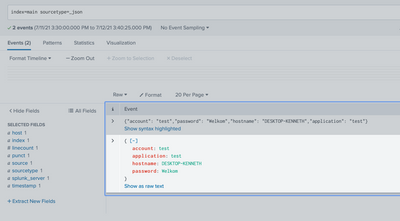
Thanks
KV
▄︻̷̿┻̿═━一
If any of my reply helps you to solve the problem Or gain knowledge, an upvote would be appreciated.
- Mark as New
- Bookmark Message
- Subscribe to Message
- Mute Message
- Subscribe to RSS Feed
- Permalink
- Report Inappropriate Content
Hi Kamlesh,
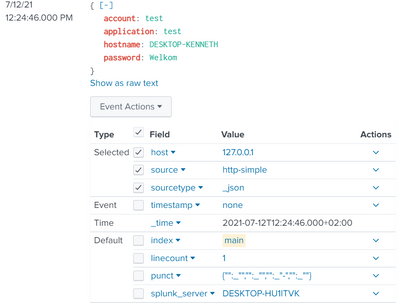
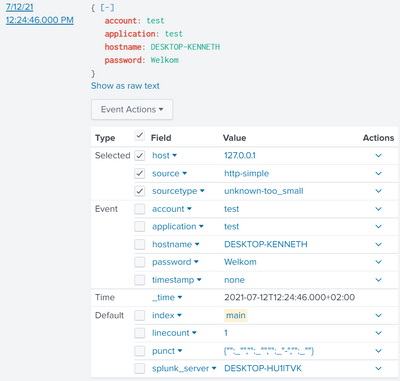
Could you search for "application=test" instead of "sourcetype=_json"? I see there is a problem with adding a "sourcetype: _json" via Args().
This is when I submit(Args eventArgs, String data) - it does not set the Type Event key/value pairs:
This is if I only submit(String data) - it picks up all the key/value pairs:
- Mark as New
- Bookmark Message
- Subscribe to Message
- Mute Message
- Subscribe to RSS Feed
- Permalink
- Report Inappropriate Content
Here, I suggest not to use _json sourcetype and clone it and use.
Or create below configurations in props.conf and send data to this sourcetype.
[m_json]
KV_MODE = json
I hope this will help you.
Thanks
KV
▄︻̷̿┻̿═━一
If any of my reply helps you to solve the problem Or gain knowledge, an upvote would be appreciated.
- Mark as New
- Bookmark Message
- Subscribe to Message
- Mute Message
- Subscribe to RSS Feed
- Permalink
- Report Inappropriate Content
That's right, I'll skip the "_json" and use another sourcetype. It seems that "_json" is not giving me the right result, I can use any other sourcetype except this (not sure what exactly "_json" does as a sourcetype, but it's not working and I'll refrain from).
"json" does seem to work, giving me the right Event Types key/value pairs:
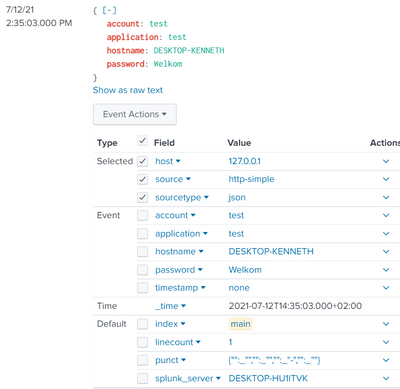
String input = "{\"account\": \"test\",\"password\": \"Welkom\",\"hostname\": \"DESKTOP-KENNETH\",\"application\": \"test\"}";
Args eventArgs = new Args();
eventArgs.put("sourcetype", "json");
handler.sendEvent(eventArgs, "main", input);

Join the Splunk Community Slack to learn, troubleshoot, and make connections with fellow Splunk practitioners in real time!
Join Splunk User Groups to connect and learn in-person by region or remotely by topic or industry.
Meet the .conf26 AI Agent Buildathon Winners
Trusted Autonomy in the SOC: A Maturity Journey
Supercharging Windows Security Detection Performance: Introducing Hybrid Field ...
