
Join the Conversation
- Find Answers
- :
- Splunk Administration
- :
- Getting Data In
- :
- Re: add regular expression for cisco ISE accountin...
- Subscribe to RSS Feed
- Mark Topic as New
- Mark Topic as Read
- Float this Topic for Current User
- Bookmark Topic
- Subscribe to Topic
- Mute Topic
- Printer Friendly Page
- Mark as New
- Bookmark Message
- Subscribe to Message
- Mute Message
- Subscribe to RSS Feed
- Permalink
- Report Inappropriate Content
add regular expression for cisco ISE accounting logs CmdAV=show CmdArgAV=license CmdArgAV=usage

Hello all,
can someone help me to to extract field 'CmdSet' from cisco ISE accouting logs. string : '[ CmdAV=show CmdArgAV=license CmdArgAV=usage CmdArgAV=<cr> ]'
- Mark as New
- Bookmark Message
- Subscribe to Message
- Mute Message
- Subscribe to RSS Feed
- Permalink
- Report Inappropriate Content
Hello @sushraw
Can you please try appending below -
| makemv CmdArgAV
| eval CmdArgAV = replace(CmdArgAV, "\n", ", ")
The final results based on the sample event you shared would be -
| makeresults
| eval _raw="Mar 26 15:37:59 <device_IP> <device_name>_Passed_Authentications 0045846127 2 0 2024-03-26 14:37:59.011 +00:00 06024423114 5202 NOTICE Device-Administration: Command Authorization succeeded, ConfigVersionId=1398, Device IP Address=<device_IP>, DestinationIPAddress=<device_IP>, DestinationPort=49, UserName=<user>, CmdSet=[ CmdAV=show CmdArgAV=running-config CmdArgAV=interface CmdArgAV=Ethernet1/19 CmdArgAV=<cr> ], Protocol=Tacacs, MatchedCommandSet=Unsafecommand, RequestLatency=10, NetworkDeviceName=<device_name>"
| rex field=_raw "CmdSet=\[(?<CmdSet>[^\]]+)\]"
| rex field=CmdSet max_match=0 "CmdArgAV=(?<CmdArgAV>[^\s]+)"
| makemv CmdArgAV
| eval CmdArgAV = replace(CmdArgAV, "\n", ", ")
Below screenshot for your reference -
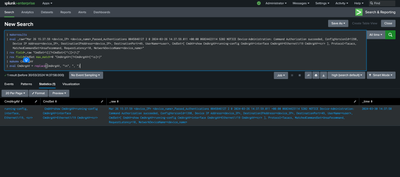
If this reply helps you, Karma would be appreciated.
- Mark as New
- Bookmark Message
- Subscribe to Message
- Mute Message
- Subscribe to RSS Feed
- Permalink
- Report Inappropriate Content
Hello @meetmshah
i would like to thank you for your reply.
but i am looking to extract 'CmdSet' field.
i am using 'rex field=CmdSet "CmdAV=(?<Command>[^\s]+)|\sCmdArgAV=(?<Command1>[^\s]+)" '
but it is giving output till 1st CmdArgAV value

- Mark as New
- Bookmark Message
- Subscribe to Message
- Mute Message
- Subscribe to RSS Feed
- Permalink
- Report Inappropriate Content


Hello @sushraw, Can you please try below -
| rex field=_raw "CmdSet=\[(?<CmdSet>[^\]]+)\]"
| rex field=CmdSet "CmdArgAV=(?<CmdArgAV>[^\s]+)"
Please accept the solution and hit Karma, if this helps!
- Mark as New
- Bookmark Message
- Subscribe to Message
- Mute Message
- Subscribe to RSS Feed
- Permalink
- Report Inappropriate Content

- Mark as New
- Bookmark Message
- Subscribe to Message
- Mute Message
- Subscribe to RSS Feed
- Permalink
- Report Inappropriate Content
Oh we will need to add max_match=0 in rex. Example below -
| rex field=_raw "CmdSet=\[(?<CmdSet>[^\]]+)\]"
| rex field=CmdSet max_match=0 "CmdArgAV=(?<CmdArgAV>[^\s]+)"
Can you please have a check and me know how it goes?
- Mark as New
- Bookmark Message
- Subscribe to Message
- Mute Message
- Subscribe to RSS Feed
- Permalink
- Report Inappropriate Content
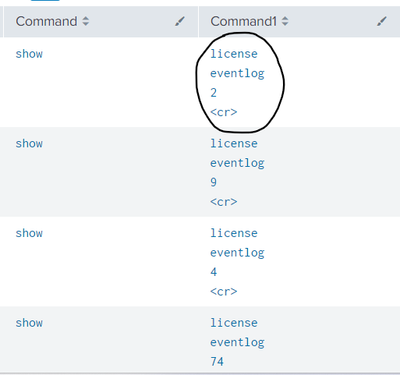
@meetmshahthanks 'max_match=0' helped.
but command keywords are separated by 'Enter'. is there any options to keep all words in one line?
- Mark as New
- Bookmark Message
- Subscribe to Message
- Mute Message
- Subscribe to RSS Feed
- Permalink
- Report Inappropriate Content
Can you please try appending below -
| makemv delim="," allowempty=t CmdArgAV
Please accept the solution and hit Karma, if this helps!
- Mark as New
- Bookmark Message
- Subscribe to Message
- Mute Message
- Subscribe to RSS Feed
- Permalink
- Report Inappropriate Content
Hi @meetmshah
not working as expected.
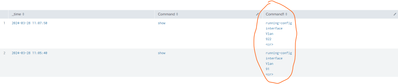
search :- log_type=Passed_Authentications MESSAGE_TEXT="Command Authorization succeeded" | rex field=CmdSet max_match=0 "CmdAV=(?<Command>[^\s]+)|\sCmdArgAV=(?<Command1>[^\s]+)" | makemv delim="," allowempty=t Command1 | table _time,Command,Command1
- Mark as New
- Bookmark Message
- Subscribe to Message
- Mute Message
- Subscribe to RSS Feed
- Permalink
- Report Inappropriate Content
TACACS event:
Mar 26 15:37:59 <device_IP> <device_name>_Passed_Authentications 0045846127 2 0 2024-03-26 14:37:59.011 +00:00 06024423114 5202 NOTICE Device-Administration: Command Authorization succeeded, ConfigVersionId=1398, Device IP Address=<device_IP>, DestinationIPAddress=<device_IP>, DestinationPort=49, UserName=<user>, CmdSet=[ CmdAV=show CmdArgAV=running-config CmdArgAV=interface CmdArgAV=Ethernet1/19 CmdArgAV=<cr> ], Protocol=Tacacs, MatchedCommandSet=Unsafecommand, RequestLatency=10, NetworkDeviceName=<device_name>
- Mark as New
- Bookmark Message
- Subscribe to Message
- Mute Message
- Subscribe to RSS Feed
- Permalink
- Report Inappropriate Content
Hello @sushraw, Can you please try below -
| rex field=_raw "CmdSet=\[(?<CmdSet>[^\]]+)\]"The above should extract CmdSet from the events.
If it looks good, you can write search time field extraction to extract the field CmdSet automatically.
Please accept the solution and hit Karma, if this helps!
- Mark as New
- Bookmark Message
- Subscribe to Message
- Mute Message
- Subscribe to RSS Feed
- Permalink
- Report Inappropriate Content
Hello @sushraw, Can you please share sample events in order to create the regex? Sample event along with the field value that you want to extract.

Join the Splunk Community Slack to learn, troubleshoot, and make connections with fellow Splunk practitioners in real time!
Join Splunk User Groups to connect and learn in-person by region or remotely by topic or industry.
May 2026 Splunk Expert Sessions: Security & Observability
Network to App: Observability Unlocked [May & June Series]
SPL2 Deep Dives, AppDynamics Integrations, SAML Made Simple and Much More on Splunk ...
