
Join the Conversation
- Find Answers
- :
- Splunk Administration
- :
- Getting Data In
- :
- Windows Universal forwarder shows 2 host names for...
- Subscribe to RSS Feed
- Mark Topic as New
- Mark Topic as Read
- Float this Topic for Current User
- Bookmark Topic
- Subscribe to Topic
- Mute Topic
- Printer Friendly Page
- Mark as New
- Bookmark Message
- Subscribe to Message
- Mute Message
- Subscribe to RSS Feed
- Permalink
- Report Inappropriate Content
Windows Universal forwarder shows 2 host names for the same server

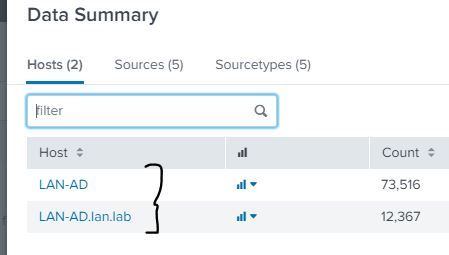
Hello, We have a single instance splunk deployment. I have installed Universal Forwarder on an Win 2012 R2 Active Directory DC. Upon checking / searching for the events in Splunk Search UI, i noticed it shows 2 different host names for the same DC server. Screenshot below. How to resolve this ? If i click on the 1st host "LAN-AD', it shows events related to CPU, Memory monitoring whereas if i click on the other one, this shows events related to Security Events, Application Event log etc.

- Mark as New
- Bookmark Message
- Subscribe to Message
- Mute Message
- Subscribe to RSS Feed
- Permalink
- Report Inappropriate Content

Interesting - what does $SPLUNK_HOME/etc/system/local/inputs.conf say on the forwarder? It should have the following -
[default]
host = <host_name>
- Mark as New
- Bookmark Message
- Subscribe to Message
- Mute Message
- Subscribe to RSS Feed
- Permalink
- Report Inappropriate Content
Thank you Ddrillic. Earlier I was looking at a different inputs.conf ( in a different folder).
- Mark as New
- Bookmark Message
- Subscribe to Message
- Mute Message
- Subscribe to RSS Feed
- Permalink
- Report Inappropriate Content

- Mark as New
- Bookmark Message
- Subscribe to Message
- Mute Message
- Subscribe to RSS Feed
- Permalink
- Report Inappropriate Content
Hi, i followed that link but don't see the solution mentioned. I have checked my server.conf and inputs.conf file on my Universal Forwarder. Both do not have any [servername] attribute defined. Where is the UF getting the 2 server names from ?
- Mark as New
- Bookmark Message
- Subscribe to Message
- Mute Message
- Subscribe to RSS Feed
- Permalink
- Report Inappropriate Content
Check the other answer.. I've copy pasted below.
I've seen this usually with syslog (/var/log/syslog)
Syslog is a pre trained sourcetype and extracts the host from within the log itself and if the log has the hostname without FQDN, you see that.
Check the sourcetypes for each of those host entry |tstats count WHERE host=test* by host,sourcetype | stats values(sourcetype) by host
You will see your problematic sourcetype that is causing the host value without FQDN.
- Mark as New
- Bookmark Message
- Subscribe to Message
- Mute Message
- Subscribe to RSS Feed
- Permalink
- Report Inappropriate Content
Hi Pradeep, Thanks. Earlier I was looking at a different inputs.conf ( in a different folder) and so the confusion. After correcting the "correct" inputs.conf , i am all set.

Join the Splunk Community Slack to learn, troubleshoot, and make connections with fellow Splunk practitioners in real time!
Join Splunk User Groups to connect and learn in-person by region or remotely by topic or industry.
Tuning Edge Processor in Hybrid Mode: What Limits Each Data Path
Best Practices: Splunk auto adjust pipeline queue
Request for Professional Development: Attending .conf26
