
Join the Conversation
- Find Answers
- :
- Splunk Administration
- :
- Getting Data In
- :
- Windows Event filtering on Heavy-Forwarder
- Subscribe to RSS Feed
- Mark Topic as New
- Mark Topic as Read
- Float this Topic for Current User
- Bookmark Topic
- Subscribe to Topic
- Mute Topic
- Printer Friendly Page
- Mark as New
- Bookmark Message
- Subscribe to Message
- Mute Message
- Subscribe to RSS Feed
- Permalink
- Report Inappropriate Content

I am ingesting 100 windows machines and the events that are affecting my license consumption the most are 5156,5157,5158, 4658,4663, 4656, 4690.
I don't really know if I should filter them or if I can get out some correlation event that is valuable.
I have already filtered the first 2 according to Splunk documentation.
But my client doesn't want me to filter the EventCode if not the "Application Name"
What I see differently is that "EventCode" is pasted and "Aplication Name" has a blank space and I don't know how I should put the regular expression if I want to filter only by "Aplication name"
for example
Application Name: \device\harddiskvolume2\windows\system32\svchost.exe
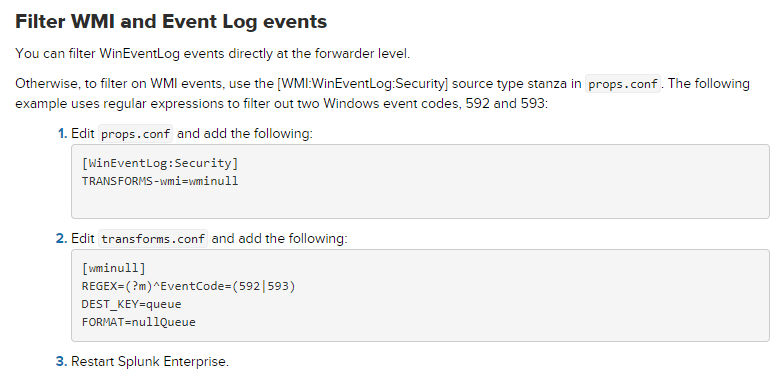
props.conf
[WinEventLog:Security]
TRANSFORMS-wmi=wminull
transforms.conf
[wminull]
REGEX=(?m)^EventCode=(592|593)
DEST_KEY=queue
FORMAT=nullQueue
https://docs.splunk.com/Documentation/Splunk/6.6.2/Forwarding/Routeandfilterdatad
- Mark as New
- Bookmark Message
- Subscribe to Message
- Mute Message
- Subscribe to RSS Feed
- Permalink
- Report Inappropriate Content
I was able to achieve filtering like this
transforms.conf
[wminull]
REGEX=(svchost.exe)
DEST_KEY=queue
FORMAT=nullQueue
- Mark as New
- Bookmark Message
- Subscribe to Message
- Mute Message
- Subscribe to RSS Feed
- Permalink
- Report Inappropriate Content
I was finally able to filter with this stanza

note: omit the bracket that is missing at the beginning
- Mark as New
- Bookmark Message
- Subscribe to Message
- Mute Message
- Subscribe to RSS Feed
- Permalink
- Report Inappropriate Content
I was able to achieve filtering like this
transforms.conf
[wminull]
REGEX=(svchost.exe)
DEST_KEY=queue
FORMAT=nullQueue


Join the Splunk Community Slack to learn, troubleshoot, and make connections with fellow Splunk practitioners in real time!
Join Splunk User Groups to connect and learn in-person by region or remotely by topic or industry.
Data Management Digest – September 2026
Federated Search for CloudWatch Unified Data Store Is Generally Available
Announcing Modern Navigation: A New Era of Splunk User Experience
