
Join the Conversation
- Find Answers
- :
- Splunk Administration
- :
- Getting Data In
- :
- Re: Why my Windows logs don't reach Splunk?
- Subscribe to RSS Feed
- Mark Topic as New
- Mark Topic as Read
- Float this Topic for Current User
- Bookmark Topic
- Subscribe to Topic
- Mute Topic
- Printer Friendly Page
- Mark as New
- Bookmark Message
- Subscribe to Message
- Mute Message
- Subscribe to RSS Feed
- Permalink
- Report Inappropriate Content

We see the following -
02-09-2017 21:12:49.973 -0600 INFO TailingProcessor - Parsing configuration stanza: monitor://E:\logs\sessiondelete\*_DELETESCRIPT.log.
And -
02-09-2017 21:12:49.973 -0600 INFO TailingProcessor - Adding watch on path: E:\logs\sessiondelete.
But they don't reach the indexers. Any ideas?
- Mark as New
- Bookmark Message
- Subscribe to Message
- Mute Message
- Subscribe to RSS Feed
- Permalink
- Report Inappropriate Content

From - http://docs.splunk.com/Documentation/Splunk/6.0/Data/Specifyinputpathswithwildcards
Caution: In Windows, you cannot currently use a wildcard at the root level. For example, this does not work:
[monitor://E:...\foo\*.log]
Splunk Enterprise logs an error and fails to index the desired files.
This is a known issue, described in the Known Issues topic of the Release Notes. Look there for details on all known issues.
This might have been fixed in later versions, I'm not sure.
- Mark as New
- Bookmark Message
- Subscribe to Message
- Mute Message
- Subscribe to RSS Feed
- Permalink
- Report Inappropriate Content
From - http://docs.splunk.com/Documentation/Splunk/6.0/Data/Specifyinputpathswithwildcards
Caution: In Windows, you cannot currently use a wildcard at the root level. For example, this does not work:
[monitor://E:...\foo\*.log]
Splunk Enterprise logs an error and fails to index the desired files.
This is a known issue, described in the Known Issues topic of the Release Notes. Look there for details on all known issues.
This might have been fixed in later versions, I'm not sure.
- Mark as New
- Bookmark Message
- Subscribe to Message
- Mute Message
- Subscribe to RSS Feed
- Permalink
- Report Inappropriate Content
Gorgeous - it worked now. Please convert the comment to an answer so I can accept it...
- Mark as New
- Bookmark Message
- Subscribe to Message
- Mute Message
- Subscribe to RSS Feed
- Permalink
- Report Inappropriate Content
Glad it helped..
- Mark as New
- Bookmark Message
- Subscribe to Message
- Mute Message
- Subscribe to RSS Feed
- Permalink
- Report Inappropriate Content
Very much appreciated!!!
- Mark as New
- Bookmark Message
- Subscribe to Message
- Mute Message
- Subscribe to RSS Feed
- Permalink
- Report Inappropriate Content
Windows doesn't play well with wild cards on the monitor path. Try using whiteliest and blacklist instead to wild card your file names.
- Mark as New
- Bookmark Message
- Subscribe to Message
- Mute Message
- Subscribe to RSS Feed
- Permalink
- Report Inappropriate Content
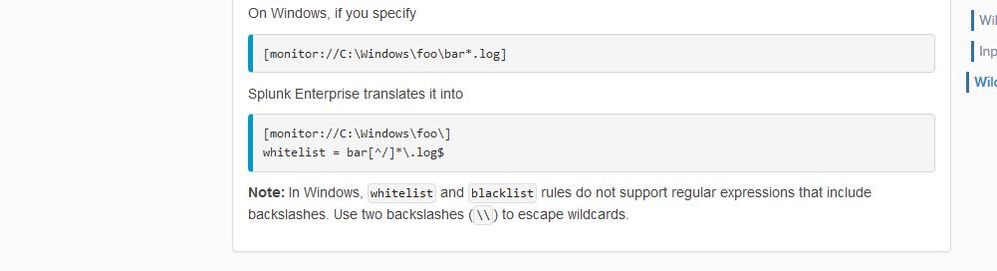
Seriously? do you have any docs about it, by any chance?
I see the following at Specify input paths with wildcards
- Mark as New
- Bookmark Message
- Subscribe to Message
- Mute Message
- Subscribe to RSS Feed
- Permalink
- Report Inappropriate Content

follow the steps from the below url, http://docs.splunk.com/Documentation/Splunk/6.5.2/Troubleshooting/Cantfinddata .
- Mark as New
- Bookmark Message
- Subscribe to Message
- Mute Message
- Subscribe to RSS Feed
- Permalink
- Report Inappropriate Content
Great link - the only thing that I don't know is whether the forwarder can access this Windows folder ...
- Mark as New
- Bookmark Message
- Subscribe to Message
- Mute Message
- Subscribe to RSS Feed
- Permalink
- Report Inappropriate Content


Sysinternals tool Process Explorer can easily find out if your UF has that file open.
Open Process Explorer, click the binoculars, search for E:\whatever in there. If the UF has the file open, it'll be listed.
- Mark as New
- Bookmark Message
- Subscribe to Message
- Mute Message
- Subscribe to RSS Feed
- Permalink
- Report Inappropriate Content

Check for error like access denied on the splunkd.log on the forwarder (for that file).
- Mark as New
- Bookmark Message
- Subscribe to Message
- Mute Message
- Subscribe to RSS Feed
- Permalink
- Report Inappropriate Content
The only references to DELETESCRIPT in splunkd.log are the two at the beginning of this thread...
- Mark as New
- Bookmark Message
- Subscribe to Message
- Mute Message
- Subscribe to RSS Feed
- Permalink
- Report Inappropriate Content
The forwarder should be sending _internal data to Indexers, do you at least see that (to confirm that outputs.conf is configured correctly, check index=_internal host=yourForwarder ). Also, restart your forwarder and check the splunkd.log for errors and warning, you may catch something relevant.



Join the Splunk Community Slack to learn, troubleshoot, and make connections with fellow Splunk practitioners in real time!
Join Splunk User Groups to connect and learn in-person by region or remotely by topic or industry.
Rounding off the Splunk Dashboard Contest
A Four Part Event Series: AI + Observability: AI Agents, LLMs, Apps, & Infrastructure
Splunk Technical Support Is Moving to Cisco Support Tools
