
Join the Conversation
- Find Answers
- :
- Splunk Administration
- :
- Getting Data In
- :
- Re: Why isn't timestamp extraction showing millise...
- Subscribe to RSS Feed
- Mark Topic as New
- Mark Topic as Read
- Float this Topic for Current User
- Bookmark Topic
- Subscribe to Topic
- Mute Topic
- Printer Friendly Page
- Mark as New
- Bookmark Message
- Subscribe to Message
- Mute Message
- Subscribe to RSS Feed
- Permalink
- Report Inappropriate Content
Why isn't timestamp extraction showing milliseconds?

Hi,
I managed to make the time format from Epoch to human readable but I can't really get the millisecond out.
Example timeStamp":1495447178314
From Splunk it converted to "5/22/17 5:59:38.000 PM" but from https://www.epochconverter.com/, it is showing
May 22, 2017 5:59:38.314 PM
Reference document: http://docs.splunk.com/Documentation/Splunk/6.0/Data/Configuretimestamprecognition, .%3N should show the milliseconds.
- Mark as New
- Bookmark Message
- Subscribe to Message
- Mute Message
- Subscribe to RSS Feed
- Permalink
- Report Inappropriate Content

| makeresults
| eval timeint="1495447178314"
| eval time=strptime(timeint,"%s%3N")
| eval timestr=strftime(time, "%F %T.%3N %Z")
- Mark as New
- Bookmark Message
- Subscribe to Message
- Mute Message
- Subscribe to RSS Feed
- Permalink
- Report Inappropriate Content


| makeresults
| eval time=_time
| eval timee=time*1000+315
| eval timeee=strptime(timee,"%s%3N")
- Mark as New
- Bookmark Message
- Subscribe to Message
- Mute Message
- Subscribe to RSS Feed
- Permalink
- Report Inappropriate Content

- Mark as New
- Bookmark Message
- Subscribe to Message
- Mute Message
- Subscribe to RSS Feed
- Permalink
- Report Inappropriate Content

Epoch time should be something like the following: 1495427378.314000, with decimal before millisecond. You can use %3N to display milliseconds part.
Following is the run anywhere search.
| makeresults
| eval timeStamp=strptime("05/22/17 09:59:38.314","%m/%d/%y %H:%M:%S.%3N")
| eval stringStamp=strftime(timeStamp,"%m/%d/%y %H:%M:%S.%3N")
Documentation for various time format variables: https://docs.splunk.com/Documentation/Splunk/latest/SearchReference/Commontimeformatvariables
PS: 1st eval is to generate epoch timestamp. I have used second eval just to generate a new field to display time as string. You should ideally use fieldformat to retain time as epoch while presenting the same as string time which is human readable.
| fieldformat timeStamp=strftime(timeStamp,"%m/%d/%y %H:%M:%S.%3N")
| makeresults | eval message= "Happy Splunking!!!"
- Mark as New
- Bookmark Message
- Subscribe to Message
- Mute Message
- Subscribe to RSS Feed
- Permalink
- Report Inappropriate Content
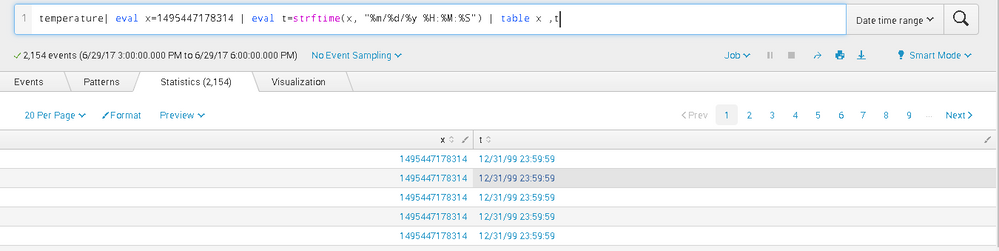
Hi, does it work on 1495427378314000 without the decimal? My log timestamp was displayed without the decimal and I keep getting the time being converted as "12/31/99 23:59:59"
- Mark as New
- Bookmark Message
- Subscribe to Message
- Mute Message
- Subscribe to RSS Feed
- Permalink
- Report Inappropriate Content

This ended up working for me:
| eval secs=substr(timestamp,0,10)
| eval msecs=substr(timestamp,11,13)
| strcat secs "." msecs "000" epoch_fmt
| eval datetime=strftime(epoch_fmt,"%Y-%m-%d %H:%M:%S.%3N")

Join the Splunk Community Slack to learn, troubleshoot, and make connections with fellow Splunk practitioners in real time!
Join Splunk User Groups to connect and learn in-person by region or remotely by topic or industry.
Observability Simplified: Combining User Experience, Application Performance & ...
Event Series May & June: From Network Visibility to Service Intelligence
Global Splunk User Group Events: May + June 2026
