
Join the Conversation
- Find Answers
- :
- Splunk Administration
- :
- Getting Data In
- :
- Re: Why is the Http event collector not visible in...
- Subscribe to RSS Feed
- Mark Topic as New
- Mark Topic as Read
- Float this Topic for Current User
- Bookmark Topic
- Subscribe to Topic
- Mute Topic
- Printer Friendly Page
- Mark as New
- Bookmark Message
- Subscribe to Message
- Mute Message
- Subscribe to RSS Feed
- Permalink
- Report Inappropriate Content

Hi,
Splunk version : 6.6.1
Http event collector not visible in UI, we are not able to find it under data inputs.
After searching in support site, we have modified input config file.(disabled=0) and done server restart.
Still we cannot see Http event collector option under data inputs.
- Mark as New
- Bookmark Message
- Subscribe to Message
- Mute Message
- Subscribe to RSS Feed
- Permalink
- Report Inappropriate Content


The Data Inputs page should look something like this:
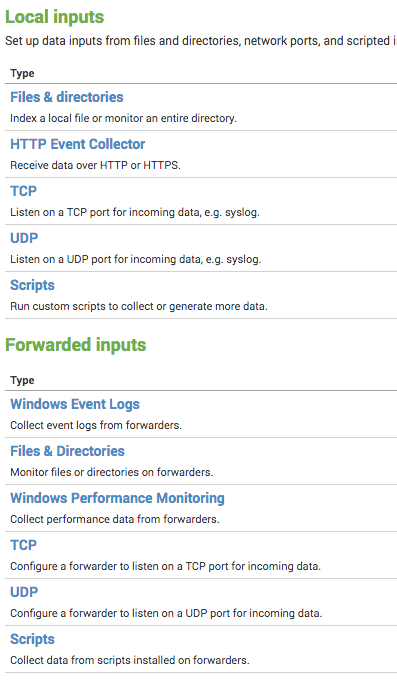
If you are missing one or more inputs, this is typically related to an older app breaking some gui elements. I've seen it with older DBConnect (dbx-2207) as well as a number of third party apps on 6.3.x and newer. There were code changes to the gui in 6.3 and apps which aren't supported in 6.3.x or later can cause this behavior. Hopefully this is what you are experiencing and a simple upgrade to can correct it for you. I would review all installed apps and confirm you have the latest version installed. If it doesn't support the version you are on, remove it temporarily and see if that resolves your issue.
Sr. Technical Support Engineer
- Mark as New
- Bookmark Message
- Subscribe to Message
- Mute Message
- Subscribe to RSS Feed
- Permalink
- Report Inappropriate Content
We are also having this same issue. Already had the edit_http_token capability for my role, that was not a fix.
We are running Splunk 7.0.3 and CentOS 7.4
Seems like a major bug.,I am also having this issue. Running splunk 7.0.3 on CentOS 7.4.
Seems like there is a major bug.
- Mark as New
- Bookmark Message
- Subscribe to Message
- Mute Message
- Subscribe to RSS Feed
- Permalink
- Report Inappropriate Content

I found the culprit!
I don't know how or when it happened but in my role, the "edit_token_http" capability was disabled.
After I (re-)enabled it, the HTTP Event Collector was available again in the Data Inputs screen
- Mark as New
- Bookmark Message
- Subscribe to Message
- Mute Message
- Subscribe to RSS Feed
- Permalink
- Report Inappropriate Content
I have the same issue. I have removed every (yes every) app I installed but to no avail. I also made sure that Index Clustering and Distributed Search was disabled. But alas, no HTTP Event Collector is available in my Data Inputs.
I am running Splunk 7.2.0 Enterprise on Centos 7.5
In the past, I was able to configure HEC and they are still running and active but without the option in Data Inputs, I cannot manage them nor add or delete them via the Splunk UI
(When I do a clean install, there is no issue but migrating is not my preferred choice)
Does anybody have a tip on where to look to fix this issue?
- Mark as New
- Bookmark Message
- Subscribe to Message
- Mute Message
- Subscribe to RSS Feed
- Permalink
- Report Inappropriate Content
The Data Inputs page should look something like this:
If you are missing one or more inputs, this is typically related to an older app breaking some gui elements. I've seen it with older DBConnect (dbx-2207) as well as a number of third party apps on 6.3.x and newer. There were code changes to the gui in 6.3 and apps which aren't supported in 6.3.x or later can cause this behavior. Hopefully this is what you are experiencing and a simple upgrade to can correct it for you. I would review all installed apps and confirm you have the latest version installed. If it doesn't support the version you are on, remove it temporarily and see if that resolves your issue.
Sr. Technical Support Engineer
- Mark as New
- Bookmark Message
- Subscribe to Message
- Mute Message
- Subscribe to RSS Feed
- Permalink
- Report Inappropriate Content
Hi,
We have splunk_app_db_connect v3.1.1 still we are not able to see HTTP event collector in Data inputs GUI.
Inside settings and data inputs we can see only types listed excluding HTTP event collector.
We cannot see local inputs and forwarded inputs in our splunk.



Join the Splunk Community Slack to learn, troubleshoot, and make connections with fellow Splunk practitioners in real time!
Join Splunk User Groups to connect and learn in-person by region or remotely by topic or industry.
Persistent Queue at TcpOut — One of Splunk's Most Practical Features
Skip the Awkward Silence: Have a .conf-ersation at .conf26
Rethinking Zero Trust: From Product Purchases to Logical Control Evidence
