
Join the Conversation
- Find Answers
- :
- Splunk Administration
- :
- Getting Data In
- :
- Re: Why does the search query does not show host, ...
- Subscribe to RSS Feed
- Mark Topic as New
- Mark Topic as Read
- Float this Topic for Current User
- Bookmark Topic
- Subscribe to Topic
- Mute Topic
- Printer Friendly Page
- Mark as New
- Bookmark Message
- Subscribe to Message
- Mute Message
- Subscribe to RSS Feed
- Permalink
- Report Inappropriate Content

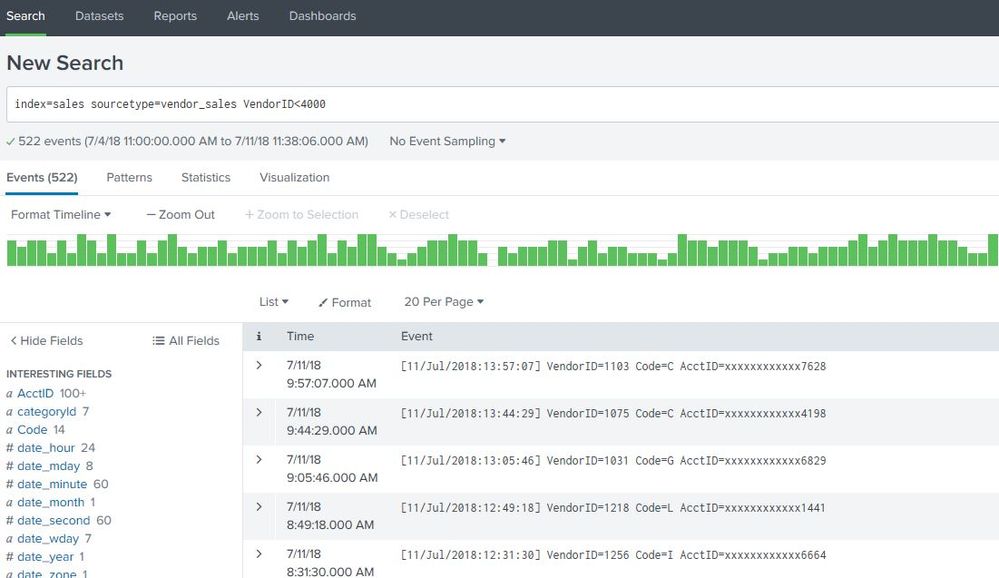
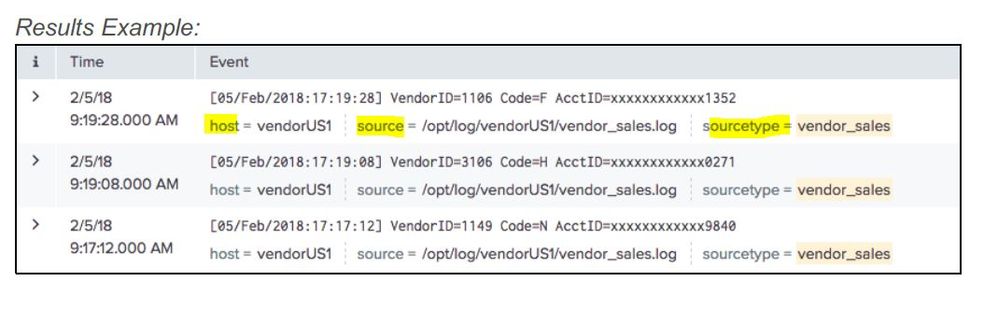
Hi, I am taking Splunk Fundamentals course and during one of the lab exercises related to performing a search operation i noticed that my output of search query does not show the common fields like "host, source and source type" below each event , which are normally supposed to be extracted by default. My question is not about lab manual. Basically, i am curious as in What is making splunk to not show these 3 fields? I am using the exact query that is listed in the manual. Please refer to below screenshots.
My output ( which doesn't show those 3 fields)
Expected output as shown in the lab manual :
- Mark as New
- Bookmark Message
- Subscribe to Message
- Mute Message
- Subscribe to RSS Feed
- Permalink
- Report Inappropriate Content

Hi @neerajshah81,
The default fields displayed with the event is decided by the user "Selected Fields" which is normally shown on the left panel under "Selected fields" and on basis of the user selection - expanding the event and select the fields manually(selecting checkbox). Configuration setting is stored in ui-prefs.conf of the user ie. splunk\etc\users\"user_name"\search\local\ui-prefs.conf
What goes around comes around. If it helps, hit it with Karma 🙂
- Mark as New
- Bookmark Message
- Subscribe to Message
- Mute Message
- Subscribe to RSS Feed
- Permalink
- Report Inappropriate Content
Hi @neerajshah81,
The default fields displayed with the event is decided by the user "Selected Fields" which is normally shown on the left panel under "Selected fields" and on basis of the user selection - expanding the event and select the fields manually(selecting checkbox). Configuration setting is stored in ui-prefs.conf of the user ie. splunk\etc\users\"user_name"\search\local\ui-prefs.conf
What goes around comes around. If it helps, hit it with Karma 🙂
- Mark as New
- Bookmark Message
- Subscribe to Message
- Mute Message
- Subscribe to RSS Feed
- Permalink
- Report Inappropriate Content

The in-line callout of fields and values happens for selected fields. To select a field, click on the All Fields link to get a field selector. Click on the checkbox to the left of whichever fields you would like Selected. Then click the Done button. You will see a new Selected Fields section above your existing Interesting Fields section and your in-line callouts should be there, too. These settings are somewhat sticky and I believe related to the neglected/no-longer-really-supported viewstates feature of Splunk.
- Mark as New
- Bookmark Message
- Subscribe to Message
- Mute Message
- Subscribe to RSS Feed
- Permalink
- Report Inappropriate Content
Thank you woodcock & Renjith.
- Mark as New
- Bookmark Message
- Subscribe to Message
- Mute Message
- Subscribe to RSS Feed
- Permalink
- Report Inappropriate Content
Up-Votes appreciated.
- Mark as New
- Bookmark Message
- Subscribe to Message
- Mute Message
- Subscribe to RSS Feed
- Permalink
- Report Inappropriate Content
Granted. Sorry getting used to splunk forums.




Join the Splunk Community Slack to learn, troubleshoot, and make connections with fellow Splunk practitioners in real time!
Join Splunk User Groups to connect and learn in-person by region or remotely by topic or industry.
Agentic SOC Triage: Investigating Splunk ES Notables with MCP Server and a Local LLM
All Work and No Play? Not at .conf26! Unwind at These Evening Events
Join the Hackathon at .conf26 and build a No-Code AI agent
