
Join the Conversation
- Find Answers
- :
- Splunk Administration
- :
- Getting Data In
- :
- Re: Why does the custom search command display onl...
- Subscribe to RSS Feed
- Mark Topic as New
- Mark Topic as Read
- Float this Topic for Current User
- Bookmark Topic
- Subscribe to Topic
- Mute Topic
- Printer Friendly Page
- Mark as New
- Bookmark Message
- Subscribe to Message
- Mute Message
- Subscribe to RSS Feed
- Permalink
- Report Inappropriate Content
Why does the custom search command display only 1000 events?

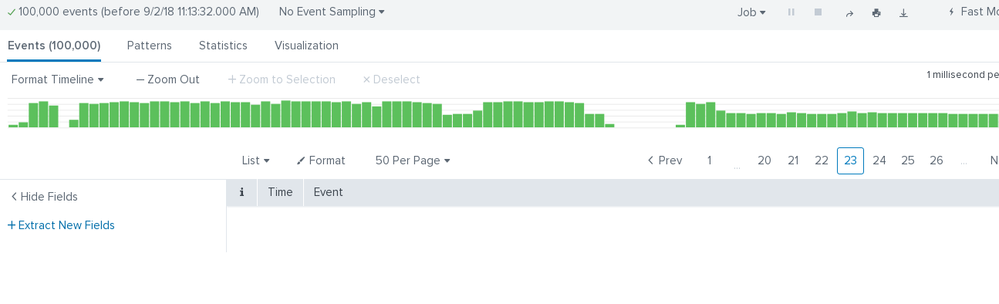
The following custom search command (which should return 100,000 displays) returns only 1000 events in Splunk. The rest of the events seems to be accounted for, but are not displayed; Splunk 6.x and 7.x:
import splunk.clilib.cli_common as spcli
import splunk.Intersplunk
import sys
import time

keywords, options = splunk.Intersplunk.getKeywordsAndOptions()

def main(args):
  results = []
  row = {}
  for i in range(0,100000):
    record = {}
    record['_time'] = time.time()
    record['_raw'] = "{" + str(i) + "}"
    results.append(record)
  splunk.Intersplunk.outputStreamResults(results)
  exit()
main(sys.argv)
commands.conf:
[test]
filename = test.py
local = true
overrides_timeorder = true
streaming = true
supports_multivalues = true
generating = stream
- Mark as New
- Bookmark Message
- Subscribe to Message
- Mute Message
- Subscribe to RSS Feed
- Permalink
- Report Inappropriate Content


This is because by default it's limited at 1000 in code.
You can increase this value in limits.conf:
[search]
max_events_per_bucket = xxxx
Please refer to this answer:
https://answers.splunk.com/answers/92979/the-flashtimeline-dashboard-only-shows-first-1000-events.ht...
- Mark as New
- Bookmark Message
- Subscribe to Message
- Mute Message
- Subscribe to RSS Feed
- Permalink
- Report Inappropriate Content
- Mark as New
- Bookmark Message
- Subscribe to Message
- Mute Message
- Subscribe to RSS Feed
- Permalink
- Report Inappropriate Content
No that doesn't seem to change the behavior, I added this in limits.conf, then restarted splunk.
/opt/splunk/bin/splunk btool limits list | grep -A10 searchresults
[searchresults]
compression_level = 1
max_mem_usage_mb = 200
maxresultrows = 100000
tocsv_maxretry = 5
tocsv_retryperiod_ms = 500
[set]
max_mem_usage_mb = 200
maxresultrows = 50000
[show_source]
distributed = true
Same behavior as previously reported though... only 10,000 results visible.
Note that the same behavior is observed with the default splunk command:
| streambag chunks=100
there are no events passed page #20. Exact same behavior.



Join the Splunk Community Slack to learn, troubleshoot, and make connections with fellow Splunk practitioners in real time!
Join Splunk User Groups to connect and learn in-person by region or remotely by topic or industry.
How much can you really learn in 3 minutes?
Event Series: The Agentic SOC: Trust Before Autonomy
Free Professional Services for .conf26 Attendees
