
Join the Conversation
- Find Answers
- :
- Splunk Administration
- :
- Getting Data In
- :
- Re: WMI Input: best practice for field values with...
- Subscribe to RSS Feed
- Mark Topic as New
- Mark Topic as Read
- Float this Topic for Current User
- Bookmark Topic
- Subscribe to Topic
- Mute Topic
- Printer Friendly Page
- Mark as New
- Bookmark Message
- Subscribe to Message
- Mute Message
- Subscribe to RSS Feed
- Permalink
- Report Inappropriate Content

I have some powershell scripts scheduled on a windows server and want to track their memory and cpu utilization. And I do have a working solution, but I just wondered what's the best practice here.
So I created a WMI input for Win32_process, which has the "CommandLine" for each powershell.exe instance, and that includes the script name.
But out of the box, Splunk cuts off that CommandLine field at the first space.
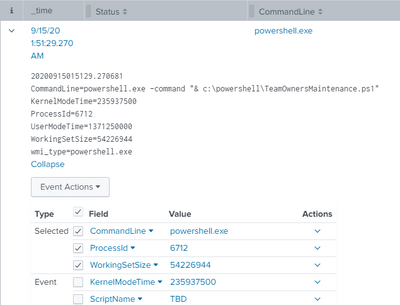
I guess my question is, if there are any props.conf options (or in any other configuration) to let it read that full "line" and not stop at the spaces. It seems to be clever enough to read the WMI feed in a way where it puts each field=value into one line in the _raw data.
The server in question has a universal forwarder installed. And that has an app with the wmi.conf in it:
[WMI:powershell.exe]
index = perfmon
disabled = 0
interval = 60
wql = SELECT CommandLine, ProcessId, WorkingSetSize, KernelModeTime, UserModeTime from Win32_process WHERE Name = 'powershell.exe'
And on the indexer, the sourcetype is configured in the props.conf like this:
[WMI:powershell.exe]
FIELDALIAS-dest_for_perfmon = host AS dest
FIELDALIAS-src_for_perfmon = host AS src
LINE_BREAKER = ([\r\n]+)
NO_BINARY_CHECK = true
category = Custom
disabled = false
In the end, my goal is to get that script name, so I just added a field extraction for that
EXTRACT-ScriptName = CommandLine=powershell.exe+\s+\-command+\s+"&\s+'*(?P<ScriptName>[^("|')]+)
Is that the best way of doing it?
- Mark as New
- Bookmark Message
- Subscribe to Message
- Mute Message
- Subscribe to RSS Feed
- Permalink
- Report Inappropriate Content


what you have done to extract CommandLine is correct but EXTRACT is search time field extraction so you can keep it on search head rather Indexers.
[WMI:powershell.exe]
EXTRACT-ScriptName = CommandLine=powershell.exe+\s+\-command+\s+"&\s+'*(?P<ScriptName>[^("|')]+)
If this helps, give a like below.
- Mark as New
- Bookmark Message
- Subscribe to Message
- Mute Message
- Subscribe to RSS Feed
- Permalink
- Report Inappropriate Content
good to know, thanks
- Mark as New
- Bookmark Message
- Subscribe to Message
- Mute Message
- Subscribe to RSS Feed
- Permalink
- Report Inappropriate Content
what you have done to extract CommandLine is correct but EXTRACT is search time field extraction so you can keep it on search head rather Indexers.
[WMI:powershell.exe]
EXTRACT-ScriptName = CommandLine=powershell.exe+\s+\-command+\s+"&\s+'*(?P<ScriptName>[^("|')]+)
If this helps, give a like below.

Join the Splunk Community Slack to learn, troubleshoot, and make connections with fellow Splunk practitioners in real time!
Join Splunk User Groups to connect and learn in-person by region or remotely by topic or industry.
Persistent Queue at TcpOut — One of Splunk's Most Practical Features
Catalog Is Now Generally Available on Splunk Cloud Platform
Your Path to AgenticOps: AI Experiences for Every Splunk Practitioner
