
Join the Conversation
- Find Answers
- :
- Splunk Administration
- :
- Getting Data In
- :
- Re: Unable to parse nested json
- Subscribe to RSS Feed
- Mark Topic as New
- Mark Topic as Read
- Float this Topic for Current User
- Bookmark Topic
- Subscribe to Topic
- Mute Topic
- Printer Friendly Page
- Mark as New
- Bookmark Message
- Subscribe to Message
- Mute Message
- Subscribe to RSS Feed
- Permalink
- Report Inappropriate Content

Hello All,
I am facing issues parsing the json data to form the required table.
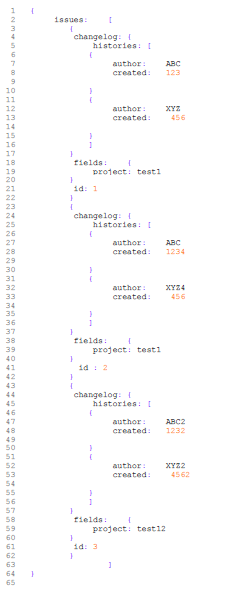
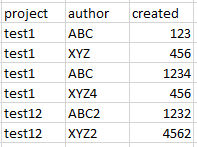
The json file is being pulled in the splunk as a single event. I am able to fetch the fields separately but unable to correlate them as illustrated in json.
Please let me know if it is doable. if yes, then how ?
Query:
source=source1 host=host1 index=index1 sourcetype=_json1
| head 1
| table issues{}.fields{}.project, issues{}.changelog.histories{}.author, issues{}.changelog.histories{}.created
Input json:
The required output table:
- Mark as New
- Bookmark Message
- Subscribe to Message
- Mute Message
- Subscribe to RSS Feed
- Permalink
- Report Inappropriate Content


@aayushisplunk1
Can you please try this?
YOUR_SEARCH
| spath path=issues{} output=issues
| mvexpand issues
| fields issues
| eval _raw=issues
| extract
| rename changelog.histories{}.* as * ,fields.* as *
| eval temp = mvzip(author,created) | mvexpand temp | eval author=mvindex(split(temp,","),0), created=mvindex(split(temp,","),1) | table project author created
Sample Search:
| makeresults
| eval _raw="{\"issues\":[{\"changelog\":{\"histories\":[{\"author\":\"ABC\",\"created\":\"123\"},{\"author\":\"XYZ\",\"created\":\"456\"}]},\"fields\":{\"project\":\"test1\"},\"id\":\"1\"},{\"changelog\":{\"histories\":[{\"author\":\"ABC\",\"created\":\"1234\"},{\"author\":\"XYZ4\",\"created\":\"456\"}]},\"fields\":{\"project\":\"test1\"},\"id\":\"2\"},{\"changelog\":{\"histories\":[{\"author\":\"ABC2\",\"created\":\"1232\"},{\"author\":\"XYZ2\",\"created\":\"4562\"}]},\"fields\":{\"project\":\"test12\"},\"id\":\"3\"}]}"
| extract
| spath path=issues{} output=issues
| mvexpand issues
| fields issues
| eval _raw=issues
| extract
| rename changelog.histories{}.* as * ,fields.* as *
| eval temp = mvzip(author,created) | mvexpand temp | eval author=mvindex(split(temp,","),0), created=mvindex(split(temp,","),1) | table project author created
Thanks
- Mark as New
- Bookmark Message
- Subscribe to Message
- Mute Message
- Subscribe to RSS Feed
- Permalink
- Report Inappropriate Content

try this:
| makeresults
 | eval raw="issues:    [
     {
        changelog:    {
          histories:    [
           {
              author:    ABC
              created:    123

           }
           {
              author:    XYZ
              created:     456

           }
         ]
       }
        fields:    {
          project: test1
       }
      id: 1
     }
     {
        changelog:    {
          histories:    [
           {
              author:    ABC
              created:    1234

           }
           {
              author:    XYZ4
              created:     456

           }
         ]
       }
        fields:    {
          project: test1
       }
       id : 2
     }
     {
        changelog:    {
          histories:    [
           {
              author:    ABC2
              created:    1232

           }
           {
              author:    XYZ2
              created:     4562

           }
         ]
       }
        fields:    {
          project: test12
       }
      id: 3
     }
             ]"
| eval raw=split(raw,"id")
| mvexpand raw
|rex field=raw "author:(?<author>.*)" max_match=0
| rex field=raw "created:(?<created>.*)" max_match=0
|eval x=mvzip(author,created)
| rex field=raw "project:(?<project>.*)" max_match=0

|  fields - _time
| fields project,x
| mvexpand x
| rex field=x "(?<author>.*?)," max_match=0| rex field=x ",(?<created>.*)" max_match=0
| fields project,author,created
- Mark as New
- Bookmark Message
- Subscribe to Message
- Mute Message
- Subscribe to RSS Feed
- Permalink
- Report Inappropriate Content
@aayushisplunk1
Can you please try this?
YOUR_SEARCH
| spath path=issues{} output=issues
| mvexpand issues
| fields issues
| eval _raw=issues
| extract
| rename changelog.histories{}.* as * ,fields.* as *
| eval temp = mvzip(author,created) | mvexpand temp | eval author=mvindex(split(temp,","),0), created=mvindex(split(temp,","),1) | table project author created
Sample Search:
| makeresults
| eval _raw="{\"issues\":[{\"changelog\":{\"histories\":[{\"author\":\"ABC\",\"created\":\"123\"},{\"author\":\"XYZ\",\"created\":\"456\"}]},\"fields\":{\"project\":\"test1\"},\"id\":\"1\"},{\"changelog\":{\"histories\":[{\"author\":\"ABC\",\"created\":\"1234\"},{\"author\":\"XYZ4\",\"created\":\"456\"}]},\"fields\":{\"project\":\"test1\"},\"id\":\"2\"},{\"changelog\":{\"histories\":[{\"author\":\"ABC2\",\"created\":\"1232\"},{\"author\":\"XYZ2\",\"created\":\"4562\"}]},\"fields\":{\"project\":\"test12\"},\"id\":\"3\"}]}"
| extract
| spath path=issues{} output=issues
| mvexpand issues
| fields issues
| eval _raw=issues
| extract
| rename changelog.histories{}.* as * ,fields.* as *
| eval temp = mvzip(author,created) | mvexpand temp | eval author=mvindex(split(temp,","),0), created=mvindex(split(temp,","),1) | table project author created
Thanks
- Mark as New
- Bookmark Message
- Subscribe to Message
- Mute Message
- Subscribe to RSS Feed
- Permalink
- Report Inappropriate Content
Hello @aayushisplunk1 ,
See this:
https://answers.splunk.com/answers/366957/how-do-i-get-splunk-to-extract-nested-json-arrays.html
And this link too:
https://answers.splunk.com/answers/762294/parse-nested-json-array-into-splunk-table.html
- Mark as New
- Bookmark Message
- Subscribe to Message
- Mute Message
- Subscribe to RSS Feed
- Permalink
- Report Inappropriate Content
what kind of default fields are you getting under interesting fields and have you tried spath?
If you want more precise help, can you please post your event sample as text so that we can re-use it ?
- Mark as New
- Bookmark Message
- Subscribe to Message
- Mute Message
- Subscribe to RSS Feed
- Permalink
- Report Inappropriate Content
Hello,
Thank you for your quick response!
As for your queries:
The default fields i am getting are given as below:
issues{}.fields{}.project,
issues{}.changelog.histories{}.author,
issues{}.changelog.histories{}.created,
issues{}.id
i tried using spath but i guess it will not be able to help much as i already have the required fields. It is just that that i am unable to correlate these field values as per the json.
json in text:
*{
issues: [
{
changelog: {
histories: [
{
author: ABC
created: 123
        }
        {
             author:    XYZ
             created:    456

        }
        ]
    }
     fields:    {
         project: test1
    }
     id: 1
    }
    {
     changelog: {
         histories: [
        {
             author:    ABC
             created:   1234

        }
        {
             author:    XYZ4
             created:    456

        }
        ]
    }
     fields:    {
         project: test1
    }
      id : 2
    }
    {
     changelog: {
         histories: [
        {
             author:    ABC2
             created:   1232

        }
        {
             author:    XYZ2
             created:    4562

        }
        ]
    }
     fields:    {
         project: test12
    }
     id: 3
    }
            ]
}*
- Mark as New
- Bookmark Message
- Subscribe to Message
- Mute Message
- Subscribe to RSS Feed
- Permalink
- Report Inappropriate Content
@aayushisplunk1
Can you please share raw event? Your provided event is not valid JSON.
- Mark as New
- Bookmark Message
- Subscribe to Message
- Mute Message
- Subscribe to RSS Feed
- Permalink
- Report Inappropriate Content
@kamlesh_vaghela
Raw event:
{"issues":[{"changelog":{"histories":[{"author":"ABC","created":"123"},{"author":"XYZ","created":"456"}]},"fields":{"project":"test1"},"id":"1"},{"changelog":{"histories":[{"author":"ABC","created":"1234"},{"author":"XYZ4","created":"456"}]},"fields":{"project":"test1"},"id":"2"},{"changelog":{"histories":[{"author":"ABC2","created":"1232"},{"author":"XYZ2","created":"4562"}]},"fields":{"project":"test12"},"id":"3"}]}




Join the Splunk Community Slack to learn, troubleshoot, and make connections with fellow Splunk practitioners in real time!
Join Splunk User Groups to connect and learn in-person by region or remotely by topic or industry.
Painting a Clearer Picture: Unifying Your Investigations with Cisco AI Canvas
Hello POJO, meet nocode
Announcing Modern Navigation: A New Era of Splunk User Experience
