
Join the Conversation
- Find Answers
- :
- Splunk Administration
- :
- Getting Data In
- :
- Re: Timestamp of events is wrong after indexer reb...
- Subscribe to RSS Feed
- Mark Topic as New
- Mark Topic as Read
- Float this Topic for Current User
- Bookmark Topic
- Subscribe to Topic
- Mute Topic
- Printer Friendly Page
- Mark as New
- Bookmark Message
- Subscribe to Message
- Mute Message
- Subscribe to RSS Feed
- Permalink
- Report Inappropriate Content
Timestamp of events is wrong after indexer reboot?

Hello, I'm having a problem where the _time field of events does not match the actual events. This happened after I rebooted the splunk server.
As you can see from the pics, before the reboot the Time stamp, _time matches the time field
After the reboot the _time stamp is 2 hours before the time field
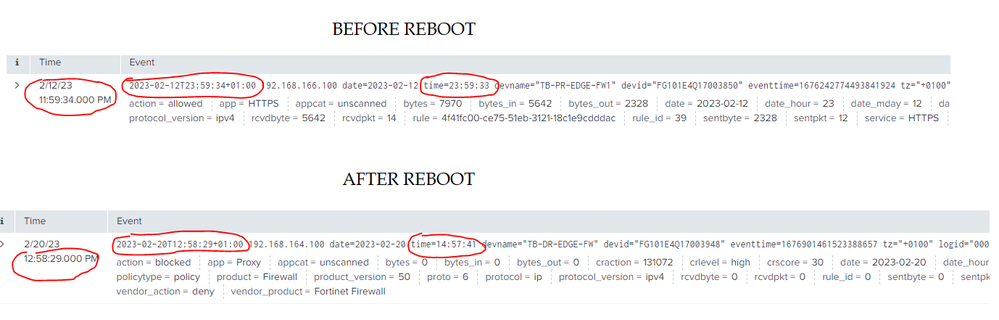
I checked the local linux server time, the user's Splunk time, they're all OK. Where does Splunk change the time of the events?
- Mark as New
- Bookmark Message
- Subscribe to Message
- Mute Message
- Subscribe to RSS Feed
- Permalink
- Report Inappropriate Content


The timestamp _time is being picked up from the same place in the event before and after the reboot.
Note in the before image the time is 11:59:34 PM which tallies with 23:59:34 from the first timestamp in the event. The second highlighted time is 1 second earlier i.e. time=23:59:33.
- Mark as New
- Bookmark Message
- Subscribe to Message
- Mute Message
- Subscribe to RSS Feed
- Permalink
- Report Inappropriate Content
> The timestamp _time is being picked up from the same place in the event before and after the reboot.
But the path is the same. I did not change anything, only rebooted the server
- Mark as New
- Bookmark Message
- Subscribe to Message
- Mute Message
- Subscribe to RSS Feed
- Permalink
- Report Inappropriate Content
The event has been ingested from somewhere which has written a time field as part of the data. Actually, there are two time fields, one at the beginning of the event (which is the one Splunk appears to be using) and one further on in the event record. Splunk does not normally change this event data, it merely interprets what it finds. It appears to be interpreting the first time field both before and after the reboot. Has something changed on the server which is producing these events?

Join the Splunk Community Slack to learn, troubleshoot, and make connections with fellow Splunk practitioners in real time!
Join Splunk User Groups to connect and learn in-person by region or remotely by topic or industry.
Agent Mode Engaged! Enchaining Agentic Operations with Splunk AI Assistant 2.0
Announcing Modern Navigation: A New Era of Splunk User Experience
Modernize your Splunk Apps – Introducing Python 3.13 in Splunk
