
Join the Conversation
- Find Answers
- :
- Splunk Administration
- :
- Getting Data In
- :
- Re: Syslog and UDP (Data Input)
- Subscribe to RSS Feed
- Mark Topic as New
- Mark Topic as Read
- Float this Topic for Current User
- Bookmark Topic
- Subscribe to Topic
- Mute Topic
- Printer Friendly Page
- Mark as New
- Bookmark Message
- Subscribe to Message
- Mute Message
- Subscribe to RSS Feed
- Permalink
- Report Inappropriate Content
Syslog and UDP (Data Input)

I had a EC2 syslog client and a MacOS which installed the Splunk Enterprise. I want my Splunk Enterprise to be my syslog server. In that way, I should configure my syslog client to transfer syslog to Splunk Enterprise and nothing syslog server configure stuff need I make.
On Splunk server I created a UDP Data Input. I also exposed 514 port and specified an Index for this Data Input. I set SourceType as 'syslog'.
On syslog client side, I configured the destination to be *.* <Splunk Enterprise IP>:514 in its rsyslog.conf file.
I tried to use logger to generate syslog on my client side e.g. logger -p local0.crit "...", but there was no event showing up in my index when I did the search.
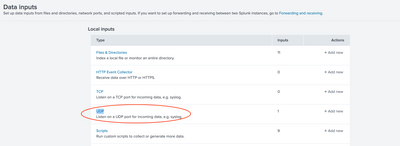
Basically, in my understanding the Splunk Enterprise Server can function as a syslog server which can receive message from syslog clients.
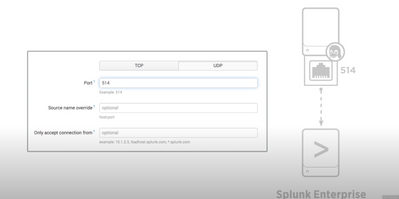
(Screenshot is from: https://www.youtube.com/watch?v=BQU-bsSCXhk)
Is there any step I did incorrect or do I miss any step?
- Mark as New
- Bookmark Message
- Subscribe to Message
- Mute Message
- Subscribe to RSS Feed
- Permalink
- Report Inappropriate Content


You might have forgoten reloading your syslog server or opening ports on firewall. Or your traffic can be filtered somewhere along the way.
But if you can avoid it, don't use splunk server itself as your syslog receiver - use external syslog (rsyslog or syslog-ng - maybe in form of sc4s) and "redirect" the data to HEC input. Splunk does indeed have raw tcp and udp inputs but they are not very efficient and not manageable if your installation grows in term of different types of sources.
I'd not use UDP if I could avoid - especially across the internet. It's unreliable and you will be losing events along the way.
Also, sending unencrypted logs across open internet introduces privacy risks.
So I'd advise you to set up a local syslog and either send data to HEC input on your splunk server or to a forwarder in your local infrastructure that would send the data to the server.


Join the Splunk Community Slack to learn, troubleshoot, and make connections with fellow Splunk practitioners in real time!
Join Splunk User Groups to connect and learn in-person by region or remotely by topic or industry.
Event Series: The Agentic SOC: Trust Before Autonomy
Free Professional Services for .conf26 Attendees
Defend at Machine Speed: Your Guide to Security Sessions at .conf26
