
Join the Conversation
- Find Answers
- :
- Splunk Administration
- :
- Getting Data In
- :
- Re: Splunk dashboard "could not create search" on ...
- Subscribe to RSS Feed
- Mark Topic as New
- Mark Topic as Read
- Float this Topic for Current User
- Bookmark Topic
- Subscribe to Topic
- Mute Topic
- Printer Friendly Page
- Mark as New
- Bookmark Message
- Subscribe to Message
- Mute Message
- Subscribe to RSS Feed
- Permalink
- Report Inappropriate Content
Splunk dashboard "could not create search" on external network

Hi All,
I have a Splunk environment which works internally using the IP address.
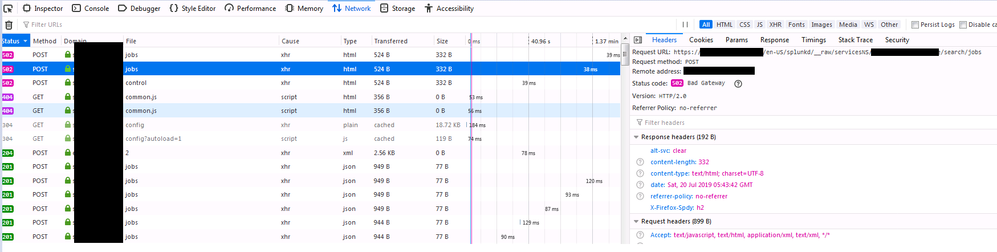
But when I tried accessing it externally on a site -sometimes dashboards are working and sometimes it's not showing anything just "Could not create search".
Is this caused by a network issue or Splunk configuration file?
Jobs are randomly stopped and show "502 error" on network inspect element.

- Mark as New
- Bookmark Message
- Subscribe to Message
- Mute Message
- Subscribe to RSS Feed
- Permalink
- Report Inappropriate Content


Most likely this is related to either a load balancer or application firewall/filter you are going through when you access this externally. Generally we recommend that in the case of load balancers, that you make sure sticky sessions are enabled or that you disable application filtering for the Splunk base urls.
- Mark as New
- Bookmark Message
- Subscribe to Message
- Mute Message
- Subscribe to RSS Feed
- Permalink
- Report Inappropriate Content
Hi, esix,
What do you mean by "sticky sessions are enabled".
And how can I disable application filtering for Splunk base URL?
- Mark as New
- Bookmark Message
- Subscribe to Message
- Mute Message
- Subscribe to RSS Feed
- Permalink
- Report Inappropriate Content


Hi jadengoho,
some very stupid questions:
- when you say "sometimes", are you saying that the same dashboard, sometimes run and sometimes goes in error or that any dashboards (always the same) go in error and any always run?
- did you verified in your dashboard that all the configurations use IP address and not hostnames?
Bye.
Giuseppe
- Mark as New
- Bookmark Message
- Subscribe to Message
- Mute Message
- Subscribe to RSS Feed
- Permalink
- Report Inappropriate Content
when you say "sometimes", are you saying that the same dashboard, sometimes runs and sometimes goes in error or that any dashboards (always the same) go in error and any always run? - sometimes panels works, sometimes not.. It always happens
did you verify in your dashboard that all the configurations use IP address and not hostnames? Yes we tried using IP address same issue
- Mark as New
- Bookmark Message
- Subscribe to Message
- Mute Message
- Subscribe to RSS Feed
- Permalink
- Report Inappropriate Content
Hi jadengoho,
did you find the differences between the two kind of panels?
Bye.
Giuseppe
- Mark as New
- Bookmark Message
- Subscribe to Message
- Mute Message
- Subscribe to RSS Feed
- Permalink
- Report Inappropriate Content
External Site: All panels show this error.
Internal Site: No error Exist.
We suspect that the error occurs on the load balancer or the firewall.
- Mark as New
- Bookmark Message
- Subscribe to Message
- Mute Message
- Subscribe to RSS Feed
- Permalink
- Report Inappropriate Content
Hi jadengoho,
are there firewalls between splunk servers?
anyway you can test the open ports between servers.
Why do you use a load balancer between Search Heads and Indexers? you don't need them: Splunk has auto load balancing features.
Bye.
Giuseppe
- Mark as New
- Bookmark Message
- Subscribe to Message
- Mute Message
- Subscribe to RSS Feed
- Permalink
- Report Inappropriate Content

Should be a network issue. Is it happening even if you try from different network (say your mobile network instead of WiFi) ?
- Mark as New
- Bookmark Message
- Subscribe to Message
- Mute Message
- Subscribe to RSS Feed
- Permalink
- Report Inappropriate Content
Same network, but using the external address still shows the issue.

Join the Splunk Community Slack to learn, troubleshoot, and make connections with fellow Splunk practitioners in real time!
Join Splunk User Groups to connect and learn in-person by region or remotely by topic or industry.
Why Splunk Customers Should Attend Cisco Live 2026 Las Vegas
What Is the Name of the USB Key Inserted by Bob Smith? (BOTS Hint, Not the Answer)
Automating Threat Operations and Threat Hunting with Recorded Future
