
Join the Conversation
- Find Answers
- :
- Splunk Administration
- :
- Getting Data In
- :
- Re: Sourcetype not searcheable
- Subscribe to RSS Feed
- Mark Topic as New
- Mark Topic as Read
- Float this Topic for Current User
- Bookmark Topic
- Subscribe to Topic
- Mute Topic
- Printer Friendly Page
- Mark as New
- Bookmark Message
- Subscribe to Message
- Mute Message
- Subscribe to RSS Feed
- Permalink
- Report Inappropriate Content

Hello,
I am facing this behaviour: when searching for thin index, I see events of sourcetype=broker, like shown in the image below.
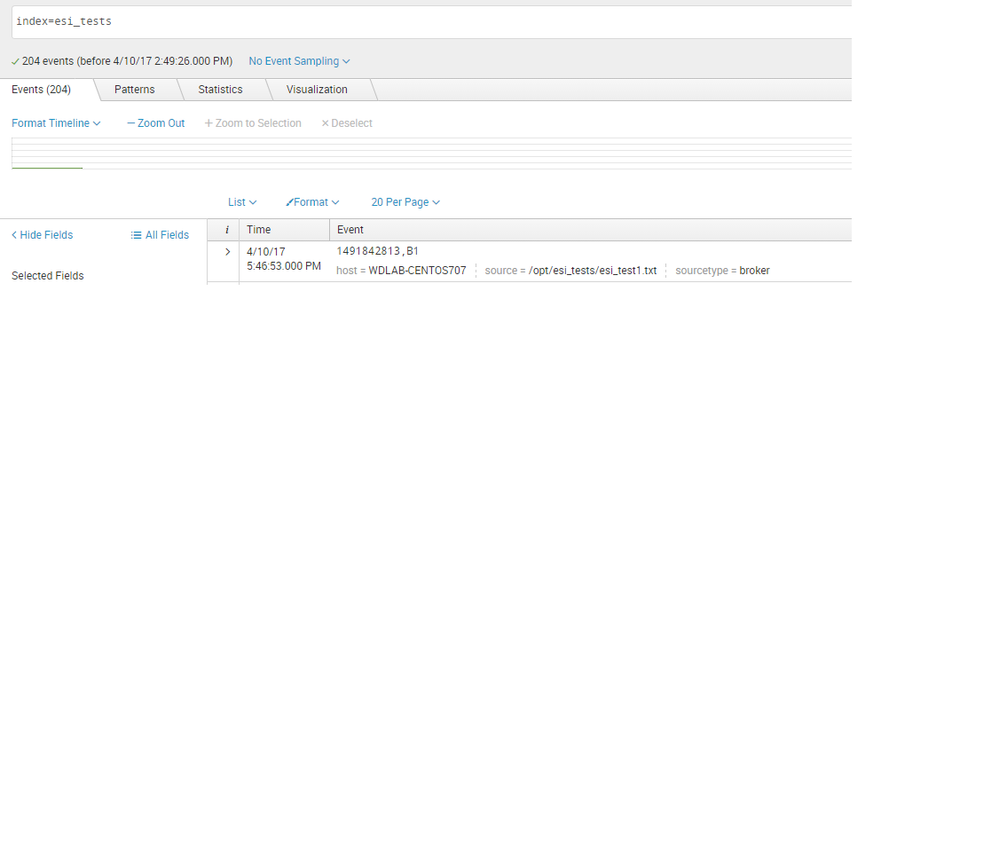
When searching only for sourcetype=broker, no event shows up:

Any idea why?


- Mark as New
- Bookmark Message
- Subscribe to Message
- Mute Message
- Subscribe to RSS Feed
- Permalink
- Report Inappropriate Content
Thanks to @joao_amorim
Found my mistake:
[broker]
DEST_KEY = MetaData:Sourcetype
REGEX = (B1)
FORMAT = sourcetype::broker
- Mark as New
- Bookmark Message
- Subscribe to Message
- Mute Message
- Subscribe to RSS Feed
- Permalink
- Report Inappropriate Content
Thanks to @joao_amorim
Found my mistake:
[broker]
DEST_KEY = MetaData:Sourcetype
REGEX = (B1)
FORMAT = sourcetype::broker
- Mark as New
- Bookmark Message
- Subscribe to Message
- Mute Message
- Subscribe to RSS Feed
- Permalink
- Report Inappropriate Content

@TiagoTLD1
Can u elaborate how u fix this issue as i facing the same issue and i am unable to understand what u actually did to get the results by source type.
- Mark as New
- Bookmark Message
- Subscribe to Message
- Mute Message
- Subscribe to RSS Feed
- Permalink
- Report Inappropriate Content
Agree on that, but what about if the search "index=esi_tests sourcetype=broker" also does not return any values?
- Mark as New
- Bookmark Message
- Subscribe to Message
- Mute Message
- Subscribe to RSS Feed
- Permalink
- Report Inappropriate Content
Can you add sourcetype value using field picker to your search?
- Mark as New
- Bookmark Message
- Subscribe to Message
- Mute Message
- Subscribe to RSS Feed
- Permalink
- Report Inappropriate Content
Yes I did that in my splunk. Also, to prevent hidden spaces in my sourcetype name, I used this:
index=esi_tests | search sourcetype=b*.
Also got no results
- Mark as New
- Bookmark Message
- Subscribe to Message
- Mute Message
- Subscribe to RSS Feed
- Permalink
- Report Inappropriate Content
Hello, TiagoTLD1
By default splunk searches index=main (default index)
so it may be the reason of such behavior

Join the Splunk Community Slack to learn, troubleshoot, and make connections with fellow Splunk practitioners in real time!
Join Splunk User Groups to connect and learn in-person by region or remotely by topic or industry.
Make Your Machine Data AI-Ready in Splunk
Splunk Asynchronous Forwarding Explained
How to Monitor AI Agents with Splunk Agent Observability
