
Join the Conversation
- Find Answers
- :
- Splunk Administration
- :
- Getting Data In
- :
- Re: Programmatically enable/disable JMX input
- Subscribe to RSS Feed
- Mark Topic as New
- Mark Topic as Read
- Float this Topic for Current User
- Bookmark Topic
- Subscribe to Topic
- Mute Topic
- Printer Friendly Page
- Mark as New
- Bookmark Message
- Subscribe to Message
- Mute Message
- Subscribe to RSS Feed
- Permalink
- Report Inappropriate Content

We have one JMX input that needs to be disabled and then re-enabled every now and then. I am trying to figure out how to do this in an automated fashion thru Automic. So I am trying to understand how the command works by running it directly on the linux server the forwarder is running on.
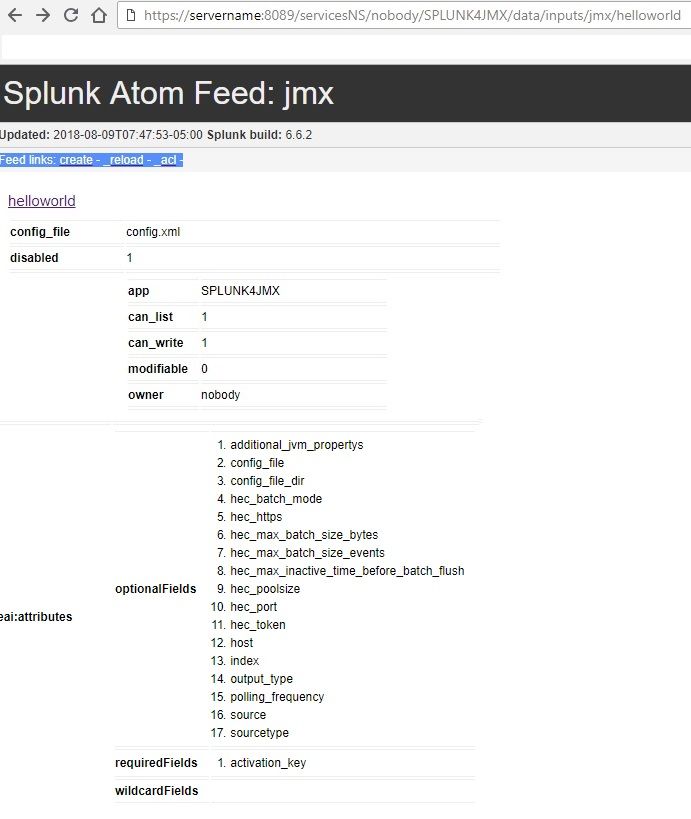
I found the jmx through the webpage
But I am unfamiliar with how to work with the REST API. I have tried the following from other answers I have found here:
curl POST -k -u admin:password https://servername:8089/servicesNS/nobody/SPLUNK4JMX/data/inputs/jmx/helloworld -d disabled=true
I have tried to run the command on the linux server that the forwarder is on, and I get the following error:
user:~$ curl POST -k -u admin:password https://servername:8089/servicesNS/nobody/SPLUNK4JMX/data/inputs/jmx/helloworld -d disabled=false
    curl: (6) Could not resolve host: POST; Unknown error
    <?xml version="1.0" encoding="UTF-8"?>
    <response>
      <messages>
        <msg type="ERROR">Argument "disabled" is not supported by this handler.</msg>
      </messages>
    </response>
I see the key from the GET command I need to change:
<s:key name="disabled">1</s:key>
But I seem to be missing something on how to actually change the value because of the error shown above.
GET command results:
curl: (6) Could not resolve host: GET; Unknown error
<?xml version="1.0" encoding="UTF-8"?>
<!--This is to override browser formatting; see server.conf[httpServer] to disable. . . . . . . . . . . . . . . . . . . . . . . . . . . . . . . . . . . . . . . . . . . . . . . . . . . . . . . . . . . . . . . . . . . . . . . . . . . . . . . . . . . . . . . . . . . . . . . . . . . . . . . . . . . . . . . . . . . . . . . . . . . . . . . . . . . . . . . . . . . . . . . . . . . . . . . . . . . . . . . . . . . . . . . . . . . . . . . . . . . . . . . . . . . . . . . . . . . . . . . . . . . . . . . . . . . . . . . . . . . . . . . . . . . . . . . . . . . . . . . . . . . . . . . . . . . . . . . . . . . . . . . . . . . . . . . . . . . . . . . . . . . . . . . . . . . . . . . . . . . . . . . . . . . . . . . . . . . . . . . . . . . . . . . . . . . . . . . . . . . . . . . . . . . . . . . . . . . . . . . . . . . . . . . . . . . . . . . . . . . . . . . . . . . . . . . . . . . . . . . . . . . . . . . . . . . . . . . . . . . . . . . . . . . . . . . . . . . . . . . . . . . . . . . . . . . . . . . . . . . . . . . . . . . . . . . . .-->
<?xml-stylesheet type="text/xml" href="/static/atom.xsl"?>
<feed xmlns="http://www.w3.org/2005/Atom" xmlns:s="http://dev.splunk.com/ns/rest" xmlns:opensearch="http://a9.com/-/spec/opensearch/1.1/">
  <title>jmx</title>
  <id>https://servername:8089/servicesNS/nobody/SPLUNK4JMX/data/inputs/jmx</id>
  <updated>2018-08-09T08:37:41-05:00</updated>
  <generator build="4b804538c686" version="6.6.2"/>
  <author>
    <name>Splunk</name>
  </author>
  <link href="/servicesNS/nobody/SPLUNK4JMX/data/inputs/jmx/_new" rel="create"/>
  <link href="/servicesNS/nobody/SPLUNK4JMX/data/inputs/jmx/_reload" rel="_reload"/>
  <link href="/servicesNS/nobody/SPLUNK4JMX/data/inputs/jmx/_acl" rel="_acl"/>
  <opensearch:totalResults>1</opensearch:totalResults>
  <opensearch:itemsPerPage>30</opensearch:itemsPerPage>
  <opensearch:startIndex>0</opensearch:startIndex>
  <s:messages/>
  <entry>
    <title>helloworld</title>
    <id>https://servername:8089/servicesNS/nobody/SPLUNK4JMX/data/inputs/jmx/helloworld</id>
    <updated>1969-12-31T18:00:00-06:00</updated>
    <link href="/servicesNS/nobody/SPLUNK4JMX/data/inputs/jmx/helloworld" rel="alternate"/>
    <author>
      <name>nobody</name>
    </author>
    <link href="/servicesNS/nobody/SPLUNK4JMX/data/inputs/jmx/helloworld" rel="list"/>
    <link href="/servicesNS/nobody/SPLUNK4JMX/data/inputs/jmx/helloworld/_reload" rel="_reload"/>
    <link href="/servicesNS/nobody/SPLUNK4JMX/data/inputs/jmx/helloworld" rel="edit"/>
    <link href="/servicesNS/nobody/SPLUNK4JMX/data/inputs/jmx/helloworld/enable" rel="enable"/>
    <content type="text/xml">
      <s:dict>
        <s:key name="config_file">config.xml</s:key>
        <s:key name="disabled">1</s:key>
        <s:key name="eai:acl">
          <s:dict>
            <s:key name="app">SPLUNK4JMX</s:key>
            <s:key name="can_list">1</s:key>
            <s:key name="can_write">1</s:key>
            <s:key name="modifiable">0</s:key>
            <s:key name="owner">nobody</s:key>
            <s:key name="perms">
              <s:dict>
                <s:key name="read">
                  <s:list>
                    <s:item>admin</s:item>
                    <s:item>db_connect_admin</s:item>
                    <s:item>db_connect_user</s:item>
                    <s:item>power</s:item>
                    <s:item>splunk-system-role</s:item>
                    <s:item>user</s:item>
                    <s:item>user-asaadmin</s:item>
                  </s:list>
                </s:key>
                <s:key name="write">
                  <s:list>
                    <s:item>admin</s:item>
                    <s:item>splunk-system-role</s:item>
                    <s:item>user-asaadmin</s:item>
                  </s:list>
                </s:key>
              </s:dict>
            </s:key>
            <s:key name="removable">0</s:key>
            <s:key name="sharing">app</s:key>
          </s:dict>
        </s:key>
        <s:key name="eai:attributes">
          <s:dict>
            <s:key name="optionalFields">
              <s:list>
                <s:item>additional_jvm_propertys</s:item>
                <s:item>config_file</s:item>
                <s:item>config_file_dir</s:item>
                <s:item>hec_batch_mode</s:item>
                <s:item>hec_https</s:item>
                <s:item>hec_max_batch_size_bytes</s:item>
                <s:item>hec_max_batch_size_events</s:item>
                <s:item>hec_max_inactive_time_before_batch_flush</s:item>
                <s:item>hec_poolsize</s:item>
                <s:item>hec_port</s:item>
                <s:item>hec_token</s:item>
                <s:item>host</s:item>
                <s:item>index</s:item>
                <s:item>output_type</s:item>
                <s:item>polling_frequency</s:item>
                <s:item>source</s:item>
                <s:item>sourcetype</s:item>
              </s:list>
            </s:key>
            <s:key name="requiredFields">
              <s:list>
                <s:item>activation_key</s:item>
              </s:list>
            </s:key>
            <s:key name="wildcardFields">
              <s:list/>
            </s:key>
          </s:dict>
        </s:key>
        <s:key name="host">SERVERNAME</s:key>
        <s:key name="host_resolved">servername</s:key>
        <s:key name="index">jmx</s:key>
        <s:key name="polling_frequency">60</s:key>
        <s:key name="sourcetype">jmx</s:key>
      </s:dict>
    </content>
  </entry>
</feed>
curl: (6) Could not resolve host: disabled; Unknown error
Any help would be appreciated!
Thanks!
- Mark as New
- Bookmark Message
- Subscribe to Message
- Mute Message
- Subscribe to RSS Feed
- Permalink
- Report Inappropriate Content
Figured it out:
curl -k -u admin:password https://servername:8089/servicesNS/nobody/SPLUNK4JMX/data/inputs/jmx/helloworld/disable -X POST

curl -k -u admin:password https://servername:8089/servicesNS/nobody/SPLUNK4JMX/data/inputs/jmx/helloworld/enable -X POST
- Mark as New
- Bookmark Message
- Subscribe to Message
- Mute Message
- Subscribe to RSS Feed
- Permalink
- Report Inappropriate Content
Figured it out:
curl -k -u admin:password https://servername:8089/servicesNS/nobody/SPLUNK4JMX/data/inputs/jmx/helloworld/disable -X POST

curl -k -u admin:password https://servername:8089/servicesNS/nobody/SPLUNK4JMX/data/inputs/jmx/helloworld/enable -X POST



Join the Splunk Community Slack to learn, troubleshoot, and make connections with fellow Splunk practitioners in real time!
Join Splunk User Groups to connect and learn in-person by region or remotely by topic or industry.
Self-Healing Pipeline Is Now Generally Available: AI-Powered CIM Compliance
Meet Splunk Observability Studio: AI-Assisted OpenTelemetry Instrumentation Without ...
Federated Search for Cisco Security and Analytics Logging (SAL) is now GA on Splunk ...
