
Join the Conversation
- Find Answers
- :
- Splunk Administration
- :
- Getting Data In
- :
- Problem as per screen shot - 500MB min disk space ...
- Subscribe to RSS Feed
- Mark Topic as New
- Mark Topic as Read
- Float this Topic for Current User
- Bookmark Topic
- Subscribe to Topic
- Mute Topic
- Printer Friendly Page
- Mark as New
- Bookmark Message
- Subscribe to Message
- Mute Message
- Subscribe to RSS Feed
- Permalink
- Report Inappropriate Content
Problem as per screen shot - 500MB min disk space reached

Hi Guys
I have Splunk enterprise installed. I have pulled across some directory's with files inside ( from Kali ).
The issue is I cannot bring up the files in the search and reporting app..
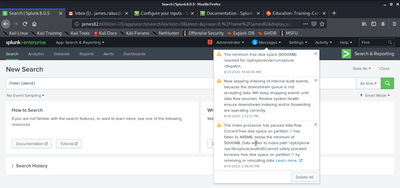
I believe it is because of the Messages in the screen shot below.. which I have no idea how to fix.. even after reading some forums..
I am non IT person.. and new to Splunk.
Any help would be great .
- Mark as New
- Bookmark Message
- Subscribe to Message
- Mute Message
- Subscribe to RSS Feed
- Permalink
- Report Inappropriate Content
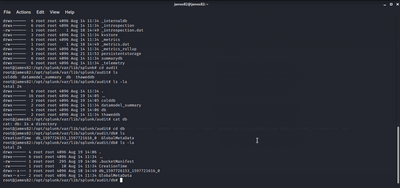
This is another screen shot of the index path the data writes to.. I need to somehow get more space..
- Mark as New
- Bookmark Message
- Subscribe to Message
- Mute Message
- Subscribe to RSS Feed
- Permalink
- Report Inappropriate Content


Hi
as you already noticed, you are running out of disc space. You must get additional volume for splunk indexes. Then you have two options: increase /opt/splunk or create own fs/volume group + splunk volume where you move your indexes. There are many examples how this should do on answers.
r. Ismo

Join the Splunk Community Slack to learn, troubleshoot, and make connections with fellow Splunk practitioners in real time!
Join Splunk User Groups to connect and learn in-person by region or remotely by topic or industry.
[Puzzles] Solve, Learn, Reuse: Word-play
Tuning Edge Processor in Hybrid Mode: What Limits Each Data Path
Best Practices: Splunk auto adjust pipeline queue
