
Join the Conversation
- Find Answers
- :
- Splunk Administration
- :
- Getting Data In
- :
- Optiv Threat Intel: After initial configuration, g...
- Subscribe to RSS Feed
- Mark Topic as New
- Mark Topic as Read
- Float this Topic for Current User
- Bookmark Topic
- Subscribe to Topic
- Mute Topic
- Printer Friendly Page
- Mark as New
- Bookmark Message
- Subscribe to Message
- Mute Message
- Subscribe to RSS Feed
- Permalink
- Report Inappropriate Content
Optiv Threat Intel: After initial configuration, getting "Error while posting to url=/servicesNS/nobody/optiv_threat_intel/saved/searches/...."

Hello world,
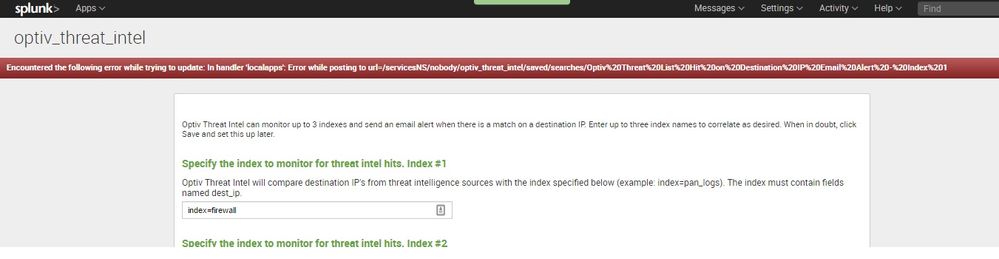
The initial config comes back with the message:
Encountered the following error while trying to update: In handler 'localapps': Error while posting to url=/servicesNS/nobody/optiv_threat_intel/saved/searches/Optiv%20Threat%20List%20Hit%20on%20Destination%20IP%20Email%20Alert%20-%20Index%201
Any clue what I did wrong here?
Thx a lot
Marcus
- Mark as New
- Bookmark Message
- Subscribe to Message
- Mute Message
- Subscribe to RSS Feed
- Permalink
- Report Inappropriate Content

- Mark as New
- Bookmark Message
- Subscribe to Message
- Mute Message
- Subscribe to RSS Feed
- Permalink
- Report Inappropriate Content
Dev here- are you editing the saved search as admin? If this issue persists please try restarting Splunk. Otherwise you can edit the search in optiv_threat_intel/default, then copy the stanza you want and paste it into local and make your changes there.
Good luck.
- Mark as New
- Bookmark Message
- Subscribe to Message
- Mute Message
- Subscribe to RSS Feed
- Permalink
- Report Inappropriate Content
Hi Derek,
I am having the same issue, I have tried restarting Splunk and making changes in the stanza. It still takes me back to the setup page and same error every time.
I have even tried installing it on a different search head. Any ideas?
- Mark as New
- Bookmark Message
- Subscribe to Message
- Mute Message
- Subscribe to RSS Feed
- Permalink
- Report Inappropriate Content
Hi Derek,
Can you let me know what config file would be updated during the initial configuration so I can update them manually. I know the macro.conf file would be updated with the three indexes but I am not sure what file gets updated with the alert configuration in the initial configuration.
Maybe I can manually update this file and get past the configuration page to actually be able to see what the app looks like.
Thanks,
- Mark as New
- Bookmark Message
- Subscribe to Message
- Mute Message
- Subscribe to RSS Feed
- Permalink
- Report Inappropriate Content
Update macros.con with your index names in local:
Example:
[network_index_one]
disabled = 0
definition = index=pan_logs
Create app.conf in local:
Example
[default]

[install]
is_configured = 1
Create savedsearches.conf in local:
[Optiv Threat List Hit on Destination IP Email Alert - Index 1]
disabled = 0
action.email.to = [email protected]
cron_schedule = 35 2,14 * * *



Join the Splunk Community Slack to learn, troubleshoot, and make connections with fellow Splunk practitioners in real time!
Join Splunk User Groups to connect and learn in-person by region or remotely by topic or industry.
Cisco Data Fabric from Architecture to Investigation, Better SOC Visibility, and More ...
The Trust Gap: Why a Data Foundation is Fundamental to an Agentic Enterprise
Data Management Digest – September 2026
