
Join the Conversation
- Find Answers
- :
- Splunk Administration
- :
- Getting Data In
- :
- Re: Network folder monitoring
- Subscribe to RSS Feed
- Mark Topic as New
- Mark Topic as Read
- Float this Topic for Current User
- Bookmark Topic
- Subscribe to Topic
- Mute Topic
- Printer Friendly Page
- Mark as New
- Bookmark Message
- Subscribe to Message
- Mute Message
- Subscribe to RSS Feed
- Permalink
- Report Inappropriate Content
Network folder monitoring

Hello Splunker
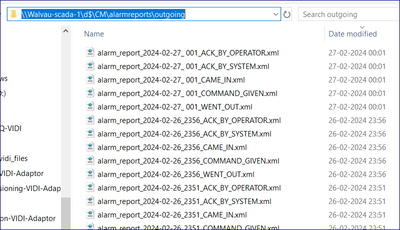
In my request, I want to monitor the below files, which are under the network folder. I have configured indexes.conf, props.conf, inputs.conf & transforms.conf but nothing is working for me to get data into Splunk. Please check my config and help or suggest me if any changes are required.
inputs.conf :
[monitor://\\WALVAU-SCADA-1\d$\CM\alarmreports\outgoing*]
disabled = false
index = scada
host = WALVAU-SCADA-1
sourcetype = cm_scada_xml
indexes.conf :
[scada]
coldPath = $SPLUNK_DB/scada/colddb
enableDataIntegrityControl = 0
enableTsidxReduction = 0
homePath = $SPLUNK_DB/scada/db
maxTotalDataSizeMB = 512000
thawedPath = $SPLUNK_DB/scada/thaweddb
props.conf :
[cm_scada_xml]
KEEP_EMPTY_VALS = false
KV_MODE = xml
LINE_BREAKER = <\/eqtext:EquipmentEvent>()
MAX_TIMESTAMP_LOOKAHEAD = 24
NO_BINARY_CHECK = true
SEDCMD-first = s/^.*<eqtext:EquipmentEvent/<eqtext:EquipmentEvent/g
SHOULD_LINEMERGE = false
TIME_FORMAT = %Y-%m-%dT%H:%M:%S.%3f%Z
TIME_PREFIX = ((?<!ReceiverFmInstanceName>))<eqtext:EventTime>
TRUNCATE = 100000000
category = Custom
disabled = false
pulldown_type = true
TRANSFORMS-remove-xml-footer = remove-xml-footer
TRANSFORMS-keep-came-in-and-went-out-states = keep-came-in-and-went-out-states
FIELDALIAS-fields_scada_xml = "eqtext:EquipmentEvent.eqtext:ID.eqtext:Location.eqtext:PhysicalLocation.AreaID" AS area "eqtext:EquipmentEvent.eqtext:ID.eqtext:Location.eqtext:PhysicalLocation.ElementID" AS element "eqtext:EquipmentEvent.eqtext:ID.eqtext:Location.eqtext:PhysicalLocation.EquipmentID" AS equipment "eqtext:EquipmentEvent.eqtext:ID.eqtext:Location.eqtext:PhysicalLocation.ZoneID" AS zone "eqtext:EquipmentEvent.eqtext:ID.eqtext:Description" AS description "eqtext:EquipmentEvent.eqtext:ID.eqtext:MIS_Address" AS mis_address "eqtext:EquipmentEvent.eqtext:Detail.State" AS state "eqtext:EquipmentEvent.eqtext:Detail.eqtext:EventTime" AS event_time "eqtext:EquipmentEvent.eqtext:Detail.eqtext:MsgNr" AS msg_nr "eqtext:EquipmentEvent.eqtext:Detail.eqtext:OperatorID" AS operator_id "eqtext:EquipmentEvent.eqtext:Detail.ErrorType" AS error_type "eqtext:EquipmentEvent.eqtext:Detail.Severity" AS severity
transforms.conf :
[remove-xml-footer]
REGEX = <\/eqtexo:EquipmentEventReport>
DEST_KEY = queue
FORMAT = nullQueue
[keep-came-in-and-went-out-states]
REGEX = <State>(?!CAME_IN|WENT_OUT).*?<\/State>
DEST_KEY = queue
FORMAT = nullQueue
- Mark as New
- Bookmark Message
- Subscribe to Message
- Mute Message
- Subscribe to RSS Feed
- Permalink
- Report Inappropriate Content
@PickleRick Do you see any difference? I am not seeing any different in the files in the both server.

Join the Splunk Community Slack to learn, troubleshoot, and make connections with fellow Splunk practitioners in real time!
Join Splunk User Groups to connect and learn in-person by region or remotely by topic or industry.
[Puzzles] Solve, Learn, Repeat: Character substitutions with Regular Expressions
Splunk Community Badges!
[Puzzles] Solve, Learn, Repeat: Matching cron expressions
