
Turn on suggestions
Auto-suggest helps you quickly narrow down your search results by suggesting possible matches as you type.
Getting Data In
×
Join the Conversation
Without signing in, you're just watching from the sidelines. Sign in or Register to connect, share, and be part of the Splunk Community.
- Find Answers
- :
- Splunk Administration
- :
- Getting Data In
- :
- Need help in displaying process status in Dashboar...
Options
- Subscribe to RSS Feed
- Mark Topic as New
- Mark Topic as Read
- Float this Topic for Current User
- Bookmark Topic
- Subscribe to Topic
- Mute Topic
- Printer Friendly Page
- Mark as New
- Bookmark Message
- Subscribe to Message
- Mute Message
- Subscribe to RSS Feed
- Permalink
- Report Inappropriate Content
Need help in displaying process status in Dashboard from the mentioned log entries

Sishad
Explorer
03-18-2024
09:40 AM
Hi Splunk experts,
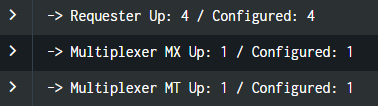
I am looking to display status as Green/Red in Splunk dashboard after comparing the values of Up & Configured in the below screenshot of log entries.
If both are equal it should be green else Red.
Can anyone please guide me how to achieve that.
- Mark as New
- Bookmark Message
- Subscribe to Message
- Mute Message
- Subscribe to RSS Feed
- Permalink
- Report Inappropriate Content

bowesmana

SplunkTrust
03-18-2024
10:40 PM
What is your data and what is the visualisation you want to show. If it's a Splunk table, then look at this documentation for how to colour table cells
https://docs.splunk.com/Documentation/SplunkCloud/latest/Viz/TableFormatsXML
Perhaps you can say more about what your data looks like, how many entries you are talking about and how to plan to visualise it.


Got questions? Get answers!
Join the Splunk Community Slack to learn, troubleshoot, and make connections with fellow Splunk practitioners in real time!
Meet up IRL or virtually!
Join Splunk User Groups to connect and learn in-person by region or remotely by topic or industry.
Get Updates on the Splunk Community!
What’s New in Splunk AI: Volume 02
Welcome to the second edition of “What’s New in Splunk AI” where we look at the latest and greatest updates, ...
Splunk App Dev Quarterly Roundup: AI, Agents, and Innovation!
Another quarter, another wave of innovation. From complex integrations to pushing the limits ...
Federated Search for Dynamic Data Self Storage Is Now Generally Available on Splunk ...
Splunk is excited to announce the General Availability of Federated Search for Dynamic Data Self Storage ...
