
Join the Conversation
- Find Answers
- :
- Splunk Administration
- :
- Getting Data In
- :
- Monitoring inputs not parsing logs to indexers
- Subscribe to RSS Feed
- Mark Topic as New
- Mark Topic as Read
- Float this Topic for Current User
- Bookmark Topic
- Subscribe to Topic
- Mute Topic
- Printer Friendly Page
- Mark as New
- Bookmark Message
- Subscribe to Message
- Mute Message
- Subscribe to RSS Feed
- Permalink
- Report Inappropriate Content

Hello Team,
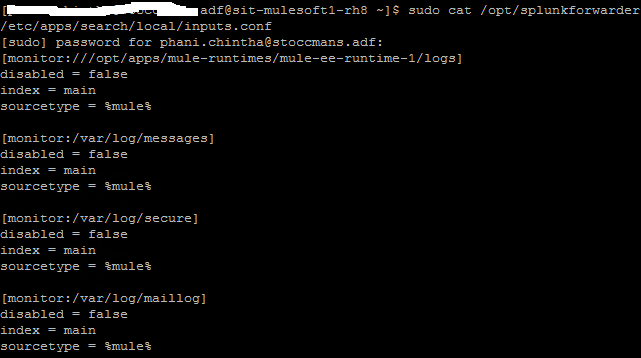
As we are parsing logs from Linux machine to Splunk indexer via Splunk Universal Forwarder in Linux machine, from monitor input paths "var/logs" am getting data in indexers but am not getting data from this path "monitor:///opt/apps/mule-runtimes/mule-ee-runtime-1/logs" please help what to do, for reference please check the below snap.
- Mark as New
- Bookmark Message
- Subscribe to Message
- Mute Message
- Subscribe to RSS Feed
- Permalink
- Report Inappropriate Content


Hi
have the Splunk UF user read access to this directory? And are you restarted UF after updating configurations?
Usually when you are monitoring directory you should add white lists there or other option is use file name and define sourcetypes for those at same time?
You could see what splunk thinks that it should be read by
splunk btool inputs list monitor:///opt/apps/mule-runtimes/mule--ee-runtime-1/logs --debugAnother tool to see what it has read is
splunk list inputstatusr. Ismo
- Mark as New
- Bookmark Message
- Subscribe to Message
- Mute Message
- Subscribe to RSS Feed
- Permalink
- Report Inappropriate Content
Thanks for the clue @isoutamo I did respective changes, and I got the solution.
- Mark as New
- Bookmark Message
- Subscribe to Message
- Mute Message
- Subscribe to RSS Feed
- Permalink
- Report Inappropriate Content
Hi
have the Splunk UF user read access to this directory? And are you restarted UF after updating configurations?
Usually when you are monitoring directory you should add white lists there or other option is use file name and define sourcetypes for those at same time?
You could see what splunk thinks that it should be read by
splunk btool inputs list monitor:///opt/apps/mule-runtimes/mule--ee-runtime-1/logs --debugAnother tool to see what it has read is
splunk list inputstatusr. Ismo

Join the Splunk Community Slack to learn, troubleshoot, and make connections with fellow Splunk practitioners in real time!
Join Splunk User Groups to connect and learn in-person by region or remotely by topic or industry.
Observability Simplified: Combining User Experience, Application Performance & ...
Event Series May & June: From Network Visibility to Service Intelligence
Global Splunk User Group Events: May + June 2026
